High-end PCs need more than fast fans—they need the right balance of airflow, static pressure, acoustics, control, and reliability. The wrong model can add noise without meaningfully improving temperatures.
We compared 10 standout 120mm and 140mm options for demanding gaming rigs, workstation builds, overclocked systems, and RGB-focused setups. Use the guide below to match fan type, size, speed range, and control features to your case and cooling hardware.
Best 10 Computer Cooling Fans for High End PCs Picks for 2026
Premium Quiet Pick
Noctua NF-A12x25 G2 chromax.Black 2-Pack

- Two 1800rpm 120mm PWM fans
- Speed-offset design for quieter pairing
- Includes radiator and anti-vibration accessories
Best For: Premium radiator, cooler, and case builds
Best Five-Pack Value
Thermalright TL-C12C-S ARGB 5-Pack

- Five 120mm PWM fans for broad coverage
- ARGB lighting with up to 17 modes
- 66.17 CFM airflow and S-FDB bearings
Best For: Large cases and synchronized ARGB builds
Premium 140mm Choice
Noctua NF-A14x25 G2 chromax.Black 2-Pack
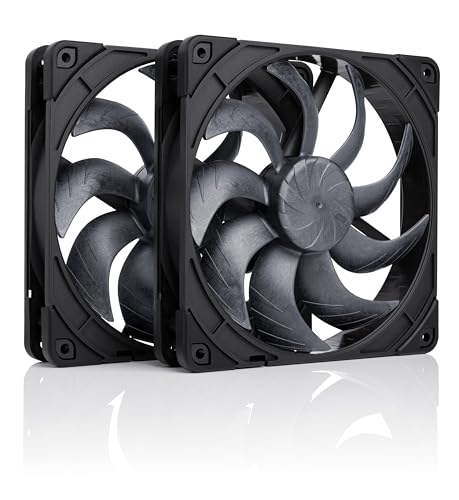
- Two advanced 140mm PWM fans
- Designed for 280mm radiators and push-pull use
- Includes gaskets, LNA adapters, and cables
Best For: Quiet, high-performance 140mm cooling
Best Three-Pack Starter
Thermalright TL-C12C-S ARGB 3-Pack
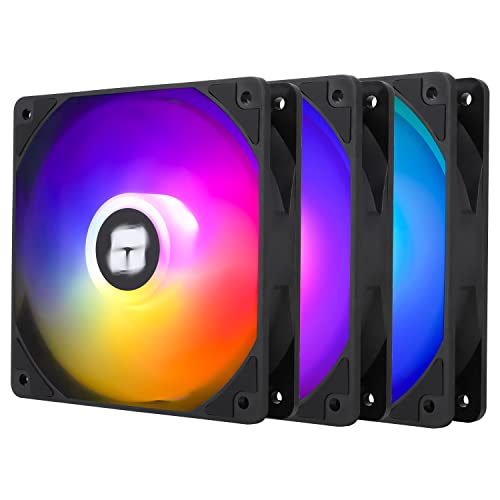
- Three 120mm PWM fans for flexible placement
- ARGB lighting with motherboard synchronization
- 66.17 CFM airflow and S-FDB bearings
Best For: Three-fan case and cooler configurations
Premium RGB Cooling
CORSAIR iCUE Link RX120 RGB Triple Pack

- Up to 2,100 RPM and 74.2 CFM airflow
- High 4.38mm-H2O static pressure
- iCUE LINK connectors and RGB lighting
Best For: High-end RGB builds and radiator cooling
Quiet Performance Pick
Noctua NF-P12 redux-1700 PWM 3-Pack

- 1700 RPM 4-pin PWM control
- Pressure-optimised for coolers and radiators
- 25.1 dB(A) maximum noise rating
Best For: Quiet performance-focused desktop builds
Value Multi-Pack

- Five pressure-optimised 120mm fans
- Up to 1,800 RPM and 56.3 CFM airflow
- Fluid Dynamic Bearing design
Best For: Affordable multi-fan case ventilation
Balanced ARGB Upgrade
Cooler Master MF120 Lite ARGB 3-Pack

- 120mm PWM fans rated from 650–1,750 RPM
- Frosted blades spread customizable aRGB lighting
- Includes ARGB extender for daisy chaining
Best For: ARGB-focused builds seeking a balanced three-fan kit
High-Pressure ARGB Performance

- 600–3,000 RPM PWM range with stop below 5% PWM
- 77 CFM airflow and high static pressure
- Includes 5V digital RGB and Y-cable splitter
Best For: Radiator-equipped builds needing strong, adjustable airflow
Maximum Coverage Value
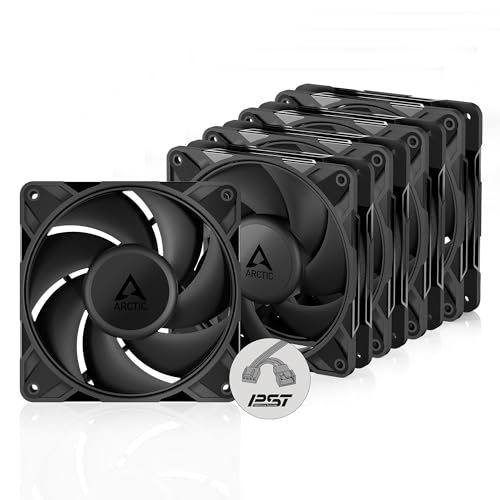
- Five 120mm PWM fans for broad airflow coverage
- 600–3,000 RPM range with stop below 5% PWM
- 77 CFM airflow and high static pressure
Best For: Large cases and multi-fan cooling layouts
Premium Quiet Pick – Noctua NF-A12x25 G2 chromax.Black 2-Pack
For builders seeking computer cooling fans for high end pcs, this two-pack combines high airflow, static pressure, and quiet operation in a refined 120mm design. The speed-offset pairing is intended to reduce unwanted acoustic interaction when fans run side by side or in push-pull layouts.
Best For: Premium radiator, cooler, or case setups that need two high-performance 120mm fans.
Pros:
- Two 1800rpm PWM fans with up to 107.3 m³/h airflow.
- Designed for radiators, push-pull cooling, and case intake or exhaust.
- Includes anti-vibration mounts, radiator gaskets, LNA adapters, cables, and splitter.
- Premium SSO2 bearing with a stated MTTF over 150,000 hours and six-year warranty.
Cons:
- Two-fan set may be more than needed for a basic case upgrade.
- Premium features make it a higher-end choice than a budget multipack.
This is a strong fit for performance-focused systems where acoustic refinement and radiator compatibility matter as much as cooling output.
Best Five-Pack Value – Thermalright TL-C12C-S ARGB 5-Pack
This five-pack is a practical way to outfit a larger chassis with computer cooling fans for high end pcs while adding synchronized ARGB lighting. Each 120mm fan uses 4-pin PWM control, allowing motherboard-based speed adjustment up to 1550rpm.
Best For: Multi-fan case builds, CPU cooler support, and buyers who want broad ARGB coverage.
Pros:
- Five 120mm fans provide flexible intake, exhaust, or cooler configurations.
- 4-pin PWM control supports automatic speed adjustment based on motherboard temperature.
- ARGB lighting offers up to 17 modes and motherboard synchronization.
- S-FDB bearings, 66.17 CFM airflow, and rated noise of no more than 25.6dBA.
Cons:
- 1550rpm maximum speed is lower than some performance-focused fan options.
- Requires compatible ARGB and PWM connections for full functionality.
For a high-end PC with several 120mm mounting positions, this pack emphasizes quantity, controllable lighting, and balanced everyday cooling.
Premium 140mm Choice – Noctua NF-A14x25 G2 chromax.Black 2-Pack
When a case or radiator supports 140mm hardware, this dual-fan set is a compelling option among computer cooling fans for high end pcs. Its speed-offset design is intended to minimize acoustic interaction, while the 25mm-thick fans target demanding radiator and case applications.
Best For: High-performance 280mm radiators and cases with 140mm fan mounts.
Pros:
- Two 140mm PWM fans are suited to side-by-side and push-pull operation.
- Uses Noctua’s advanced impeller, frame, and tight-clearance construction.
- Includes black anti-vibration mounts, radiator gaskets, LNA adapters, cables, and splitter.
- Premium SSO2 bearings carry a stated MTTF over 150,000 hours.
Cons:
- Limited to systems with compatible 140mm mounting locations.
- A two-pack may not cover a full multi-fan configuration.
This is the premium 140mm alternative for builders prioritizing refined acoustics, robust construction, and radiator-ready accessories.
Best Three-Pack Starter – Thermalright TL-C12C-S ARGB 3-Pack
This three-pack offers a straightforward way to add computer cooling fans for high end pcs without overbuying. The 120mm fans combine 4-pin PWM control, ARGB lighting, and S-FDB bearings for case, radiator, or CPU cooler use.
Best For: Mid-sized builds needing three coordinated 120mm fans with PWM and ARGB.
Pros:
- Three fans can be assigned to intake, exhaust, or CPU cooler duties.
- 1550rpm PWM operation enables automatic motherboard speed control.
- ARGB blades support up to 17 lighting modes and motherboard synchronization.
- Rated for 66.17 CFM airflow with noise up to 25.6dBA.
Cons:
- Requires compatible PWM and ARGB headers or control hardware.
- Three fans may be insufficient for larger cases with many mounting points.
Choose this pack when you want a coordinated three-fan installation with controllable lighting and useful cooling flexibility at a smaller quantity than the five-pack.
Premium RGB Cooling – CORSAIR iCUE Link RX120 RGB Triple Pack
For high-end systems that need strong radiator or heatsink performance plus coordinated lighting, the CORSAIR iCUE Link RX120 RGB is a feature-rich choice among computer cooling fans for high end pcs. Its PWM control reaches 2,100 RPM, while AirGuide vanes help focus airflow toward hot components.
Best For: High-end gaming PCs, radiator cooling, and builds using the iCUE LINK ecosystem.
Pros:
- Delivers up to 74.2 CFM airflow and 4.38mm-H2O static pressure.
- PWM control supports precise speeds up to 2,100 RPM.
- Includes vivid RGB lighting and LINK connectors for streamlined installation.
- Includes a five-year manufacturer warranty.
Cons:
- Requires the iCUE LINK system hub for its connected setup.
- Its 36 dB noise rating is higher than quieter alternatives in this roundup.
This triple pack is a strong fit when cooling performance, concentrated airflow, and integrated RGB matter more than the simplest installation or lowest noise.
Quiet Performance Pick – Noctua NF-P12 redux-1700 PWM 3-Pack
The Noctua NF-P12 redux-1700 PWM 3-pack balances strong pressure-oriented airflow with a rated maximum noise level of 25.1 dB(A). For computer cooling fans for high end pcs, its 4-pin PWM control makes it suitable for CPU coolers, radiators, and chassis ventilation.
Best For: Quiet high-performance desktops, CPU coolers, water-cooling radiators, and PWM-controlled case ventilation.
Pros:
- Pressure-optimised design supports heatsinks, radiators, and case airflow.
- 4-pin PWM operation allows automatic motherboard speed control.
- 1700 RPM performance is paired with a 25.1 dB(A) maximum noise rating.
- Rated for more than 150,000 hours MTTF and backed by a six-year warranty.
Cons:
- Does not include RGB lighting.
- Its 1,700 RPM maximum is lower than the CORSAIR option.
This is the practical choice for builders who want dependable, quiet airflow and PWM flexibility without paying for lighting features.
Value Multi-Pack – ARCTIC P12 120mm Five-Pack
The ARCTIC P12 five-pack offers a straightforward way to populate multiple case positions or cooling zones. These pressure-optimised computer cooling fans for high end pcs run at up to 1,800 RPM and provide 56.3 CFM airflow, making them suitable for heatsinks, radiators, and general ventilation.
Best For: Multi-fan case builds, budget-conscious upgrades, and systems requiring airflow across several mounting points.
Pros:
- Five fans provide broad coverage for a full case setup.
- Pressure-optimised design is suited to heatsinks and radiators.
- Offers up to 56.3 CFM airflow at 1,800 RPM.
- Fluid Dynamic Bearing design supports quiet operation and long service life.
Cons:
- Uses 3-pin connectors rather than PWM control.
- Has no RGB lighting.
- Provides less static pressure than the CORSAIR RX120.
Choose this pack when you need several capable fans at once and prefer simple, fixed-voltage control over advanced PWM or lighting integration.
Balanced ARGB Upgrade – Cooler Master MF120 Lite ARGB 3-Pack
For builders looking for computer cooling fans for high end pcs, the Cooler Master MF120 Lite ARGB 3-Pack combines adjustable PWM performance with customizable lighting. Its 650–1,750 RPM range supports a practical balance between airflow and noise for case, air-cooler, or liquid-cooler setups.
Best For: High-end PC builders who want a three-fan ARGB kit with straightforward motherboard synchronization.
Pros:
- Three 120mm fans provide a convenient multi-fan upgrade.
- PWM control supports speeds from 650 to 1,750 RPM.
- Frosted blades enhance aRGB light diffusion.
- Included extender supports daisy-chain connections.
Cons:
- Its 1,750 RPM ceiling is lower than the 3,000 RPM options in this roundup.
- Lighting requires a compatible aRGB connection or splitter.
This is a well-rounded choice when coordinated lighting and simple installation matter more than maximum fan speed. The hybrid frame and revised blades target dependable airflow for general PC cooling.
High-Pressure ARGB Performance – ARCTIC P12 Pro A-RGB 3-Pack
The ARCTIC P12 Pro A-RGB 3-Pack is aimed at computer cooling fans for high end pcs that need strong performance through radiators, mesh, or restrictive panels. Its 600–3,000 RPM PWM range, 77 CFM airflow rating, and fluid dynamic bearing support both high-output cooling and low-speed operation.
Best For: High-performance systems using dense radiators or restrictive case panels that also want 5V digital RGB lighting.
Pros:
- High static pressure helps push air through radiators and mesh.
- Wide 600–3,000 RPM PWM range offers flexible control.
- Can stop below 5% PWM for low-load operation.
- FDB bearing and precision balancing are designed to reduce noise and vibration.
Cons:
- 5V digital RGB requires compatible motherboard or lighting hardware.
- High-speed operation may prioritize cooling output over quietness.
With its broad speed range and pressure-focused design, this three-pack suits demanding cooling layouts. It is especially compelling for users who want radiator capability without giving up the option of near-silent idle operation.
Maximum Coverage Value – ARCTIC P12 Pro PST 5-Pack
For larger cases and multi-fan layouts, the ARCTIC P12 Pro PST 5-Pack offers a cost-efficient approach to computer cooling fans for high end pcs. Each 120mm PWM fan reaches up to 3,000 RPM, delivers listed airflow of 77 CFM, and uses a pressure-oriented design for radiators and restrictive panels.
Best For: High-end builds needing several matching fans for case intake, exhaust, or radiator coverage.
Pros:
- Five fans make it suitable for comprehensive case airflow upgrades.
- 600–3,000 RPM PWM control covers quiet and high-performance use.
- High static pressure supports radiators and narrow mesh openings.
- FDB bearing is designed for smooth, long-lasting operation.
Cons:
- The five-pack may exceed the needs of smaller cases.
- No RGB lighting is listed for this PST version.
- Maximum-speed operation can be less focused on quiet cooling.
This pack is the practical choice when quantity and cooling flexibility matter most. Its matching fans, broad control range, and splitter-oriented setup simplify outfitting a large case or multiple cooling zones.
How We Picked the Best Computer Cooling Fans for High End PCs
We focused on fans suitable for modern performance systems, prioritizing airflow, static pressure, PWM control, bearing design, acoustic potential, and overall value. The selection includes premium quiet fans from Noctua, high-speed and pressure-optimized models from ARCTIC, affordable multipacks from Thermalright, and RGB ecosystems from CORSAIR and Cooler Master.
Because high-end builds vary, we included both 120mm and 140mm formats, single-speed and wide-range PWM designs, and fans intended for case intake, exhaust, radiators, or tower heatsinks. Pack sizes were also considered for builders cooling multiple zones.
Quick Comparison
| Best For | Recommended Type | Why It Matters |
|---|---|---|
| Quiet premium builds | Noctua NF-A12x25 G2 or NF-A14x25 G2 | Refined acoustics and high-end construction |
| Radiators and dense heatsinks | High-static-pressure PWM fans | Pushes air effectively through resistance |
| Large multi-fan upgrades | ARCTIC or Thermalright multipacks | Strong coverage at a lower per-fan cost |
| RGB systems | CORSAIR, Cooler Master, or ARCTIC A-RGB | Lighting and software or motherboard integration |
| Maximum adjustable performance | ARCTIC P12 Pro PST or A-RGB | Broad speed range and flexible control |
Key Buying Factors for Computer Cooling Fans for High-End PCs
Size, Airflow, and Static Pressure
Check whether your case, radiator, or heatsink supports 120mm or 140mm fans. A 140mm fan can move substantial air at lower noise, but 120mm models fit more mounting locations. For radiators, restrictive filters, and dense heatsinks, prioritize static pressure rather than free-air airflow alone.
PWM Control and Speed Range
Four-pin PWM fans allow your motherboard or fan controller to adjust speed based on temperature. A wide range, especially one that supports very low speeds or a zero-RPM mode, helps keep the system quiet at idle while preserving cooling headroom under load.
Noise, Bearings, and Durability
Published noise ratings are useful but not perfectly comparable across brands. Look for fluid-dynamic or similarly durable bearings, solid frame construction, and a speed curve that avoids unnecessary ramping. Premium fans often justify their cost in acoustics, consistency, and long-term refinement.
RGB and Connectivity
Standard 5V addressable RGB usually connects to a compatible motherboard header, while proprietary ecosystems may require a dedicated controller or software. Confirm connector types, controller requirements, cable length, and whether included splitters support your full fan count.
Who Should Buy Which Computer Cooling Fans for High End PCs?
Choose Noctua’s premium models if low noise, build quality, and dependable performance matter more than lighting or upfront price. Pick ARCTIC’s P12 Pro models for demanding systems that need aggressive airflow, broad PWM adjustment, or radiator-friendly pressure. The standard ARCTIC P12 and Thermalright multipacks are strong choices for budget-conscious builders cooling several case positions.
RGB-focused buyers should compare the CORSAIR iCUE Link option with motherboard-based 5V A-RGB fans from Cooler Master or ARCTIC. CORSAIR is most appealing when you already use its ecosystem; motherboard-compatible A-RGB models can be simpler and more flexible across brands. Before ordering, verify clearance, fan orientation, header availability, and whether your case has enough mounts for the selected pack.