The best computer cooling fans can lower temperatures, reduce noise, and improve airflow without requiring a major hardware upgrade. This roundup covers options for desktop cases, laptops, consoles, routers, receivers, and compact electronics.
We included PWM case fans, USB-powered cooling systems, laptop stands, and AC-powered utility fans so you can match the fan to your device, available ports, and cooling needs.
Best 10 Computer Cooling Fans Picks for 2026
Quiet Performance Pick

- 120mm 4-pin PWM fan
- Up to 1700 RPM and 120.2 m³/h airflow
- 25.1 dB(A) maximum noise rating
Best For: Quiet CPU cooler, radiator, or case ventilation
Laptop Cooling Stand Pick
Kootek 5-Fan Laptop Cooling Pad

- Five USB-powered fans for 12–17-inch laptops
- Six adjustable height settings
- Two extra USB ports and selectable fan control
Best For: Elevated laptop cooling for work, gaming, or media
External Electronics Cooling Pick
AC Infinity MULTIFAN S7 Dual USB Fans

- Two 120mm USB-powered fans
- 104 CFM total airflow with 19 dBA noise
- Multi-speed controller and dual-ball bearings
Best For: Consoles, AV equipment, cabinets, and external component cooling
Multi-Fan ARGB Value Pick

- Five 120mm 4-pin PWM fans
- Up to 1550 RPM and 66.17 CFM each
- ARGB lighting with motherboard synchronization
Best For: Multi-fan desktop cases, radiators, and ARGB builds
Quiet USB Cooling

- Dual 80mm fans deliver 52 CFM total airflow.
- Adjustable speed controller balances noise and cooling.
- USB-powered design suits computers and electronics.
Best For: Quiet supplemental cooling for electronics and consoles
PWM PC Cooling
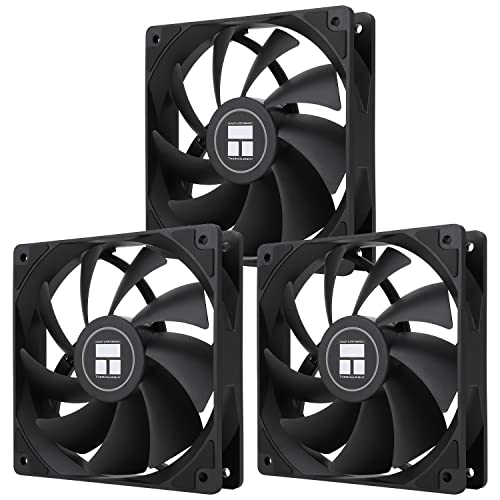
- Three 120mm fans provide up to 66.17 CFM each.
- 4-pin PWM enables automatic speed control.
- ARGB lighting supports 17 effects and synchronization.
Best For: Desktop PC airflow and coordinated ARGB builds
USB Electronics Cooling

- 120mm fan delivers 56.7 CFM of airflow.
- USB power and three speed settings simplify setup.
- Includes guard, feet, screws, and mounting nuts.
Best For: Cooling routers, consoles, receivers, and mini PCs
Quiet 80mm Case Cooling
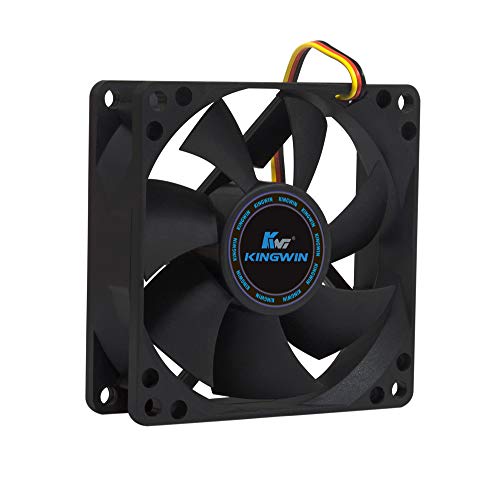
- Quiet 25 dB operation
- 30 CFM airflow at 1,700 RPM
- Long-life bearing with standard 80mm fit
Best For: Quiet desktops, home servers, and compatible 80mm mounts
Flexible USB Cooling
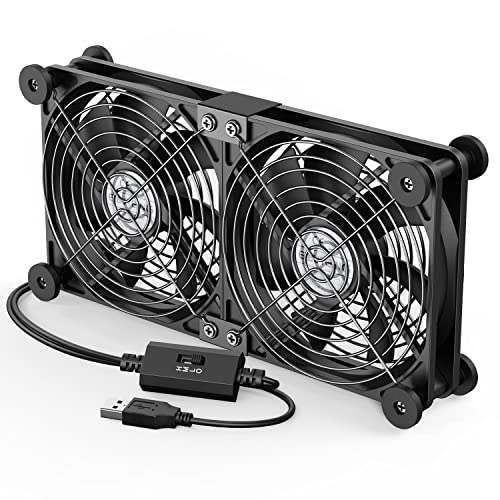
- Two USB-powered 120mm fans
- Three adjustable speed settings
- Protective grilles and rubber feet
Best For: External cooling for laptops, consoles, routers, and AV devices
High-Airflow AC Cooling

- Up to 95.8 CFM airflow
- 700–2,800 RPM speed control
- Dual-ball bearings rated for 50,000 hours
Best For: Adjustable ventilation for cabinets, servers, consoles, and routers
Quiet Performance Pick – Noctua NF-P12 redux-1700 PWM
The Noctua NF-P12 redux-1700 PWM is a strong choice when you need a dependable 120mm computer cooling fan for a CPU cooler, radiator, or case. Its pressure-optimized blade design combines high airflow with PWM speed control, allowing the motherboard to increase cooling when needed and reduce noise at idle.
Best For: Quiet desktop builds, CPU coolers, radiators, and low-noise case ventilation.
Pros:
- 4-pin PWM control with speeds up to 1700 RPM
- Pressure-optimized design provides strong airflow and static pressure
- Rated noise level of up to 25.1 dB(A)
- Backed by a six-year manufacturer warranty
Cons:
- Sold as a single fan
- Does not include built-in lighting
This is a practical premium-style fan for shoppers who prioritize proven airflow, PWM control, and long-term reliability over lighting or multi-fan bundle value.
Laptop Cooling Stand Pick – Kootek 5-Fan Laptop Cooling Pad
The Kootek laptop cooling pad combines five USB-powered computer cooling fans with an adjustable stand for laptops from 12 to 17 inches. Selective fan controls let you run one, four, or all five fans, while the six height settings can make longer gaming, work, or viewing sessions more comfortable.
Best For: Laptop users who want adjustable cooling, extra USB connectivity, and an elevated workstation.
Pros:
- Five fans provide broad coverage beneath compatible laptops
- Six adjustable height positions support ergonomic setup
- Two USB ports add connectivity for peripherals
- Front stoppers help keep 12- to 17-inch laptops secure
Cons:
- Requires USB power, with a 5V 1A adapter recommended for best performance
- Blue LED lighting may not suit every setup
- Its stand-style design is intended for laptops rather than desktop cases
Choose this model if you want more than a basic fan: it works as a cooling pad, laptop stand, and small USB hub, with flexible control over how many fans operate.
External Electronics Cooling Pick – AC Infinity MULTIFAN S7 Dual USB Fans
The AC Infinity MULTIFAN S7 is a compact pair of computer cooling fans designed for electronics, consoles, cabinets, and other components. Its USB power connection and multi-speed controller make placement simple, while dual-ball bearings allow the fans to operate flat or upright.
Best For: Cooling game consoles, AV equipment, receivers, DVRs, computers, and enclosed cabinets.
Pros:
- Includes two 120mm fans with 104 CFM total airflow
- Multi-speed controller balances airflow and noise
- USB power works with ports on many electronics and consoles
- 19 dBA total noise rating and noise-absorption pads
Cons:
- Designed as an external USB cooling solution rather than a standard internal PWM case fan
- Maximum speed is 1300 RPM
This is a flexible option when you need targeted cooling outside a PC chassis. The dual-fan layout, USB compatibility, and speed control are especially useful for warm entertainment equipment or confined cabinets.
Multi-Fan ARGB Value Pick – Thermalright TL-C12C-S 5-Pack
The Thermalright TL-C12C-S five-pack offers a practical way to outfit a desktop case or cooling setup with multiple 120mm computer cooling fans. Each fan uses 4-pin PWM control, reaches up to 1550 RPM, and includes ARGB lighting that can be synchronized through a compatible motherboard connection.
Best For: Desktop builders needing several PWM case, radiator, or CPU-cooler fans with ARGB lighting.
Pros:
- Five 120mm fans provide strong multi-position cooling coverage
- 4-pin PWM supports automatic motherboard speed adjustment
- S-FDB bearings are designed for quieter operation and durability
- ARGB lighting supports up to 17 modes and motherboard synchronization
Cons:
- Requires compatible ARGB motherboard connectivity for lighting control
- Sold as a five-fan bundle, which may be more than a small build needs
- Maximum noise is rated at up to 25.6 dBA per supplied specifications
For a new build or case refresh, this bundle delivers good coverage per purchase. It is particularly appealing when you want PWM automation and coordinated ARGB lighting without buying each fan separately.
Quiet USB Cooling – Dual 80mm USB Fan
For electronics that need extra airflow without a complicated installation, the AC Infinity MULTIFAN S5 is a practical choice among computer cooling fans. Its two USB-powered 80mm fans include a speed controller, allowing you to balance airflow and noise for computers, game consoles, receivers, and other equipment.
Best For: Quiet cooling for computers, AV receivers, game consoles, and enclosed electronics.
Pros:
- Dual fans provide a combined 52 CFM of airflow.
- Speed controller helps adjust noise and cooling performance.
- USB power works with many electronics and game-console ports.
- Dual-ball bearings and noise-absorption pads support quiet, flexible placement.
Cons:
- Its 80mm fan size may provide less airflow than larger case fans.
- Designed for USB-powered supplemental cooling rather than direct motherboard control.
The MULTIFAN S5 stands out when quiet operation and easy USB installation matter more than high-performance PC case airflow. Its upright or flat placement options make it especially adaptable for tight entertainment-center setups.
PWM PC Cooling – 120mm PWM ARGB Fan 3-Pack
The Thermalright TL-C12C X3 is a three-fan set for desktop builders who want motherboard-controlled airflow. These 120mm computer cooling fans use 4-pin PWM connections to adjust speed based on system temperature and provide up to 66.17 CFM of airflow per fan.
Best For: Desktop cases and CPU-cooling setups needing PWM control, strong airflow, and ARGB lighting.
Pros:
- Three 120mm fans offer up to 66.17 CFM of airflow each.
- 4-pin PWM control allows automatic motherboard-based speed adjustment.
- S-FDB bearings are designed to reduce noise and blade shake.
- ARGB lighting supports up to 17 effects and motherboard synchronization.
Cons:
- Requires compatible 4-pin PWM and ARGB motherboard connections for full functionality.
- At up to 25.6 dBA, it is not the quietest option listed.
This three-pack is a strong value for a desktop upgrade where coordinated airflow and lighting are priorities. The 1550 RPM maximum speed and PWM support make it more suitable for PC case or CPU-cooler use than USB electronics cooling.
USB Electronics Cooling – 120mm 5V USB Cooling Fan
This 120mm USB fan offers a straightforward way to add airflow to routers, consoles, receivers, mini PCs, and other electronics. With a 5V USB connection, three speed settings, and included mounting hardware, it is a flexible option among computer cooling fans for spaces without motherboard fan headers.
Best For: USB-powered cooling for routers, gaming consoles, home-theater equipment, and mini PCs.
Pros:
- Provides 56.7 CFM of airflow at up to 1500 RPM.
- USB connection supports simple installation with compatible electronics.
- Three speed settings allow basic airflow adjustment.
- Includes a protective net, foot columns, mounting screws, and nuts.
Cons:
- Uses sleeve bearings rather than dual-ball bearings.
- Single-fan design offers less total airflow than multi-fan kits.
- USB power does not provide motherboard-based automatic speed control.
Choose this fan when you want larger 120mm airflow and easy USB operation without installing a full PC cooling system. Its included mounting accessories make it practical for directing air around equipment in tight or enclosed spaces.
Quiet 80mm Case Cooling – Kingwin Silent 80mm Fan
For quiet desktops, home servers, and compact case upgrades, this Kingwin fan is a straightforward choice among computer cooling fans. Its standard 80mm fit, 3-pin connector, and 12V operation make it suitable for compatible case and CPU-cooler mounts.
Best For: Quiet PC builds, office desktops, home servers, mining rigs, and compatible 80mm replacement applications.
Pros:
- Designed for quiet operation at a listed 25 dB noise level.
- Provides up to 30 CFM of airflow at 1,700 RPM.
- Long-life bearing and durable black frame support extended use.
- Standard 80mm mounting size works with compatible cases and coolers.
Cons:
- Only one fan is included.
- Uses a 3-pin connector, so compatibility with available headers should be checked.
- Its 80mm size may provide less airflow than larger fans.
This is a practical replacement or supplemental fan when low noise and a compact 80mm footprint matter more than advanced speed controls or high-end features.
Flexible USB Cooling – ELUTENG Dual 120mm Fan
This ELUTENG unit is a convenient option when you need computer cooling fans without internal wiring. Its dual 120mm fans run from a USB port, offer three speed settings, and can be positioned horizontally or vertically for PCs, laptops, consoles, routers, and other equipment.
Best For: USB-equipped laptops, routers, game consoles, receivers, hard-drive enclosures, and other external devices.
Pros:
- Dual 120mm fans run together for broader cooling coverage.
- USB-powered plug-and-play design avoids internal case wiring.
- Three speed settings range from 900 to 1,500 RPM.
- Rubber shock absorbers and protective metal grilles improve stability and safety.
Cons:
- Requires an available USB port and is rated for 5V operation.
- The dual-fan assembly is less compact than a single 120mm fan.
- Noise is listed up to 32.5 dB at the highest setting.
Choose this model for flexible external cooling rather than a traditional replacement case fan. The adjustable speeds and one-meter cable make placement simple, while the USB connection broadens device compatibility.
High-Airflow AC Cooling – Easy Cloud Variable-Speed Fan
This Easy Cloud model suits buyers who want computer cooling fans with adjustable speed and outlet-powered convenience. The 120mm axial fan includes a controller, reaches up to 95.8 CFM, and is designed for compatible PCs, servers, gaming equipment, routers, and other enclosures.
Best For: High-airflow cooling for PC or server cabinets, DVRs, consoles, routers, and other compatible equipment near an AC outlet.
Pros:
- Variable speed control ranges from 700 to 2,800 RPM.
- Listed airflow reaches 95.8 CFM for demanding ventilation needs.
- Dual-ball bearings are rated for a 50,000-hour lifespan.
- Includes an AC-plug setup and speed controller for convenient operation.
Cons:
- Noise is listed below 41 dB, so maximum airflow may be more noticeable.
- Requires access to an AC outlet and uses a 2-pin connection.
- Compatibility should be confirmed because the fan is rated for 12V operation.
This is the strongest airflow-focused option of the three, especially where adjustable ventilation is more important than minimal noise. Its AC-powered controller makes it useful for standalone cooling projects and equipment cabinets.
How We Picked These Computer Cooling Fans
We selected products across the main cooling categories rather than treating every fan as a substitute for another. The lineup includes 120mm and 80mm PC case fans, multi-fan laptop cooling pads, USB fan assemblies for electronics, and variable-speed AC models for higher-demand setups.
Our comparison focuses on practical specifications: fan size, power connection, speed control, airflow potential, noise-conscious design, installation requirements, and compatibility. PWM models are especially useful in desktop PCs because the motherboard can automatically adjust fan speed, while USB models are convenient for laptops, consoles, routers, receivers, and other equipment without standard fan headers.
Quick Comparison
| Best For | Recommended Type | What to Look For |
|---|---|---|
| Desktop case airflow | 120mm PWM fan or multi-pack | Four-pin PWM control, suitable RPM range, and correct mounting spacing |
| Laptops | USB cooling pad or adjustable USB fan | Device-size compatibility, stable stand design, and speed control |
| Receivers, routers, and consoles | USB fan assembly | 5V USB power, compact placement, and adjustable airflow |
| Small PC cases or CPU coolers | 80mm or 120mm replacement fan | Frame dimensions, connector type, bearing design, and clearance |
| Servers or utility cooling | AC-powered variable-speed fan | Voltage compatibility, controller access, airflow direction, and safe placement |
Key Buying Factors for Computer Cooling Fans
Size and Installation
Measure the available mounting area before buying. A 120mm fan is common in desktop cases and usually moves more air quietly than a smaller fan at comparable speeds, but an 80mm model may be the only option for compact cases or older hardware. Confirm thickness, screw-hole spacing, and clearance around cables or components.
Power and Control
Check whether your device uses a three-pin DC connector, four-pin PWM header, USB, or AC power. USB fans are simple to deploy but may not integrate with motherboard fan curves. PWM fans offer finer automatic control, while models with a physical controller are useful when you need manual adjustment.
Noise, Airflow, and Bearing Design
Higher maximum RPM can provide stronger cooling but may create more noise. Look for a broad usable speed range rather than focusing only on peak speed. Fluid or self-stabilizing bearing designs can support smoother, longer-running operation, but real-world noise also depends on mounting, dust, vibration, and airflow restrictions.
Airflow Direction and Placement
For a desktop, use front or bottom fans as intake and rear or top fans as exhaust when possible. For external equipment, position the fan where it can draw heat away from vents without blocking them. Avoid placing a fan so close that it recirculates warm air.
Who Should Buy Which Computer Cooling Fans?
Choose a PWM 120mm fan or multipack if you are upgrading a desktop case, replacing worn fans, or building a quieter airflow setup. Multipacks are convenient when you need matched intake and exhaust fans.
Choose a laptop cooling pad for a portable computer that runs hot during gaming or demanding work. Verify the pad’s supported laptop size and make sure its vents align reasonably with the laptop’s intake area.
Choose a USB dual-fan system for receivers, routers, consoles, DVRs, and other electronics where standard PC headers are unavailable. These are also useful when you want movable cooling without opening the device.
Choose an 80mm fan when space is limited or you are replacing a smaller existing fan. Choose an AC-powered model only when its voltage, plug, controller, and installation environment are appropriate; keep exposed electrical equipment away from moisture and ensure the fan cannot contact moving parts.