A quieter PC starts with the right fan—not simply the fan with the lowest advertised noise rating. Blade design, bearing type, speed control, airflow pressure, and installation location all affect the result.
We’ve gathered 10 quiet computer cooling fans for different builds, from affordable 120mm case fans and multipacks to USB-powered desktop fans and high-performance 140mm models.
Best 10 Quiet Computer Cooling Fans Picks for 2026
Premium Quiet Cooling

- Pressure-optimized airflow for coolers and radiators
- 4-pin PWM control with speeds up to 1700 RPM
- 25.1 dB(A) rating and six-year warranty
Best For: Performance-focused desktop cooling
Multi-Fan ARGB Value

- Five 120mm PWM fans for complete case airflow
- 66.17 CFM airflow with up to 1550 RPM
- ARGB lighting with motherboard synchronization
Best For: Multi-fan gaming PCs and ARGB case builds
Best USB Cooling Kit
AC Infinity MULTIFAN S7 Dual 120mm

- Dual 120mm USB fans with up to 104 CFM total airflow
- Multi-speed controller and 19 dBA rated noise
- Dual-ball bearings support flat or upright placement
Best For: External cooling for computers, consoles, and AV equipment
Compact Budget Pick
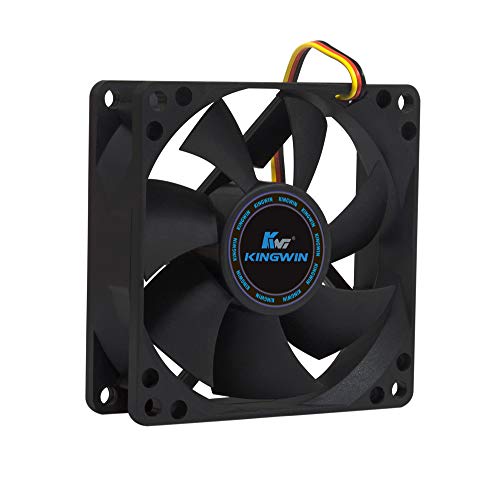
- 25 dB listed noise level
- 30 CFM airflow
- Long-life bearing and 3-pin connector
Best For: Quiet cooling in compact 80mm systems
Premium Quiet Cooling – Noctua NF-P12 redux-1700 PWM
The Noctua NF-P12 redux-1700 PWM is a strong choice for quiet computer cooling fans when you need more than basic airflow. Its pressure-optimized design suits CPU coolers, liquid-cooling radiators, and case ventilation, while 4-pin PWM control lets the motherboard adjust speed automatically.
Best For: Performance-focused desktops, CPU coolers, radiators, and users who want automatic speed control.
Pros:
- Pressure-optimized 120mm design supports heatsinks, radiators, and case airflow.
- 4-pin PWM control provides up to 1700 RPM when cooling demand rises.
- Rated noise level is 25.1 dB(A), with a 150,000-hour MTTF.
- Includes a six-year manufacturer’s warranty.
Cons:
- It uses a 12V 4-pin desktop connection rather than USB power.
- Maximum noise and speed are higher than slower, ultra-quiet fan options.
This is a versatile quiet computer cooling fan for builds that need a useful balance between airflow and acoustics. PWM control helps it stay quieter during light workloads while retaining stronger cooling potential under load.
Low-Speed Silence – ARCTIC P12 Silent 120mm
The ARCTIC P12 Silent is designed for quiet computer cooling fans in systems where low operating noise matters most. Its 1050 RPM speed, pressure-optimized blade design, and 3-pin connector make it suitable for case ventilation and applications with moderate air resistance.
Best For: Quiet desktop case ventilation, heatsinks, and radiators where a slower 3-pin fan is appropriate.
Pros:
- Low 1050 RPM operating speed helps limit fan noise.
- Pressure-optimized design is intended for heatsinks and radiators.
- Uses a bearing and motor design focused on reducing friction and unwanted noise.
- Includes a six-year warranty.
Cons:
- Its 3-pin connection does not provide the same PWM control as a 4-pin fan.
- Airflow is rated at 24.1 CFM, so it may be less suitable for high-demand cooling.
The P12 Silent is a straightforward option when quiet operation takes priority over maximum airflow. Check that your motherboard or fan controller can regulate its 3-pin connection if adjustable speed is important.
USB-Powered Quiet Cooling – AC Infinity MULTIFAN S3
The AC Infinity MULTIFAN S3 is a practical quiet computer cooling fan for electronics that use USB power rather than internal desktop fan headers. It includes a multi-speed controller, noise-absorption pads, and a flexible design that can stand upright or lie flat.
Best For: USB-powered cooling for computers, game consoles, receivers, DVRs, amplifiers, and cabinets.
Pros:
- USB connection works with ports on many electronics and consoles.
- Multi-speed controller lets you balance airflow and noise.
- Rated at 18 dBA with up to 52 CFM of airflow.
- Dual-ball bearings support upright or flat placement and are rated for 67,000 hours.
Cons:
- It is a 5V USB fan, so it is not a direct replacement for a 12V internal PC fan.
- Its external format may require space near the device being cooled.
This is one of the more flexible quiet computer cooling fans for external or retrofit cooling. Choose it when convenient USB power and adjustable placement matter more than motherboard-integrated control.
Multi-Fan ARGB Value – Thermalright TL-C12C-S 5-Pack
The Thermalright TL-C12C-S five-pack offers quiet computer cooling fans for users outfitting a case or multiple cooling points at once. Each 120mm fan uses 4-pin PWM control, an S-FDB bearing, and ARGB lighting, making the set suitable for case airflow, radiators, and CPU cooler support.
Best For: Multi-fan desktop builds that need PWM control, coordinated ARGB lighting, and a five-fan value pack.
Pros:
- Five 120mm fans provide a convenient way to equip a larger case.
- 4-pin PWM control supports automatic speed adjustment up to 1550 RPM.
- Rated airflow reaches 66.17 CFM with noise listed at up to 25.6 dBA.
- ARGB lighting supports up to 17 modes and motherboard synchronization.
Cons:
- The five-fan pack may be excessive for smaller systems or simple replacements.
- ARGB features require compatible motherboard or lighting connections.
- At maximum speed, it is not the quietest option in this selection.
This pack makes sense for a complete airflow refresh where appearance and quantity matter alongside cooling. Its PWM control can reduce noise during lighter use, while the higher airflow rating gives the fans broader case and radiator utility.
Best USB Cooling Kit – AC Infinity MULTIFAN S7 Dual 120mm
For quiet computer cooling fans that can also serve AV equipment and consoles, the AC Infinity MULTIFAN S7 combines two USB-powered 120mm fans with a multi-speed controller. Its 19 dBA noise rating, airflow of up to 104 CFM, and noise-absorption pads make it a practical choice for flexible equipment cooling.
Best For: Cooling computers, game consoles, receivers, DVRs, and other electronics where USB power and flexible placement are useful.
Pros:
- Dual fans provide up to 104 CFM of total airflow.
- Multi-speed control helps balance airflow and noise.
- Dual-ball bearings support a stated 67,000-hour lifespan and allow flat or upright placement.
- USB connectivity works with ports commonly found on AV electronics and consoles.
Cons:
- Its USB, 2-pin setup is less suited to standard motherboard fan headers.
- Each fan is only 4.7 inches square, so coverage may be limited for larger cases.
The MULTIFAN S7 stands out among quiet computer cooling fans for external, flexible cooling rather than conventional internal case installation. The controller and dual-fan layout make it especially adaptable for electronics with limited airflow.
Best Quiet 140mm Case Fan – be quiet! Pure Wings 3
The be quiet! Pure Wings 3 is a 140mm PWM case fan designed for desktop PCs and demanding airflow setups. Its seven airflow-optimized blades, low minimum RPM capability, and 21.9 dB noise rating make it a solid option when selecting quiet computer cooling fans for a standard case or radiator.
Best For: Desktop PC builders who want a large 140mm PWM fan with strong airflow potential and quiet low-speed operation.
Pros:
- 140mm frame and optimized outlet are designed for high airflow performance.
- Four-pin PWM connection supports speed control through a compatible motherboard.
- Seven blades are designed to reduce noise while maintaining performance.
- Rifle bearing provides a stated operating lifetime of 80,000 hours.
Cons:
- Its 140mm size may not fit cases designed only for 120mm fans.
- It is sold as a single fan rather than a multi-pack.
Pure Wings 3 is a straightforward choice for desktop users who need a PWM-controlled 140mm fan. It offers a useful combination of low-speed quiet operation, a 1500 RPM maximum, and a long stated bearing life.
Best Multi-Pack for Radiators – ARCTIC P12 5-Pack
The ARCTIC P12 five-pack is built for users who need several quiet computer cooling fans across a case, heatsink, or radiator. Its pressure-optimized design delivers 56.3 CFM per fan and 2.2 mmH₂O of static pressure, while the fluid dynamic bearing is designed for quiet operation and extended service life.
Best For: Multi-fan desktop builds, radiators, and heatsinks where static pressure and five matching 120mm fans are useful.
Pros:
- Five 120mm fans provide a cost-effective way to populate a case.
- Pressure-optimized design is suited to heatsinks and radiators.
- Each fan provides 56.3 CFM airflow and 2.2 mmH₂O static pressure.
- Fluid dynamic bearings are designed for quiet operation and long service life.
Cons:
- The three-pin connectors do not provide four-pin PWM control.
- At 1800 RPM, the fans may be more noticeable at maximum speed than at lower speeds.
- A five-pack may be excessive for a small or minimally ventilated case.
For buyers outfitting an entire desktop, the P12 five-pack offers strong value and consistent fan performance. Its pressure-focused design makes it particularly compelling for airflow paths that include restrictive components such as radiators or heatsinks.
Quiet Airflow Pick – Pure Wings 3 120mm
The be quiet! Pure Wings 3 is a practical choice for quiet computer cooling fans when you want a standard 120mm case fan with PWM control. Its seven airflow-optimized blades, low minimum RPM, and 49.9 CFM airflow balance quiet operation with cooling performance.
Best For: Gaming PCs, demanding case configurations, and users seeking quiet 120mm PWM cooling.
Pros:
- Low minimum RPM supports very quiet operation.
- Airflow-optimized blades provide up to 49.9 CFM of airflow.
- 4-pin PWM connector and 80,000-hour rifle-bearing life.
Cons:
- Its 25.5 dB noise rating is not the lowest among all fan types.
- Sold as a single fan.
Choose this model if you need versatile 120mm cooling with a low-noise focus and useful PWM speed control. It is especially well suited to builds that need stronger airflow under demanding conditions.
High-Performance Quiet Pick – Silent Wings Pro 4 140mm
The be quiet! Silent Wings Pro 4 is a strong option among quiet computer cooling fans for larger cases, radiators, and heat sinks. This 140mm PWM fan combines up to 97.4 CFM of airflow with a speed switch, funnel-shaped outlet, and fluid-dynamic bearing for smooth operation.
Best For: High-performance gaming PCs, radiators, heat sinks, and users who want adjustable fan speeds.
Pros:
- High airflow capacity of up to 97.4 CFM.
- Speed switch offers medium, high, and ultra-high speed settings.
- 6-pole motor and fluid-dynamic bearing help reduce vibration.
- Designed for high air pressure on radiators and heat sinks.
Cons:
- Its 36.8 dB noise rating is higher than quieter lower-speed options.
- 140mm sizing may not fit cases designed for 120mm fans.
- High-speed operation can reach up to 2400 RPM.
This is the performance-focused choice in the group. Its adjustable speed range lets you prioritize quieter regular operation or stronger cooling when your system needs additional airflow.
Compact Budget Pick – Kingwin 80mm Silent Fan
The Kingwin 80mm Silent Fan is a compact option for quiet computer cooling fans in smaller cases, office desktops, home servers, and other systems using standard 80mm mounts. It delivers 30 CFM of airflow at a listed 25 dB noise level and uses a 3-pin connection.
Best For: Replacing an 80mm case or CPU-cooler fan in compact PCs, home servers, and mining rigs.
Pros:
- Compact 80mm size fits standard 80mm mounts.
- Listed 25 dB noise level suits quiet PC builds.
- Provides 30 CFM of airflow for case ventilation.
- Long-life bearing supports extended use.
Cons:
- 3-pin connector does not provide the supplied PWM control of 4-pin models.
- 30 CFM airflow is lower than the larger fans in this roundup.
- Only suitable for systems with an 80mm mounting space.
Consider this fan when size and straightforward replacement matter more than maximum airflow. Its compact dimensions and low listed noise make it a practical fit for older or space-constrained systems.
How We Picked These Quiet Computer Cooling Fans
We focused on fans that balance noise control with useful cooling performance and practical installation options. The selection includes common 120mm and 140mm case fans, compact 80mm models, USB-powered fans for desks or electronics cabinets, and multipacks for full-system upgrades.
We also considered PWM or speed-controller support, airflow and static-pressure suitability, bearing design, included accessories, size compatibility, and value. Because noise depends heavily on fan speed and the surrounding case, advertised decibel figures should be treated as reference points rather than guaranteed results.
Quick Comparison
| Best For | Recommended Type | What to Look For |
|---|---|---|
| Most standard PC builds | 120mm PWM fan | Motherboard speed control and balanced airflow |
| Radiators or restrictive filters | Pressure-optimized 120mm fan | Strong static pressure at controlled speeds |
| Large cases and quieter low-speed airflow | 140mm PWM fan | Case compatibility and low-RPM operation |
| Multiple replacement fans | Three- or five-pack | Consistent performance and lower cost per fan |
| USB-powered cooling | Single or dual USB fan | Speed controller, cable length, and power source |
| Small cases or older hardware | 80mm fan | Exact mounting size and connector compatibility |
Key Buying Factors for Quiet Computer Cooling Fans
Size and Mounting Space
Check the mounting pattern before buying. A 120mm fan is a common default, while 140mm fans can move comparable air at lower speeds when the case supports them. An 80mm model is useful for compact or older systems but may need to spin faster to provide similar cooling.
PWM Control and Operating Speed
Four-pin PWM fans can adjust speed automatically through a compatible motherboard header, helping the system stay quiet at idle and increase cooling under load. Three-pin fans may still work, but control depends on the motherboard or fan hub. USB models typically use an inline speed controller instead.
Airflow Versus Static Pressure
Use airflow-focused fans for open case vents and exhaust positions. Pressure-optimized fans are better suited to dust filters, mesh restrictions, heatsinks, and liquid-cooling radiators. A balanced fan is often the simplest choice for a general-purpose case.
Bearing Quality and Acoustics
Fluid-dynamic, sleeve, and other long-life bearing designs can reduce mechanical noise and improve durability. Also consider tonal hum, clicking, vibration, and included anti-vibration hardware—not only the maximum noise number.
Lighting, Wiring, and Value
ARGB adds visual customization but also requires compatible headers or a controller. For a quiet-focused build, prioritize controllability and stable mounting over lighting. Multipacks offer strong value when replacing several fans, provided your motherboard has enough headers or you use a hub.
Who Should Buy Which Quiet Computer Cooling Fans?
- Choose a standard 120mm PWM fan for most gaming and office PCs where you want simple motherboard-controlled cooling.
- Choose a pressure-optimized model for radiators, tower CPU coolers, filtered intakes, or restrictive front panels.
- Choose a 140mm fan if your case supports it and you want quieter airflow at lower rotational speeds.
- Choose a multipack when building a matched airflow layout or replacing several aging fans at once.
- Choose a USB fan for routers, AV cabinets, laptops, consoles, or any setup without an available PC fan header.
- Choose the 80mm option only when your case or cooler requires that smaller mounting size.
Before installation, confirm dimensions, connector type, header capacity, and airflow direction. Set a conservative fan curve first, then increase speed only when temperatures require it.