A workstation power supply has to deliver stable, dependable power for high-core-count processors, professional graphics cards, storage arrays, and long hours of sustained use. The right model also provides the connectors, efficiency, protections, and headroom your build needs.
We selected 10 options ranging from compact 750W units to powerful 1000W models, including newer ATX 3.1 and PCIe 5.1-compatible designs as well as value-focused alternatives.
Best 10 Computer Power Supplies for Workstations Picks for 2026
High-Headroom Workstation Power

- 1000W ATX 3.1 output
- Native 12V-2x6 cable
- Fully modular, low-noise design
Best For: High-performance workstations with demanding GPUs
Quiet Professional Performance
be quiet! Pure Power 13 M 1000W

- 1000W ATX 3.1 power
- Semi-passive zero-RPM cooling
- Native 12V-2x6 and four PCIe connectors
Best For: Quiet media-creation and high-performance workstations
Balanced GPU Workstation Choice

- 850W ATX 3.1 output
- Native 12V-2x6 GPU cable
- Fully modular and low noise
Best For: Modern workstations with moderate-to-high GPU demands
Basic Budget Workstation Power

- 700W continuous output
- 80 PLUS certified efficiency
- 120mm fan and five-year warranty
Best For: Budget workstations with modest power needs
Best Budget ATX 3.1 Option
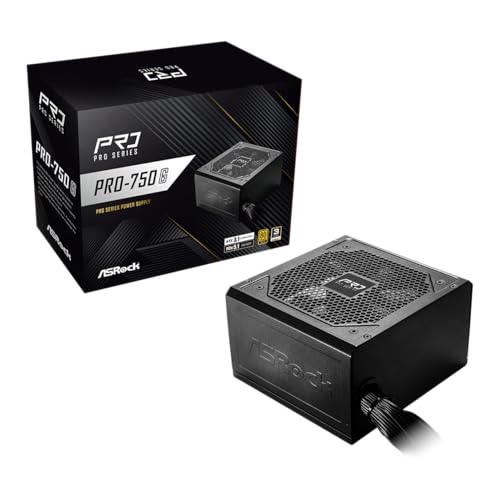
- ATX 3.1 and PCIe 5.1 compliant
- Native 12V-2x6 connector rated up to 450W
- 80 Plus Gold efficiency with a quiet 120mm fan
Best For: Standard ATX workstations using modern GPUs
Balanced High-Power Choice
Thermaltake Toughpower GT 850W

- 850W output with ATX 3.1 and PCIe 5.1 support
- 80 PLUS Gold efficiency and Smart Zero Fan operation
- Fully modular design with native 12V-2x6 connector
Best For: High-end workstations with modern GPUs
Compact Long-Term Value

- 750W fully modular ATX power supply
- ATX 3.1 and PCIe 5.1 ready
- 80 PLUS Gold with a 10-year limited warranty
Best For: Mainstream single-GPU workstations
Extra Headroom Pick

- 850W fully modular power delivery
- ATX 3.1, PCIe 5.1, and native 12V-2x6 cable
- 80 PLUS Gold certification with a 10-year warranty
Best For: Demanding workstations with modern GPUs
High-Headroom Workstation Power – CORSAIR RM1000e (2025)
For computer power supplies for workstations built around demanding processors and graphics cards, the CORSAIR RM1000e provides 1000W of capacity, ATX 3.1 compliance, and a native 12V-2×6 cable for compatible next-generation GPUs. Its fully modular design also helps keep installation tidy.
Best For: High-performance workstations that need substantial power headroom and modern GPU support.
Pros:
- 1000W output with ATX 3.1 and PCIe 5.1 readiness
- Fully modular cabling and included native 12V-2×6 cable
- 120mm rifle-bearing fan and 105°C-rated capacitors
- Seven-year manufacturer warranty
Cons:
- Its 1000W capacity may exceed the needs of modest workstations
- Uses active air cooling rather than a semi-passive fan mode
The RM1000e is a practical choice when workstation upgrades or high transient GPU loads are part of the plan. Its modern connector support and modular cabling make it especially suitable for new builds.
Quiet Professional Performance – be quiet! Pure Power 13 M 1000W
The be quiet! Pure Power 13 M 1000W is one of the computer power supplies for workstations aimed at users who value both power headroom and quiet operation. It combines ATX 3.1 support, a native 12V-2×6 connector, and semi-passive cooling with a single 12V rail.
Best For: Quiet, high-power workstations used for demanding graphics, media creation, or overclocked components.
Pros:
- 1000W continuous output with support for substantial transient loads
- ATX 3.1, PCIe 5.1, and native 12V-2×6 support
- Semi-passive zero-RPM cooling at low loads
- 80 PLUS Gold and Cybenetics Platinum efficiency certifications
Cons:
- Its 6.3-inch depth may require case clearance checking
- 1000W capacity can be more than needed for lower-power systems
With a 10-year warranty, LLC topology, and a fan that can stop under light loads, this model is well suited to workstation builders who want long-term flexibility without making fan noise a constant concern.
Balanced GPU Workstation Choice – CORSAIR RM850e (2025)
For computer power supplies for workstations that do not require a full 1000W, the CORSAIR RM850e offers 850W of output with ATX 3.1 and PCIe 5.1 readiness. It includes a native 12V-2×6 cable, fully modular connections, and a low-noise 120mm fan.
Best For: Mainstream and upper-midrange workstations with a modern discrete GPU and moderate power demands.
Pros:
- 850W capacity balances performance and power headroom
- ATX 3.1-compliant design supports PCIe 5.1 platforms
- Native 12V-2×6 cable included
- Fully modular cabling and 105°C-rated capacitors
Cons:
- Less expansion headroom than a 1000W workstation PSU
- Seven-year warranty is shorter than some competing models in this roundup
The RM850e is a sensible middle ground for a workstation that needs contemporary GPU connectivity without the extra capacity of a 1000W unit. Its modular layout also simplifies cable management.
Basic Budget Workstation Power – Thermaltake Smart 700W
The Thermaltake Smart 700W is a straightforward option among computer power supplies for workstations, offering 700W of continuous power, 80 PLUS certification, and a 120mm fan. Its conventional ATX 12V V2.3/EPS 12V design is best matched with simpler, established builds.
Best For: Budget-conscious workstations with modest component power requirements and conventional ATX connectivity.
Pros:
- 700W continuous power capacity
- 80 PLUS efficiency certification with up to 86% efficiency
- 120mm ultra-quiet fan for airflow and cooling
- Five-year warranty
Cons:
- Non-modular cabling can make cable management more difficult
- Older ATX 12V V2.3 design lacks the listed ATX 3.1 and PCIe 5.1 features
- May be unsuitable for newer high-transient GPUs
This model can fit a basic workstation where price and adequate wattage matter more than modern GPU standards. Check connector requirements and total component demand carefully before selecting it for a new high-end build.
Best All-Around Choice – Corsair RM750e 750W
The Corsair RM750e is a practical choice among computer power supplies for workstations that need modern graphics-card support, efficient operation, and flexible installation. Its 750W output, ATX 3.1 certification, PCIe 5.1 readiness, and included native 12V-2×6 cable suit many current workstation builds.
Best For: Workstations using modern GPUs and builders who want fully modular cabling with quiet operation.
Pros:
- ATX 3.1 and PCIe 5.1 compliant, with support for GPU transient power excursions.
- Fully modular design reduces unused cable clutter.
- 120mm rifle-bearing fan and calculated fan curve help limit noise.
- Includes a native 12V-2×6 cable and carries a seven-year manufacturer warranty.
Cons:
- 750W capacity may be limiting for especially power-hungry workstation configurations.
- Its ATX form factor and 3.35-inch height still require case-space verification.
The RM750e balances current connectivity, manageable acoustics, and straightforward cable management. It is a strong fit when 750W is sufficient and long-term platform compatibility matters.
Best Higher-Wattage Value – Thermaltake Toughpower GF1 850W
The Thermaltake Toughpower GF1 850W gives computer power supplies for workstations extra capacity for demanding component combinations. It combines an 80 Plus Gold rating, fully modular cabling, a single high-amperage 12V rail, and a zero-RPM Smart Zero Fan mode.
Best For: Higher-power workstations that need 850W of headroom and value quiet cooling.
Pros:
- 850W output provides more capacity than the 750W alternatives in this roundup.
- Fully modular design simplifies cable routing and installation.
- 80 Plus Gold certified with DC-to-DC design.
- 140mm fluid-bearing fan and Smart Zero Fan help minimize unwanted noise.
Cons:
- The supplied notes do not list ATX 3.1, PCIe 5.1, or a native 12V-2×6 connector.
- Its larger 140mm fan may require careful chassis clearance checks.
Choose the GF1 when wattage headroom and acoustic features take priority. For a system built around the newest GPU power standards, confirm connector and compatibility requirements before purchasing.
Best Budget ATX 3.1 Option – ASRock PRO 750G
The ASRock PRO 750G is a straightforward option among computer power supplies for workstations seeking 750W, Gold-rated efficiency, and current GPU connectivity. It supports ATX 3.1 and PCIe 5.1 standards and includes a native 12V-2×6 connector rated for up to 450W power delivery.
Best For: Mid-range to high-end workstations that need modern GPU support at a standard ATX size.
Pros:
- 80 Plus Gold certification offers up to 90% energy efficiency.
- ATX 3.1 and PCIe 5.1 compliance supports next-generation components.
- Native 12V-2×6 connector supports up to 450W power delivery.
- 120mm low-noise fan and standard ATX form factor support broad usability.
Cons:
- Non-modular cabling can make installation and cable management less flexible.
- The three-year warranty is shorter than the coverage listed for the other options.
- Verify requirements carefully because the notes list a 120V maximum input.
The PRO 750G offers modern GPU standards and Gold efficiency in a conventional package. Its fixed cables and shorter warranty are trade-offs, but it remains compelling for compatible 750W workstation builds.
Balanced High-Power Choice – Thermaltake Toughpower GT 850W
For workstation builders seeking computer power supplies for workstations with modern graphics hardware, the Thermaltake Toughpower GT 850W combines 850 watts of output with ATX 3.1 and PCIe 5.1 support. Its 80 PLUS Gold efficiency, native 12V-2×6 connector, and fully modular design suit demanding, cable-conscious builds.
Best For: High-end workstations and gaming systems using modern GPUs.
Pros:
- Native PCIe 12V-2×6 connector supports compatible PCIe 5.1 graphics hardware.
- 80 PLUS Gold efficiency provides up to 90% efficiency.
- Smart Zero Fan technology helps reduce noise at low loads.
- Fully modular flat cables simplify cable management and airflow.
Cons:
- The 850W capacity may be more than needed for modest workstation configurations.
- Its ATX form factor and listed dimensions should be checked against compact cases.
The Toughpower GT is a practical middle ground for a workstation that needs modern GPU connectivity, stable single-rail power delivery, and manageable thermals without moving to a much higher wattage class.
Compact Long-Term Value – MSI MAG A750GL PCIE5 750W
The MSI MAG A750GL PCIE5 is a compact 750W option for shoppers comparing computer power supplies for workstations. It combines 80 PLUS Gold certification, a fully modular design, ATX 3.1 and PCIe 5.1 readiness, and a native dual-color 12V-2×6 cable.
Best For: Mainstream workstations that need efficient, modern power delivery in a compact ATX unit.
Pros:
- 750W output is suitable for many single-GPU workstation builds.
- ATX 3.1 and PCIe 5.1 readiness supports newer components.
- Fully modular cabling can make installation and cable routing easier.
- 10-year limited manufacturer warranty supports long-term ownership.
Cons:
- Its 750W capacity provides less headroom than the 850W models in this roundup.
- The supplied notes identify it as a compact gaming power supply, so case and workstation-load compatibility should be verified.
With modern connector support and a long warranty, the A750GL is a sensible fit when 750 watts covers the planned components and a compact, modular power supply is preferred.
Extra Headroom Pick – MSI MAG A850GL PCIE5 850W
For workstation users who want more capacity without giving up modern standards, the MSI MAG A850GL PCIE5 provides 850 watts, 80 PLUS Gold certification, and ATX 3.1 and PCIe 5.1 readiness. Its fully modular design and native dual-color 12V-2×6 cable help simplify current-generation builds.
Best For: Workstations needing 850W of headroom for power-hungry components and modern GPUs.
Pros:
- 850W output offers more capacity for demanding workstation configurations.
- ATX 3.1 and PCIe 5.1 support accommodates newer hardware.
- Native 12V-2×6 cabling reduces reliance on adapters for compatible GPUs.
- 10-year limited manufacturer warranty adds long-term value.
Cons:
- It may be unnecessary for lower-power workstation builds.
- As an ATX unit, its dimensions should be compared with the intended case.
The A850GL is a strong capacity-focused choice among computer power supplies for workstations, especially when the build calls for 850 watts, modular cabling, and a current-generation GPU connection.
How We Picked the Best Computer Power Supplies for Workstations
We focused on capacity, platform compatibility, efficiency, modular cabling, connector support, cooling design, and overall suitability for demanding workstation use. ATX 3.1 and PCIe 5.1 models received particular attention because they are designed for newer graphics cards and their transient power demands. We also included established ATX 2.x options where their price and features remain useful for compatible builds.
Ratings and certification labels are helpful, but they do not tell the entire story. A dependable workstation PSU should also have appropriate protection circuitry, strong warranty coverage, sensible thermal behavior, and enough continuous output for the complete system.
Quick Comparison
| Capacity | Best suited to | What to prioritize |
|---|---|---|
| 700W–750W | Single-GPU workstations and efficient CPUs | GPU connector support, modular cables, upgrade headroom |
| 850W | High-end single-GPU systems | ATX 3.1 compliance, native 12V-2×6 cable, quiet cooling |
| 1000W | Powerful GPUs, multicore CPUs, and expansion | Transient handling, efficiency, warranty, and cable layout |
Key Buying Factors for Computer Power Supplies for Workstations
Capacity and Headroom
Estimate the sustained draw of the CPU, graphics card, drives, fans, and expansion cards, then leave practical headroom for transient spikes and future upgrades. A 750W unit may suit an efficient single-GPU system, while 850W or 1000W is safer for higher-end graphics cards and heavily loaded CPUs.
ATX and GPU Connector Compatibility
For a new build, ATX 3.1 and PCIe 5.1 support can simplify compatibility with current GPUs. A native 12V-2×6 cable is preferable to relying on multiple adapters. Check the PSU’s included cables and connector count before buying, especially if your workstation uses several GPUs or storage devices.
Efficiency, Acoustics, and Protection
80 PLUS Gold or better can reduce wasted energy and heat during long workloads, though efficiency varies with load. Semi-passive or zero-RPM modes can lower noise at idle, while established over-current, over-voltage, short-circuit, and over-temperature protections help safeguard expensive components.
Size, Modularity, and Support
Confirm the PSU dimensions fit your case and that cable lengths work for your motherboard and GPU layout. Fully modular units make complex workstation builds easier to assemble and maintain. A longer warranty and responsive manufacturer support are valuable when downtime is costly.
Who Should Buy Which Computer Power Supplies for Workstations?
Choose a 750W model for a moderately powered workstation with one efficient graphics card and limited expansion. Move to 850W for a high-end single-GPU build, heavier CPU workloads, or more drives. A 1000W unit is the better choice when you use a power-hungry GPU, a flagship processor, multiple expansion cards, or want substantial upgrade headroom.
Prioritize ATX 3.1 and native 12V-2×6 support for new systems built around current-generation graphics hardware. A less expensive older-standard PSU can still make sense for an existing compatible workstation, but verify its connectors, wattage, condition, and warranty before installation.