A reliable Ethernet adapter can give a Linux laptop, desktop, or mini PC faster and more stable networking than built-in wireless. The right choice depends on your ports, network speed, driver support, and how portable the adapter needs to be.
We compare 10 USB, USB-C, and PCIe models across Gigabit and 2.5GbE speeds to help you choose a practical wired networking upgrade for your Linux setup.
Best 10 Ethernet Adapters for Linux Picks for 2026
Best Portable Gigabit Pick
TP-Link UE300 USB Ethernet Adapter

- USB 3.0 to Gigabit Ethernet
- Linux driver-free installation listed
- Foldable, lightweight design
Best For: Portable Linux laptops and desktops with USB-A
Best 2.5GbE Upgrade
TP-Link TX201 PCIe Network Card

- Up to 2.5 Gbps over PCIe
- Includes low-profile bracket
- Supports Linux and Wake on LAN
Best For: Linux desktops with an available PCIe slot
Best USB-A Value
UGREEN USB 3.0 Gigabit Adapter

- USB 3.0 Gigabit Ethernet
- Linux compatibility listed
- Works with Switch and Switch OLED
Best For: Mixed-device users with USB-A ports
Best USB-C Design
Anker PowerExpand USB-C Ethernet Adapter

- USB-C to Gigabit Ethernet
- Compact aluminum-and-nylon build
- Up to 1 Gbps wired networking
Best For: USB-C devices where portability matters
Best USB-C Pick
TP-Link UE300C Gigabit Adapter

- USB-C to Gigabit RJ45 connection
- Plug-and-play Ubuntu support
- Compact 18.14g travel design
Best For: USB-C laptops and tablets needing portable wired networking
Best for Everyday Use

- USB 3.0 Type-A Gigabit Ethernet
- Linux and broad OS compatibility
- VLAN, jumbo-frame, and checksum support
Best For: USB-A computers and home-office networking
Best Multi-Gigabit Option
UGREEN 2.5Gb USB Ethernet Adapter

- Up to 2.5Gbps through USB 3.0
- Realtek RTL8156BG chipset
- Aluminum housing with status lights
Best For: Linux systems with 2.5Gbps network equipment
Everyday Gigabit Pick
Amazon Basics USB 3.0 Ethernet Adapter

- USB 3.0 connection with 10/100/1000 Mbps Ethernet
- Supports Linux, ChromeOS, macOS, and Windows
- Includes Wake-on-LAN and Energy Efficient Ethernet
Best For: Linux computers needing a simple Gigabit Ethernet connection
Feature-Rich USB Choice
Cable Matters USB 3.0 Gigabit Adapter

- 10/100/1000 Mbps Ethernet over USB 3.0
- Supports Wake-on-LAN, PXE, and auto-MDIX
- Compact design weighs less than one ounce
Best For: Portable Linux networking with added enterprise-style features
USB-C Travel Pick
Anker USB-C to Gigabit Ethernet Adapter
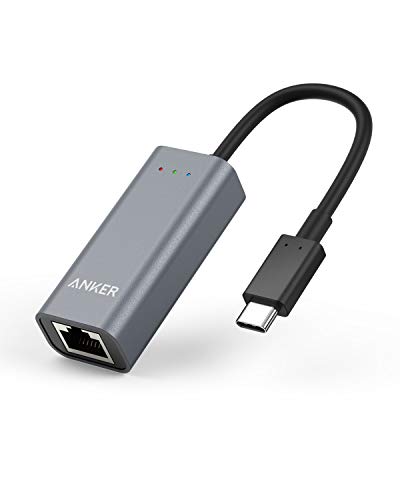
- USB-C connection with 10/100/1000 Mbps Ethernet
- Compact design weighs about 1.12 ounces
- Linux and Windows compatibility listed
Best For: Portable USB-C Linux devices needing wired Gigabit networking
Best Portable Gigabit Pick – TP-Link UE300 USB Ethernet Adapter
If you need ethernet adapters for linux that are easy to carry between computers, the TP-Link UE300 is a practical USB 3.0 option. It adds an RJ45 port and supports up to 1,000 Mbps over compatible networks, while its foldable design helps protect the connector during travel.
Best For: Linux laptop and desktop users who want a compact, driver-free Gigabit Ethernet adapter with USB-A connectivity.
Pros:
- Supports 10/100/1000 Mbps Gigabit Ethernet.
- Listed as driver-free for Linux, Windows, macOS, and ChromeOS.
- Foldable and lightweight design is convenient for travel.
- Includes a two-year manufacturer warranty and lifetime technical support.
Cons:
- Uses a USB-A connection rather than USB-C.
- Not compatible with Nintendo Switch, Wii U, or Wii.
- Older Mac OS versions require a separate driver.
The UE300 is a strong all-purpose choice when portability and broad Linux compatibility matter. Its USB 3.0 interface and Gigabit support suit everyday downloads, streaming, and wired networking, provided your computer has a compatible USB port.
Best 2.5GbE Upgrade – TP-Link TX201 PCIe Network Card
For a Linux desktop with an open PCIe slot, the TP-Link TX201 is one of the faster ethernet adapters for linux in this roundup. Its 2.5G Base-T port supports up to 2.5 Gbps and automatically negotiates down to 1 Gbps or 100 Mbps when needed.
Best For: Linux desktop users upgrading from built-in Gigabit networking to a faster 2.5GbE wired connection.
Pros:
- Supports speeds up to 2.5 Gbps.
- Backward compatible with 1 Gbps and 100 Mbps networks.
- Includes standard and low-profile brackets for different desktop cases.
- Supports Wake on LAN and QoS features.
Cons:
- Requires a desktop computer and available PCIe slot.
- Does not provide a USB connection for laptops.
- Actual performance depends on network conditions and connected equipment.
The TX201 makes sense when your Linux desktop, network hardware, and cabling can take advantage of speeds beyond Gigabit. The included low-profile bracket also makes it more flexible for compact tower builds.
Best USB-A Value – UGREEN USB 3.0 Gigabit Adapter
The UGREEN USB to Ethernet Adapter is a straightforward choice among ethernet adapters for linux when you want Gigabit networking through USB-A. It is listed as compatible with Linux and offers plug-and-play operation on several other platforms, along with support for Nintendo Switch and Switch OLED.
Best For: Linux laptop, desktop, and media-device users who need a compact USB-A Gigabit adapter with broad device compatibility.
Pros:
- Provides up to 1,000 Mbps Gigabit Ethernet.
- Listed as compatible with Linux, Windows, macOS, and ChromeOS.
- Supports Nintendo Switch and Switch OLED.
- Compact design and 24-month warranty service.
Cons:
- Requires a USB-A port.
- Its stated plug-and-play claim specifically highlights Windows, macOS, and ChromeOS; Linux support is listed in the compatibility details.
- Limited to Gigabit speeds rather than 2.5GbE.
This adapter is a sensible pick for mixed-device households or users who want one small dongle for a Linux computer and compatible consoles. It is best suited to systems with USB-A and networks operating at Gigabit speeds or below.
Best USB-C Design – Anker PowerExpand USB-C Ethernet Adapter
The Anker PowerExpand is a compact USB-C option for shoppers comparing ethernet adapters for linux on newer laptops and tablets. It connects through USB-C 3.0 and provides a stable wired connection at speeds up to 1 Gbps, with an aluminum exterior and braided-nylon cable.
Best For: Users with USB-C devices who prioritize a compact, durable-looking Gigabit Ethernet adapter.
Pros:
- Supports wired speeds up to 1 Gbps.
- Uses a USB-C connector for compatible modern devices.
- Lightweight, compact construction is easy to carry.
- Includes an 18-month warranty.
Cons:
- The supplied notes do not explicitly list Linux operating-system compatibility.
- Limited to Gigabit speeds.
- Provides one Ethernet port and no additional hub ports.
The Anker is appealing for USB-C-equipped hardware where size and build quality are priorities. Because the supplied specifications do not confirm Linux support, check compatibility with your specific distribution and device before purchasing.
Best USB-C Pick – TP-Link UE300C Gigabit Adapter
For a compact option among ethernet adapters for linux, the TP-Link UE300C adds a Gigabit RJ45 connection through USB-C. It supports plug-and-play use with Linux Ubuntu, along with Windows, macOS, and Chrome OS, and is small enough for travel.
Best For: USB-C laptops and tablets that need a portable wired Gigabit connection.
Pros:
- Supports up to 1Gbps Gigabit Ethernet over USB-C 3.0.
- No driver required for Ubuntu and several other operating systems listed by TP-Link.
- Compact 2.8 x 1.0 x 0.6-inch design weighs about 18.14g.
- Compatible with Thunderbolt 3/4 and many MacBook, Chromebook, Dell, Surface, and Lenovo devices.
Cons:
- Uses USB-C, so it is not the right fit for devices limited to USB-A.
- Reaching 1Gbps requires suitable network equipment and CAT6-or-better cabling.
- Linux support is specifically identified as Ubuntu in the supplied specifications.
The UE300C is a practical Linux-friendly choice when portability and simple setup matter more than multi-gigabit speeds. Its USB-C interface and Gigabit ceiling make it especially suitable for modern ultrabooks and tablets.
Best for Everyday Use – Plugable USB3-E1000 Adapter
The Plugable USB3-E1000 is a straightforward choice among ethernet adapters for linux when your computer has USB-A. Its ASIX AX88179B chipset provides Gigabit Ethernet, while support for Linux, Chrome OS, macOS, and Windows broadens its usefulness.
Best For: USB-A computers, home offices, and users who want a conventional Gigabit adapter with advanced network features.
Pros:
- Provides Gigabit Ethernet through USB 3.0 Type-A.
- Lists compatibility with Linux, Chrome OS, macOS 11 and newer, and Windows.
- Supports Energy Efficient Ethernet, jumbo frames, VLAN tagging, and checksum offload.
- Includes lifetime support from Plugable’s North American connectivity team.
Cons:
- Does not provide a USB-C connector.
- Not compatible with Smart TVs according to the supplied notes.
- Automatic driver installation details are focused primarily on Windows, while macOS support starts at version 11.
This adapter makes sense for Linux desktops and laptops equipped with USB-A, particularly where VLANs, jumbo frames, or other advanced features are useful. It remains a Gigabit device rather than a multi-gigabit upgrade.
Best Multi-Gigabit Option – UGREEN 2.5Gb USB Ethernet Adapter
For users comparing ethernet adapters for linux with faster-than-Gigabit networking, the UGREEN USB adapter supports up to 2.5Gbps through USB 3.0 Type-A. Its Realtek RTL8156BG chipset, aluminum housing, and status lights are designed for stable, high-throughput wired connections.
Best For: Linux desktops or laptops paired with 2.5Gbps switches, routers, NAS devices, or other compatible network hardware.
Pros:
- Supports data rates up to 2.5Gbps over USB 3.0.
- Uses the Realtek RTL8156BG chip, with low-power operation at full speed noted by UGREEN.
- Durable aluminum construction includes reinforced ports and indicator lights.
- Compatible with Linux, Chrome OS, macOS, and Windows.
Cons:
- Requires 2.5Gbps-capable network equipment to deliver speeds above 1Gbps.
- Uses USB-A rather than USB-C.
- Not compatible with all Nintendo Switch, TV, Synology NAS, or Wii devices.
The UGREEN adapter is the strongest performance choice here if your Linux system and network support 2.5Gbps. If your router and switch are limited to Gigabit, a less expensive 1Gbps model may be more practical.
Everyday Gigabit Pick – Amazon Basics USB 3.0 Ethernet Adapter
For shoppers comparing ethernet adapters for linux, this Amazon Basics USB 3.0 model is a straightforward way to add Gigabit Ethernet to a compatible computer or laptop. It connects to a router, modem, or network switch and supports Linux, ChromeOS, macOS, and Windows according to the supplied specifications.
Best For: Linux desktops and laptops that need a simple USB 3.0-to-Gigabit Ethernet connection.
Pros:
- Supports 10/100/1000 Mbps Ethernet over USB 3.0.
- Includes Wake-on-LAN and Energy Efficient Ethernet support.
- Supports IPv4/IPv6 checksum offload to help reduce CPU loading.
Cons:
- Not intended for Smart TVs or gaming consoles such as Nintendo Switch.
- Requires a computer or laptop with a compatible USB connection.
This is a practical, no-frills option when you want wired Gigabit networking on Linux and do not need extra ports or a multi-function hub.
Feature-Rich USB Choice – Cable Matters USB 3.0 Gigabit Adapter
This Cable Matters adapter is a strong contender among ethernet adapters for linux, adding a standard RJ45 Gigabit port through USB 3.0. It is designed for computers and laptops, offers backward compatibility with 10/100 Mbps networks, and lists native driver support for Chrome, macOS, and Windows while the specifications also identify Linux compatibility.
Best For: Linux users who want a portable USB 3.0 adapter with business- and network-oriented features.
Pros:
- Supports 10/100/1000 Mbps Ethernet and USB 3.0 data rates up to 5 Gbps.
- Includes Wake-on-LAN, PXE, auto-MDIX, and full- or half-duplex support.
- Compact design weighs less than one ounce for easy portability.
- Supports native driver installation on listed Chrome, macOS, and Windows systems.
Cons:
- A Cat 6 Ethernet cable is sold separately.
- Does not support Windows RT.
With its broad feature set and compact build, this model makes sense for Linux laptop users who value more than basic wired connectivity, though the supplied notes do not specify a particular Linux distribution or kernel requirement.
USB-C Travel Pick – Anker USB-C to Gigabit Ethernet Adapter
For newer Linux laptops and other USB-C devices, this compact Anker adapter provides a direct wired connection at up to 1 Gbps. Its small footprint makes it convenient for travel, while the supplied specifications list Linux and Windows compatibility.
Best For: USB-C-equipped Linux laptops, tablets, and compact workstations that need portable Gigabit Ethernet.
Pros:
- Provides 10/100/1000 Mbps Ethernet through USB-C.
- Compact 2.3-by-1-by-0.7-inch design weighs about 1.12 ounces.
- Includes an 18-month warranty and customer service.
Cons:
- Requires a USB-C port, limiting compatibility with older USB-A-only systems.
- The supplied details list Linux and Windows compatibility but do not identify specific distributions.
This is the most convenient choice of the three for a USB-C Linux setup where portability matters. It focuses on one essential function rather than adding hub ports or other extras.
How We Picked These Ethernet Adapters for Linux
We focused on adapters that cover the most useful Linux configurations: USB-A for older laptops and desktops, USB-C for newer systems, and PCIe for permanent desktop upgrades. We also considered advertised Ethernet speed, connection type, portability, build quality, compatibility claims, and how well each format suits everyday networking tasks.
Linux compatibility can vary by kernel version, distribution, chipset, and system architecture. “Plug and play” should therefore be treated as a convenience claim rather than a guarantee. Before buying, check the manufacturer’s chipset information and confirm that your distribution supports it or that a maintained driver is available.
Quick Comparison
| Adapter type | Typical speed | Best suited to |
|---|---|---|
| USB-A to Ethernet | Gigabit | Older laptops, desktops, and general upgrades |
| USB-C to Ethernet | Gigabit | Modern laptops, tablets, and compact systems |
| USB 2.5GbE | 2.5Gbps | Fast NAS, broadband, and local-network transfers |
| PCIe network card | Gigabit to 2.5Gbps | Desktop installations and low-clutter setups |
Key Buying Factors for Ethernet Adapters for Linux
Port and Connection Type
Choose USB-A if your computer has conventional rectangular USB ports. USB-C models are better for newer ultrabooks, Chromebooks, tablets, and mini PCs, but check whether the port supports the required USB standard and networking accessories.
Speed and Network Hardware
A Gigabit adapter is sufficient for most home internet plans, office connections, and media streaming. Consider 2.5GbE only if your router, switch, NAS, broadband service, and cabling can use the extra bandwidth. Otherwise, the higher-rated adapter may not provide a noticeable benefit.
Linux Driver Support
Look for well-supported chipsets and current compatibility information rather than relying only on the product title. Driver availability can affect installation, sleep and wake behavior, power management, and stability across distributions such as Ubuntu, Debian, Fedora, and Arch Linux.
Build and Portability
Compact aluminum adapters are convenient for travel, while a PCIe card is better for a desktop that stays in one place. A permanently attached adapter or cable can also reduce strain on a laptop’s port.
Who Should Buy Which Ethernet Adapters for Linux?
Choose a USB-A Gigabit adapter for an affordable, broadly useful upgrade to an older laptop, desktop, or Linux workstation. Choose USB-C Gigabit if your computer lacks USB-A ports or you want a small travel adapter. Choose 2.5GbE for faster local transfers and compatible high-speed networks. Choose the PCIe card for a desktop where internal installation, cleaner cable management, and a permanent connection matter most.
For the safest purchase, match the adapter to your computer’s physical ports first, then verify Linux driver support and your network’s actual speed before paying for a faster standard.