Finding the right smart home setup for elderly parents is less about adding gadgets and more about making everyday safety easier to manage. The best options combine simple controls, dependable alerts, and compatibility with the devices a family already uses.
This roundup includes full smart home hubs, caregiver call buttons, door sensors, voice-alert systems, and power-failure monitors. Use the guide below to match the technology to your parent’s needs, comfort level, and home layout.
Best 10 Smart Home Hubs for Elderly Parents Picks for 2026
Best Connected-Home Hub

- Supports Matter, Zigbee, Z-Wave Plus, Wi-Fi, Alexa, and Google Home
- Creates routines through the SmartThings app
- Uses Wi-Fi or Ethernet connectivity
Best For: Coordinating compatible smart-home devices and automations
Best Simple Caregiver Pager

- Includes two call buttons and one plug-in receiver
- Offers 55 tones and volume up to 110 dB
- Waterproof and dustproof call buttons and receiver
Best For: Straightforward caregiver alerts without smart-home setup
Best Touchscreen Smart Home Hub

- 8-inch customizable dashboard for device controls and routines
- Built-in support for Wi-Fi, Zigbee, Matter, Thread, and more
- Works with thousands of Alexa-compatible devices
Best For: Visual control of compatible Alexa smart-home devices
Best Two-Way Caregiving System

- Includes two call buttons, two receivers, and two walkie-talkies
- Enables two-way conversation without holding down buttons
- Offers adjustable volume up to 110 dB
Best For: Multi-room alerts and caregiver-to-resident communication
Best Low-Power Hub

- Connects up to 64 Tapo devices
- Built-in chime and up to 90 dB siren
- Requires 2.4GHz Wi-Fi
Best For: Tapo-based homes needing low-power device connections
Best Caregiver Alert System
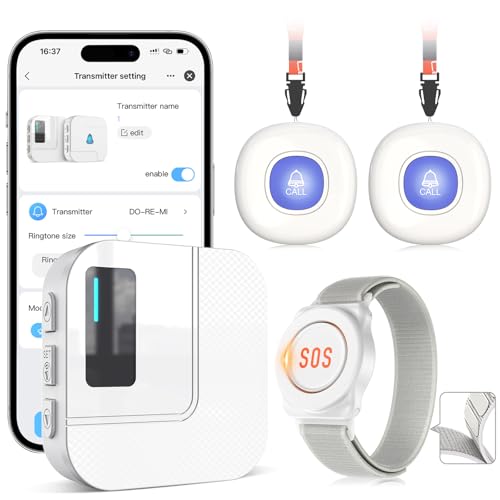
- Includes two call buttons and a watch button
- Up to 100-meter stated wireless range
- Shared app alerts for multiple caregivers
Best For: Dedicated in-home help requests and caregiver notifications
Best Starter Kit

- Includes hub and three contact sensors
- Real-time alerts and up to 90 dB alarm
- Matter-compatible with major platforms
Best For: Monitoring multiple doors and windows with one bundled setup
Best for Voice Alerts
YoLink SpeakerHub Smart Home Hub

- Custom text-to-speech and alert sounds
- Compact Wi-Fi speaker with no microphone
- Useful for doors, leaks, garages, and mail
Best For: Caregivers who need clear spoken home alerts
Best for Door Monitoring
Wi-Fi Caregiver Door Alarm Kit

- Remote app alerts for door or window openings
- Two sensors and plug-in gateway included
- Loud tones, adjustable volume, and LED indicator
Best For: Families monitoring exits and entry points remotely
Best for Power Outage Alerts
YoLink Smart Power Fail Alarm Kit

- Remote AC power monitoring through the app
- Text, email, push, and optional call alerts
- 110 dB alarm with bright outage indicators
Best For: Caregivers monitoring homes during power failures
Best Connected-Home Hub – Aeotec Smart Home Hub
For families building smart home hubs for elderly parents, the Aeotec Smart Home Hub offers broad device compatibility and app- or voice-based control. It supports Matter, Zigbee, Z-Wave Plus, Wi-Fi, Alexa, and Google Home, making it a flexible foundation for lights, sensors, comfort devices, and routines.
Best For: Families coordinating compatible smart-home devices and automations from one hub.
Pros:
- Works with Matter, Zigbee, Z-Wave Plus, Wi-Fi, Alexa, and Google Home devices.
- Supports custom routines through the SmartThings app.
- Offers both Wi-Fi and Ethernet setup options.
- Many automations can run locally for improved speed and reliability.
Cons:
- Requires compatible smart devices and use of the SmartThings app.
- Its broad feature set may take more setup than a simple alert button.
- Designed for use in North America.
This is a strong choice when elderly-parent support involves connected lighting, sensors, comfort controls, or voice assistants. It is less suited to families looking only for a dedicated emergency call device.
Best Simple Caregiver Pager – CallToU Caregiver Pager
Although it is not a traditional smart home hub, this CallToU caregiver pager can be a practical addition to smart home hubs for elderly parents when the priority is a straightforward way to request help. The kit includes two call buttons and one plug-in receiver, with adjustable volume and a stated open-area range of more than 500 feet.
Best For: Homes needing a simple, dedicated caregiver alert system.
Pros:
- Includes two call buttons and one receiver.
- Call buttons can be worn as pendants or mounted with the included-style attachment options.
- Offers 55 ringtone choices and five volume levels up to 110 dB.
- Call buttons and receiver are waterproof and dustproof.
Cons:
- The receiver must be plugged into an outlet.
- The stated 500-plus-foot range applies to open areas; indoor obstacles can reduce it.
- It does not provide broader smart-device control or automation.
Choose this pager when ease of use matters more than app integration. It provides a direct alert path for caregivers but should be viewed as a dedicated monitoring accessory rather than a connected-home hub.
Best Touchscreen Smart Home Hub – Amazon Echo Hub
The Amazon Echo Hub is a touchscreen control panel for households comparing smart home hubs for elderly parents. Its customizable dashboard can place device controls, cameras, routines, and security functions in one visible interface, while Alexa voice control provides another way to manage compatible devices.
Best For: Families wanting a visual, customizable control panel for Alexa-compatible devices.
Pros:
- Provides an 8-inch dashboard for organizing device controls and routines.
- Built-in hub supports Wi-Fi, Bluetooth, Zigbee, Matter, Sidewalk, and Thread devices.
- Works with thousands of Alexa-compatible devices.
- Can be wall mounted and includes a microphone-off button for privacy control.
Cons:
- A power-over-Ethernet adapter, in-wall cable pass-through, and tabletop stand are sold separately.
- Some Ring features require a compatible subscription sold separately.
- Its usefulness depends on compatible Alexa devices and services.
The Echo Hub suits homes where a large, organized interface may be easier than relying on a phone app alone. It is especially useful for bringing cameras, routines, security controls, and other compatible devices into one dashboard.
Best Two-Way Caregiving System – CallToU Wireless Alert System
For families evaluating smart home hubs for elderly parents alongside personal-care communication, this CallToU system adds two call buttons, two receivers, and two walkie-talkies. The call buttons provide alerts, while the two-way radios allow caregivers and residents to speak without holding down a button.
Best For: Homes needing multiple alert points plus room-to-room two-way communication.
Pros:
- Includes two call buttons, two receivers, and two walkie-talkies.
- Walkie-talkies support two-way conversation without holding down buttons.
- Offers 55 ringtone choices and adjustable volume up to 110 dB.
- Call buttons and receivers are waterproof and dustproof.
Cons:
- The pager and wireless intercom are separate systems and cannot be paired with each other.
- Receivers require outlet power.
- The 500-foot range is for open areas; the notes recommend keeping indoor use below 300 feet.
This kit is more capable than a basic pager when caregivers need both alerts and conversation across rooms. However, its separate pager and intercom systems should be understood before purchase, particularly in a larger home.
Best Low-Power Hub – Tapo H100 Smart Hub
For households building smart home hubs for elderly parents, the Tapo H100 is a compact starting point for connecting Tapo sensors, switches, and buttons. It requires 2.4GHz Wi-Fi and adds a built-in chime plus app- and voice-based control.
Best For: Families wanting a central Tapo hub with long-range, low-power connections and audible alerts.
Pros:
- Connects up to 64 compatible Tapo devices.
- Uses a low-power wireless protocol designed to extend battery life by up to 10 times compared with Wi-Fi devices.
- Built-in chime and siren can provide audible alerts, with the siren reaching up to 90 dB.
- Offers a stated maximum range of up to 30 meters, depending on conditions.
Cons:
- Requires a 2.4GHz Wi-Fi network.
- Designed for Tapo sensors, switches, and buttons rather than a universal smart-home setup.
- The hub cannot directly connect to Tapo smart plugs or smart lighting.
The H100 makes the most sense when your parents’ home already uses—or will use—Tapo accessories. Its capacity and low-power connectivity support gradual expansion, while the built-in chime and alarm add practical notification options.
Best Caregiver Alert System – CallToU Wi-Fi Caregiver Pager
Among smart home hubs for elderly parents, the CallToU system focuses specifically on getting a help request to caregivers. It includes two call buttons, a watch button, and a receiver, with app alerts and a stated wireless range of up to 100 meters.
Best For: Families prioritizing a dedicated emergency call button and shared caregiver notifications.
Pros:
- Pressing a call button triggers a loud alarm, flashing lights, and an app notification.
- 433MHz wireless signaling provides a stated range of up to 100 meters and can penetrate walls and doors.
- Tuya app sharing lets multiple family members receive alerts.
- Receiver includes 20 ringtones, five volume levels, and customizable button names.
Cons:
- Only supports 2.4GHz Wi-Fi, not 5GHz Wi-Fi.
- Phone or text message notifications require a stated $9.99-per-month subscription; app notifications are free.
- This is a focused caregiver pager rather than a broad smart-home hub for lights and sensors.
This setup is a practical choice when the main concern is giving an elderly parent a simple way to request help. The included wearable and call buttons offer placement flexibility, while shared app alerts can keep several caregivers informed.
Best Starter Kit – Tapo T31 Door Sensor Kit
The Tapo T31 kit is a useful option for families comparing smart home hubs for elderly parents because it combines the H100 hub with three door and window sensors. It can provide real-time status updates, local alarm sounds, and automations such as turning on lights when a door opens.
Best For: Homes needing several entry-point sensors with a hub included from the start.
Pros:
- Includes one H100 hub and three T110 contact sensors.
- Provides real-time app notifications and activity history for doors and windows.
- Contact sensors can trigger a customizable alarm reaching up to 90 dB.
- Matter compatibility supports integration with platforms including Alexa, Google Home, Apple HomeKit, and Samsung SmartThings.
Cons:
- The sensors require the included Tapo Hub to operate.
- Requires 2.4GHz Wi-Fi.
- Broader automation features may require compatible Tapo devices or a supported smart-home platform.
For monitoring entrances, cabinets, refrigerators, or mailboxes, this bundle offers more immediate coverage than buying a hub alone. Its tool-free adhesive or magnetic mounting and approximately two-year sensor battery life can also simplify installation and upkeep.
Best for Voice Alerts – YoLink SpeakerHub Smart Home Hub
For families comparing smart home hubs for elderly parents, the YoLink SpeakerHub stands out for customizable spoken announcements and alert sounds. It connects over Wi-Fi and uses USB power, making it a compact plug-in option for rooms where audible reminders matter.
Best For: Caregivers who want spoken alerts for events such as an open garage door, water leak, driveway activity, or incoming mail.
Pros:
- Supports custom tones, sounds, MP3 files, and text-to-speech messages.
- Can serve as an alert speaker, security siren, water-leak alarm, or door chime.
- Compact, portable design with no microphone for added privacy.
- Includes an AC adapter and works with Android or Apple smartphones.
Cons:
- Requires stable Wi-Fi and nearby USB or AC power.
- Does not include Ethernet connectivity or battery backup.
- Requires a smartphone for setup and control.
This is a focused alert hub rather than a general-purpose voice assistant. Its customizable speech and microphone-free design make it particularly useful when clear, audible notifications and privacy are priorities.
Best for Door Monitoring – Wi-Fi Caregiver Door Alarm Kit
Among smart home hubs for elderly parents, this Wi-Fi door alarm kit is designed specifically for remote entry alerts. Two door sensors and a plug-in gateway can notify caregivers through an app when a door or window opens, even when they are away from home.
Best For: Families monitoring doors for elderly relatives, children, or people with dementia, especially when caregivers live in another city or state.
Pros:
- Sends app alerts remotely when a monitored door or window opens.
- Includes two sensors and a plug-in receiver gateway.
- Offers 32 ringtones, five volume levels, and a loud setting up to 110 dB.
- LED indicators provide an additional alert for people with hearing difficulty.
Cons:
- Requires Wi-Fi, smartphone app setup, and battery replacement for sensors.
- The supplied kit is focused on door and window monitoring rather than broader home automation.
- Additional receivers or sensors may be needed for larger homes.
This kit is a practical choice when the main concern is knowing that a monitored entrance has opened. Its loud receiver, visual indicator, app sharing, and expandable design support both local and remote caregiving.
Best for Power Outage Alerts – YoLink Smart Power Fail Alarm Kit
For smart home hubs for elderly parents, this YoLink kit focuses on a frequently overlooked risk: loss of AC power. It monitors power status and can send app, email, text, or optional call notifications, helping caregivers know when a critical location has gone offline.
Best For: Caregivers who want remote notification of power outages in an older adult’s home or at connected equipment.
Pros:
- Reports AC power status remotely through the YoLink app.
- Supports push notifications, email, text messages, and optional automated calls.
- Provides a 110 dB local alarm and four bright LED indicators during power loss.
- Uses LoRa connectivity with a stated range of up to 1,320 feet.
Cons:
- Requires a YoLink hub for full app functionality; the notes say the hub is not included.
- Assembly and screw-in installation are required.
- Its primary function is power-failure monitoring rather than general home control.
This is a specialized safety-monitoring kit that can add reassurance during outages. Confirm the required hub setup before buying, then consider it where timely power notifications are more important than broad smart-home features.
How We Picked the Best Smart Home Hubs for Elderly Parents
We evaluated these products by focusing on practical caregiving needs rather than smart-home features alone. Important considerations included setup difficulty, alert speed, communication options, device compatibility, wireless range, app access, and whether the system can work without requiring an older adult to manage complicated routines.
The selection includes general-purpose hubs such as SmartThings-compatible and Alexa-based systems, along with focused caregiver products for emergency calls, door monitoring, voice announcements, and power-outage notifications. Because these categories serve different needs, the best choice depends on the type of support your parent actually requires.
Quick Comparison
| Need | Best-suited option | Why it matters |
|---|---|---|
| Broad device compatibility | Multi-protocol smart hub | Supports a wider range of sensors and accessories. |
| Simple emergency communication | Caregiver pager and call button | Provides a direct way to request help. |
| Door and window awareness | Smart door sensor kit | Can notify caregivers when an entry point opens. |
| Audible household alerts | Hub with built-in chime or speaker | Makes notifications easier to hear around the home. |
| Remote outage monitoring | Power-failure alarm and hub | Alerts family members when the home loses power. |
Key Buying Factors for Smart Home Hubs for Elderly Parents
Ease of Use
Look for large, clear controls, straightforward alert sounds, and minimal steps for acknowledging an alarm. A system that family members can maintain remotely is often more useful than one with a long list of advanced features.
Alert Method and Reliability
Decide whether alerts should arrive through a local chime, pager, smartphone app, voice announcement, or several methods at once. Battery backup, cellular independence, and reliable Wi-Fi or hub connectivity may also matter, particularly for emergency-focused installations.
Compatibility and Expansion
If you plan to add motion sensors, lights, locks, cameras, or medical-alert accessories later, choose a hub supporting the relevant standards and ecosystems. Matter, Zigbee, Z-Wave, Wi-Fi, and proprietary long-range technologies are not interchangeable, so confirm compatibility before buying additional devices.
Range and Home Layout
Large homes, detached rooms, thick walls, and multiple floors can affect wireless performance. Check the stated range and consider where the hub, chime, sensors, and call buttons will be placed. Test important alerts in the locations where your parent spends the most time.
Privacy and Maintenance
Review app permissions, account security, subscription requirements, battery life, and replacement costs. Establish who receives alerts and what happens when an alert is missed. Smart devices should supplement a caregiving plan, not replace emergency services or regular check-ins.
Who Should Buy Which Smart Home Hubs for Elderly Parents?
Choose a general-purpose hub if you want to build a broader connected-home system with lights, sensors, locks, or voice control. A caregiver pager and call button is a better fit when the main priority is allowing a parent to request immediate assistance. Door-sensor products suit families monitoring wandering or unexpected entry, while speaker-based hubs are useful when audible reminders and announcements need to be heard throughout the home.
For homes where outages are a major concern, a dedicated power-failure monitor can provide an additional layer of remote awareness. Whichever system you choose, start with one clearly defined safety goal, configure alerts with another family member, and confirm that your parent can use the setup comfortably.