The best smart home hubs without cloud access keep core automations, device control, and schedules closer to home instead of sending every command through a remote server.
We compared 10 promising hubs across protocol support, local processing, Matter compatibility, setup requirements, and ecosystem fit so you can choose a dependable foundation for your smart home.
Best 10 Smart Home Hubs Without Cloud Access Picks for 2026
Best Local-First Hub

- Local automations continue during internet outages
- Supports Matter, Z-Wave, Zigbee, and Bluetooth
- No subscription; works with major voice platforms
Best For: DIY users building a private, highly customizable smart home
Best Matter Bridge
- Local web console works without cloud services
- Bridges Zigbee and BTHome devices to Matter
- Supports Ethernet, Wi-Fi, MQTT, and Home Assistant
Best For: Connecting Zigbee devices across Matter and Home Assistant setups
Best for Aqara and IR Devices

- Runs Zigbee and Matter automations locally
- Combines Matter, Thread, Zigbee, Wi-Fi, and IR
- Supports PoE and optional USB-C backup power
Best For: Aqara households adding Matter, Thread, and infrared control
Best Lighting-Focused Hub

- Designed for Caseta lighting control
- Supports Alexa, Apple HomeKit, Google, Ring, and Sonos
- Clear Connect avoids competing with Wi-Fi devices
Best For: Lutron Caseta homes prioritizing simple, reliable lighting control
Best Overall

- Local-first Edge Hub automations
- Matter bridge with Zigbee and Thread
- PoE, IR control, and encrypted storage
Best For: Large Aqara setups and advanced local automations
Best Budget Gateway

- Zigbee 3.0 and Bluetooth Mesh support
- Controls up to 128 Tuya devices
- Alexa, Google Home, and app control
Best For: Entry-level Tuya or Smart Life installations
Best Compact Local Hub

- Local Zigbee and Matter automation
- Matter bridge with Thread support
- Compact adjustable USB-powered design
Best For: Small Aqara systems needing local control
Best SmartThings Option

- Matter and Zigbee support
- Local automation capability
- Wi-Fi or Ethernet connectivity
Best For: SmartThings households using Matter and Zigbee devices
Best Local Automation Hub

- Local processing when internet is down
- Matter, Thread, and Zigbee built in
- No subscription required
Best For: Mixed-brand homes prioritizing local automation
Best Protocol Coverage

- Z-Wave Plus and Zigbee support
- Adds BLE and infrared control
- Homey Flows for custom routines
Best For: Homes combining legacy and modern smart devices
Best Local-First Hub – Hubitat Elevation C-8 Pro
For shoppers seeking smart home hubs without cloud access, the Hubitat Elevation C-8 Pro stands out with local automation processing. It supports Matter, Z-Wave, Zigbee, and Bluetooth, while keeping device data at home and continuing to run routines when the internet is unavailable.
Best For: DIY users who want broad device compatibility, fast local automations, and advanced rule-building without a subscription.
Pros:
- Runs automations locally for fast response and offline operation.
- Supports Matter, Z-Wave 800, Zigbee 3.0, and Bluetooth.
- Works with Alexa, Google Home, and Apple HomeKit.
- Offers advanced Rule Machine logic and no recurring subscription.
Cons:
- Advanced automation features may have a learning curve.
- Voice assistants and some integrations still depend on their respective ecosystems.
The C-8 Pro is a strong choice when privacy, reliability, and expansion matter. Its extensive protocol support and active community make it especially appealing for hands-on smart home builders.
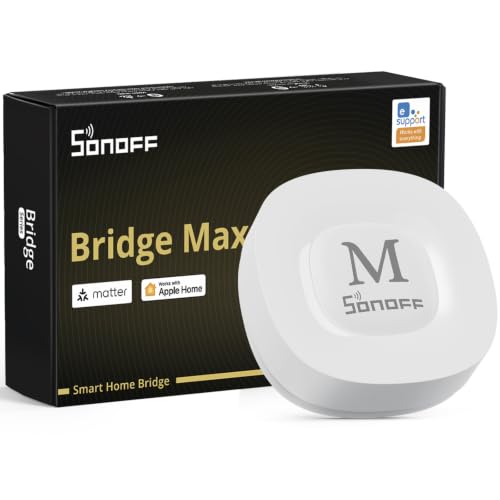
Best Matter Bridge – SONOFF Bridge Max
The SONOFF Bridge Max is a practical option for smart home hubs without cloud access, offering a local web console that can be reached directly over your LAN. It bridges Zigbee, BTHome, and eWeLink devices to Matter platforms and supports Ethernet, Wi-Fi, and Home Assistant integration.
Best For: Users who want to connect Zigbee devices with Matter ecosystems or Home Assistant while managing the bridge locally.
Pros:
- Provides a local web interface without requiring cloud services.
- Bridges Zigbee, BTHome, and eWeLink devices to Matter platforms.
- Supports Ethernet, Wi-Fi, MQTT, and Home Assistant.
- Includes a built-in 90 dB alarm for local security use.
Cons:
- Its primary role is bridging compatible devices rather than serving as a universal hub.
- Device compatibility may vary across third-party Zigbee products and ecosystems.
Bridge Max makes the most sense for mixed-platform homes that need a local connection between Zigbee devices, Matter controllers, and Home Assistant. Ethernet connectivity is useful for users who prefer a wired network link.
Best for Aqara and IR Devices – Aqara Smart Hub M200
The Aqara Smart Hub M200 combines local automation with Matter, Thread, Zigbee, Wi-Fi, and infrared control. For buyers comparing smart home hubs without cloud access, it can run Zigbee and Matter automations locally, although cloud-dependent features such as push notifications still require an internet connection.
Best For: Aqara-focused homes that need Matter and Thread support, IR control, and flexible wired or wireless networking.
Pros:
- Runs Zigbee and Matter automations locally, including without Wi-Fi or cloud access.
- Acts as a Matter controller, Matter bridge, and Thread Border Router.
- Built-in 360-degree IR blaster can control compatible traditional appliances.
- Supports PoE, dual-band Wi-Fi, and USB-C backup power options.
Cons:
- Some functions, including cloud push notifications, still require cloud connectivity.
- It supports up to 40 Aqara Zigbee devices and 40 Thread devices.
- An appropriate 2A USB power adapter is not included.
The M200 is a feature-rich choice for Aqara users who want local reliability plus Matter and Thread expansion. Its IR feedback and PoE support give it capabilities that many basic hubs lack.
Best Lighting-Focused Hub – Lutron Caseta Smart Hub
The Lutron Caseta Smart Hub is designed primarily for reliable Caseta lighting control rather than broad offline smart home management. Its Clear Connect technology avoids competing with Wi-Fi devices, while integrations with Alexa, Apple HomeKit, Google Assistant, Ring, Serena shades, and Sonos extend its usefulness.
Best For: Homes centered on Lutron Caseta switches and dimmers that want straightforward control and major ecosystem compatibility.
Pros:
- Uses Clear Connect technology separately from Wi-Fi-connected devices.
- Supports Alexa, Apple HomeKit, Google Assistant, Ring, Serena shades, and Sonos.
- Can support up to 75 Caseta devices.
- Plugs into an outlet and connects to the router for simple installation.
Cons:
- The supplied notes do not establish full local operation without cloud access.
- It is focused on Lutron Caseta devices and requires a router connection.
- Caseta dimmers, switches, and coordinating accessories are sold separately.
Choose the Caseta Smart Hub when lighting reliability and easy ecosystem integration are more important than broad local automation. It is less suitable for shoppers specifically seeking a fully offline, multi-protocol controller.
Best Overall – Aqara Hub M3
For shoppers seeking smart home hubs without cloud access, the Aqara Hub M3 stands out for its local-first Edge Hub design, broad protocol support, and encrypted onboard storage. It supports Aqara Zigbee and Thread devices, Matter bridging, wired Ethernet via PoE, and wireless connectivity.
Best For: Larger Aqara installations and advanced local automations with Matter or Home Assistant integration.
Pros:
- Runs supported automations locally and supports up to 127 Aqara Zigbee and 127 Thread devices.
- Acts as a Matter bridge for Aqara devices and supports Home Assistant, Apple Home, Alexa, and SmartThings.
- Includes 360-degree IR control with feedback, PoE, dual-band Wi-Fi, and 8GB encrypted local storage.
Cons:
- Its Zigbee capacity applies to Aqara devices, not third-party Zigbee products.
- Some cloud-based notifications still require an internet connection.
- A 2A USB power adapter is not included.
The M3 is the strongest option here for a privacy-conscious Aqara ecosystem, especially if you want wired connectivity, IR control, and room to expand. Confirm device compatibility before buying, since its Zigbee support is brand-specific.
Best Budget Gateway – Tuya Multi-Mode Gateway
This compact gateway combines Zigbee 3.0 and Bluetooth Mesh for Tuya and Smart Life devices. While it is designed primarily for app and voice control, it can link compatible sub-devices into automated routines, making it a practical entry point for a Tuya-based home.
Best For: Tuya Smart or Smart Life users who need an affordable Zigbee-and-Bluetooth gateway.
Pros:
- Combines Zigbee 3.0 and Bluetooth Mesh in one gateway.
- Supports app control, device grouping, and Alexa or Google Home voice control.
- Supports up to 128 Tuya smart home devices.
Cons:
- Supports Tuya or Smart Life devices only.
- The supplied notes emphasize remote app control, so it is less clearly suited to fully cloud-independent operation.
- Works on the 2.4GHz network rather than offering dual-band connectivity.
This gateway is a reasonable low-cost choice for a tightly managed Tuya installation, but it is not the best fit for shoppers specifically prioritizing smart home hubs without cloud access. Choose it when broad Tuya compatibility matters more than local-first control.
Best Compact Local Hub – Aqara Hub M100
The Aqara Hub M100 is a compact option for smart home hubs without cloud access, offering local automation for supported Zigbee and Matter devices. It also works as a Matter bridge, supports Thread, and uses adjustable USB-A power for flexible placement.
Best For: Smaller Aqara systems that need local automations and Matter integration in a compact design.
Pros:
- Executes supported Zigbee and Matter automations locally, even without Wi-Fi or cloud access.
- Supports Aqara Zigbee and Thread devices, plus Matter bridging to Apple Home, Alexa, and Home Assistant.
- Compact adjustable design with USB-A power and 2.4GHz Wi-Fi 6 security.
Cons:
- Supports up to 20 Aqara Zigbee and 20 Thread devices, less than the M3.
- Its Zigbee support excludes third-party Zigbee devices.
- The 5V USB power adapter is not included, and some cloud push notifications still need the cloud.
The M100 offers a strong balance of local reliability, Matter support, and small size. It is better suited to modest Aqara installations than large deployments, but its local execution makes it a more relevant choice than a basic app-dependent gateway.
Best SmartThings Option – Aeotec Smart Home Hub 2
The Aeotec Smart Home Hub 2 is a practical choice for shoppers seeking smart home hubs without cloud access, thanks to its ability to run many automations locally. It supports Matter and Zigbee devices and connects through Wi-Fi or Ethernet, but it does not support Z-Wave.
Best For: SmartThings users building a Matter- and Zigbee-based system with local automation support.
Pros:
- Supports Matter and Zigbee devices.
- Many local automations can continue during temporary internet outages.
- Works with Alexa, Google Assistant, and the SmartThings app.
- Offers Wi-Fi and Ethernet setup options.
Cons:
- Z-Wave devices are not supported.
- Some SmartThings features and integrations may depend on internet access.
The Aeotec hub is a strong fit if your devices use Matter or Zigbee and you want SmartThings routines with local execution. Confirm that your existing devices do not require Z-Wave before buying.
Best Local Automation Hub – Homey Pro mini
The Homey Pro mini suits shoppers comparing smart home hubs without cloud access because it processes data locally and keeps automations available when the internet is down. It includes Zigbee, Matter, Thread, and Ethernet, while Z-Wave, Bluetooth, and infrared require the separately sold Homey Bridge.
Best For: Users who want broad brand compatibility, local processing, and flexible Homey Flow automations without a subscription.
Pros:
- Local data processing supports privacy and offline reliability.
- Supports Zigbee, Matter, Thread, and Ethernet.
- Works with more than 1,000 brands according to the supplied product information.
- No subscription is required for Homey features.
Cons:
- Z-Wave, Bluetooth, and infrared require a separately sold Homey Bridge.
- Remote access and voice integrations use cloud services.
Homey Pro mini is a versatile foundation for mixed-brand setups, particularly when local control matters. Check device compatibility carefully if your system depends on protocols beyond its built-in radios.
Best Protocol Coverage – Homey Bridge
The Homey Bridge is worth considering among smart home hubs without cloud access if you need broad protocol coverage, including Z-Wave Plus, Zigbee, Wi-Fi, Bluetooth Low Energy, and infrared. However, its supplied details indicate that more than five connected devices and Homey Insights require a Homey Premium subscription.
Best For: Homes that need Z-Wave, Zigbee, infrared, and BLE support in one compact hub.
Pros:
- Supports Z-Wave Plus, Zigbee, Wi-Fi, BLE, and infrared.
- Works with a wide range of brands and device categories.
- Supports Homey Flows for custom routines.
- Privacy-by-design policies limit profiling and third-party sharing without consent.
Cons:
- A subscription is required for more than five devices and Homey Insights.
- Voice control requires linking compatible services such as Alexa, Siri Shortcuts, or Google Assistant.
- Device compatibility should be checked in the Homey App Store.
Choose the Homey Bridge when protocol variety is more important than subscription-free scaling. It is especially appealing for homes with legacy Z-Wave or infrared equipment, provided the ongoing Premium requirement fits your budget.
How We Picked These Smart Home Hubs Without Cloud Access
We focused on hubs that support meaningful local or local-first control, rather than treating cloud connectivity as the only way to run automations. The shortlist covers dedicated platforms, protocol bridges, and ecosystem-specific hubs with support for standards such as Zigbee, Z-Wave, Matter, Thread, Wi-Fi, Bluetooth, and infrared.
We also considered setup complexity, compatibility with popular voice assistants, expansion potential, network requirements, and whether the hub is best suited to a focused installation or a mixed-device household. “Without cloud access” does not mean every feature is guaranteed to work offline; manufacturers may reserve remote access, notifications, backups, or advanced integrations for cloud services.
Quick Comparison
| Best For | Look For | Shortlist Highlights |
|---|---|---|
| Advanced local automation | Powerful rules and broad protocol support | Hubitat Elevation C-8 Pro, Homey Pro mini |
| Matter and modern devices | Matter controller plus Thread or Zigbee support | Aqara M200, Aqara M3, Aqara M100 |
| Lighting-focused systems | Reliable proprietary device control | Lutron Caseta Smart Hub |
| SmartThings households | SmartThings compatibility and Zigbee support | Aeotec Smart Home Hub2 |
| Low-cost protocol bridging | Simple setup for a defined device range | SONOFF Bridge Max, Smart Multi-Mode Gateway |
| Broad device experimentation | Multiple radios and app-based integrations | Homey Bridge |
Key Buying Factors
Local Processing and Offline Behavior
Check exactly what continues working when the internet is unavailable. Local schedules, scenes, and device-to-device rules are more valuable than a hub that merely offers an offline mode in its app. Also verify whether remote control requires a subscription or vendor account.
Protocol Compatibility
Match the hub to the devices you already own. Zigbee and Z-Wave can provide dependable mesh networks, while Matter improves cross-platform compatibility. Thread support can be important for newer Matter devices, but it may require a separate border-router capability. Infrared is useful for legacy televisions, air conditioners, and other remote-controlled equipment.
Network and Expansion Requirements
Ethernet can improve reliability and reduce wireless congestion, while Wi-Fi hubs are often easier to place. Review radio range, antenna placement, USB or Ethernet requirements, and whether the hub supports additional repeaters. A slightly more capable hub can be worthwhile if you expect to add locks, sensors, thermostats, and lighting over time.
Voice Assistants and Privacy
Alexa, Google Home, and Apple Home support can make control easier, but voice assistants generally depend on cloud services. Treat voice control as an optional layer and confirm that essential routines still run locally. Read privacy policies and account requirements before connecting sensitive devices.
Who Should Buy Which Smart Home Hubs Without Cloud Access?
Choose Hubitat or Homey Pro mini if you want deep automation flexibility and a hub that can grow with a mixed ecosystem. Aqara’s M100, M200, or M3 models make more sense for shoppers building around Aqara devices and Matter, Zigbee, or infrared features. Lutron Caseta is the focused choice for dependable lighting control.
Pick Aeotec if SmartThings compatibility is central to your setup. SONOFF and the generic multi-mode gateway are better for simpler, budget-conscious bridging when their supported protocols match your devices. Homey Bridge suits users who value broad wireless coverage and easy ecosystem integrations, but confirm which automations remain available locally before buying.