When you need more speed, more bays, or more expansion than a simple external drive can offer, Thunderbolt storage expansion enclosures are a smart upgrade.
This roundup focuses on options for creators, editors, IT users, and power users who want fast external storage, NVMe performance, or PCIe expandability in one place.
Best 10 Thunderbolt Storage Expansion Enclosures Picks for 2026
Massive SATA RAID Expansion
OWC ThunderBay 8 8-Bay Thunderbolt Enclosure

- 8 bays for 2.5/3.5-inch SATA drives
- Dual Thunderbolt ports for daisy-chaining
- Includes SoftRAID Premium and cable
Best For: Large-capacity RAID storage for Mac/Windows desktops
5-Bay Video Workflow Hub
ORICO Thunderbolt 3/4 5-Bay Expansion Enclosure

- Thunderbolt 3/4 host support with daisy chaining
- DP 1.4 and USB-C ports for video/output use
- Up to 22TB per drive and 330TB chained
Best For: Creators needing storage expansion with display connectivity
Compact NVMe RAID Enclosure
OWC Express 4M2 USB4 Four-Slot NVMe Enclosure

- Four NVMe M.2 slots for 2230/2240/2280
- Up to 3200MB/s real-world performance
- Works with Thunderbolt and USB-C systems
Best For: Fast NVMe expansion for Mac and PC users
Quad NVMe Performance Box
StarTech 4-Bay Thunderbolt 3 M.2 Enclosure

- Up to four PCIe M.2 NVMe/AHCI drives
- DisplayPort plus downstream Thunderbolt 3 port
- Includes 72W power adapter and cable
Best For: Workstation users needing NVMe storage with video output
All-in-One Pro Storage

- 8 universal bays with SATA/SAS and U.2/M.2 NVMe support
- Up to 144TB capacity and speeds up to 2750MB/s
- Adds USB-C, USB-A, card readers, and a PCIe x16 slot
Best For: Creators needing a storage dock with expansion flexibility
Dual-Slot Expansion Chassis
VK-K2L PCIe Expansion Enclosure
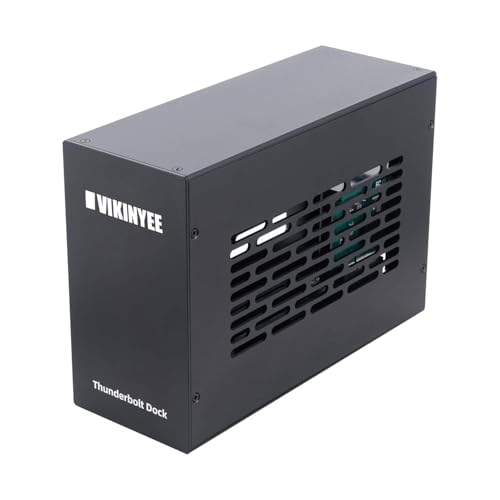
- Two external PCIe 3.0 x16 slots for add-in cards
- Thunderbolt 3/4 and USB4 compatibility with 40Gbps bandwidth
- Silent aluminum body with passive cooling
Best For: Capture cards, 10GbE adapters, and pro expansion hardware
High-Speed NVMe Travel Pick
UGREEN 80Gbps M.2 NVMe Enclosure

- Up to 80Gbps support and up to 7000MB/s on Thunderbolt 5
- Active cooling with aluminum body and built-in fan
- Fits M.2 2280 NVMe drives up to 8TB
Best For: Portable high-speed NVMe storage on Thunderbolt 5 systems
PCIe Expansion Chassis
StarTech TB31PCIEX16 Thunderbolt 3 Chassis

- One external PCIe 3.0 x16 slot
- Up to 40Gbps Thunderbolt bandwidth
- Built-in fan and aluminum housing
Best For: Thunderbolt users adding one PCIe card, not a GPU
Portable NVMe Enclosure
OWC Express 1M2 40Gb/s NVMe Enclosure

- Up to 3836MB/s real-world performance
- USB4, Thunderbolt, and USB-C compatible
- Patented heat-dissipating aluminum design
Best For: Portable NVMe storage with strong speed and cooling
Massive SATA RAID Expansion – OWC ThunderBay 8 8-Bay Thunderbolt Enclosure
If you need serious Thunderbolt storage expansion enclosures for a Mac or Windows workstation, the OWC ThunderBay 8 is built for large SATA drive pools and fast RAID workflows. It supports up to eight 2.5-inch or 3.5-inch drives, ships with Thunderbolt 3 connectivity, and is designed for plug-and-play use with no drivers needed.
Best For: Editors, archivists, and pro users who want a large-capacity multi-drive RAID enclosure for SATA SSDs or HDDs.
Pros:
- Eight drive bays support both 2.5-inch and 3.5-inch SATA drives
- Dual Thunderbolt ports allow daisy-chaining and added expansion
- Includes OWC SoftRAID Premium with RAID 0/1/4/5/1+0 (10) and JBOD support
- Thunderbolt certified for Mac and Windows, with cable included
Cons:
- Uses SATA drives, so it is not an NVMe solution
- Large chassis and 7.3 kg weight make it less portable
- Maximum performance depends on the drives you install
This is a strong choice when capacity, RAID flexibility, and clean Thunderbolt integration matter more than compact size. For a desktop storage centerpiece, it offers a lot of room to scale.
5-Bay Video Workflow Hub – ORICO Thunderbolt 3/4 5-Bay Expansion Enclosure
For Thunderbolt storage expansion enclosures aimed at video workflows, the ORICO 5-bay enclosure combines high-speed storage with extra connectivity. It supports Thunderbolt 3/4 hosts, offers a 40Gbps USB-C port for fast data transfer, and adds DP 1.4 output for monitor setups.
Best For: Creators who want a 5-bay storage enclosure with daisy-chaining and display output in one unit.
Pros:
- Compatible with Thunderbolt 3/4 hosts and supports daisy chaining
- Includes DP 1.4 plus USB-C hub-style connectivity for video output
- Supports up to 22TB per drive and up to 330TB through daisy chaining
- Aluminum body, 80mm fan, and 150W power supply support stable operation
Cons:
- Does not support RAID mode
- Compatibility is limited to Thunderbolt 3/4 hosts
- Mac M1/M2/M3 external display support is limited to 4K@60Hz
It stands out when you want storage expansion plus display output in a single desktop device. If RAID is not required, it offers a practical all-in-one layout for content work.
Compact NVMe RAID Enclosure – OWC Express 4M2 USB4 Four-Slot NVMe Enclosure
If your Thunderbolt storage expansion enclosures search is really about fast NVMe speed in a compact desktop unit, the OWC Express 4M2 is a strong fit. It supports four NVMe M.2 SSDs, connects to Thunderbolt 5/4/3 and USB-C systems, and is rated for up to 3200MB/s real-world performance.
Best For: Users who want a portable-friendly NVMe enclosure with broad Thunderbolt and USB-C compatibility.
Pros:
- Four M.2 slots support 2230, 2242, and 2280 NVMe SSDs
- Up to 3200MB/s real-world performance
- Compatible with Thunderbolt 5/4/3 and USB-C Macs and PCs
- Includes USB-C 40Gb/s cable and has adaptive fan cooling
Cons:
- Designed for NVMe SSDs, not SATA drives
- Some RAID features depend on the model
- Maximum capacity depends on the SSDs you choose
This enclosure is a good pick when you want high-speed external NVMe storage without giving up host compatibility. It is especially appealing for users who value quiet, efficient cooling in a small footprint.
Quad NVMe Performance Box – StarTech 4-Bay Thunderbolt 3 M.2 Enclosure
Among Thunderbolt storage expansion enclosures, the StarTech 4-bay M.2 NVMe enclosure is aimed at users who need high-bandwidth external SSD storage with display support. It turns up to four M-Key PCIe M.2 drives into a Thunderbolt 3 storage solution and includes DisplayPort plus dual TB3 downstream connectivity.
Best For: Power users who want a Thunderbolt 3 NVMe enclosure with software RAID and display output.
Pros:
- Supports up to four PCIe M.2 NVMe and/or AHCI drives
- Each SSD gets a dedicated 8Gbps PCIe lane
- Includes DisplayPort output and a downstream Thunderbolt 3 port
- Comes with a 72W power supply and TB3 cable
Cons:
- Not compatible with SATA SSDs
- Software RAID depends on the operating system and setup
- Built around Thunderbolt 3, not the newer Thunderbolt 5/USB4 class
It is best viewed as a workstation-grade NVMe enclosure for bandwidth-heavy setups. If your workflow includes monitor output and daisy-chaining, it covers both storage and connectivity in one box.
All-in-One Pro Storage – OWC ThunderBay Flex 8
If you want a true Thunderbolt storage expansion enclosure that can also act as a dock and PCIe expansion platform, the OWC ThunderBay Flex 8 is built for demanding desktop workflows. It combines eight universal drive bays with SATA/SAS and U.2/M.2 NVMe support, plus front USB-C/USB-A ports and card readers for a flexible pro setup.
Best For: Creators and pros who need a high-capacity, future-ready storage hub with dock and PCIe expansion features.
Pros:
- Eight drive bays support SATA/SAS and U.2/M.2 NVMe configurations for up to 144TB.
- Real-world speeds up to 2750MB/s make it suitable for fast storage workflows.
- Includes front USB-C, dual USB-A 10Gb/s ports, SD 4.0, and CFexpress readers.
- PCIe x16/x4 slot adds room for capture, networking, SSD, RAID, or I/O cards.
Cons:
- Large, heavy enclosure at 12.2 kg, so it is not portable.
- RAID 4/5/1+0 (10) is available for Mac only at this time.
- Premium feature set is likely overkill if you only need a basic external SSD enclosure.
This is a highly expandable option for users who want one enclosure to handle storage, peripheral connectivity, and PCIe add-ons. It makes the most sense when you need more than just a drive bay box.
Dual-Slot Expansion Chassis – VK-K2L PCIe Expansion Enclosure
This Thunderbolt storage expansion enclosure is aimed at users who need to add real PCIe hardware to a laptop or mini PC. With two external PCIe 3.0 x16 slots, Thunderbolt 3/4 and USB4 support, and broad OS compatibility, it is a practical way to run cards like capture devices, 10GbE adapters, NVMe add-ins, or pro audio gear.
Best For: Users who need an external PCIe chassis for capture cards, networking, or other expansion cards.
Pros:
- Two external PCIe 3.0 x16 slots provide flexible hardware expansion.
- Supports Thunderbolt 3, Thunderbolt 4, USB4, and works with Mac, Windows, and Linux.
- 40Gbps bandwidth suits high-performance cards and pro workflows.
- Silent aluminum enclosure with passive cooling is useful in quiet setups.
Cons:
- PCIe cards may still require their own drivers.
- Card size is limited to half-length, full-height designs up to 205x145x25mm.
- Not a storage enclosure by itself; it is primarily for PCIe expansion cards.
For users who need external card support rather than simple drive bays, this chassis offers a focused and practical expansion path. Its dual-slot design and quiet operation make it especially appealing for workstation and studio use.
High-Speed NVMe Travel Pick – UGREEN 80Gbps M.2 NVMe Enclosure
For a compact Thunderbolt storage expansion enclosure focused on a single fast SSD, the UGREEN 80Gbps M.2 NVMe enclosure is built around speed and portability. It supports M.2 2280 NVMe drives up to 8TB, works across Thunderbolt 5/4/3 and USB4 families, and adds active cooling for sustained transfers.
Best For: Portable NVMe storage for users who want top-end speed in a small enclosure.
Pros:
- Up to 80Gbps support with theoretical speeds up to 7000MB/s on Thunderbolt 5.
- Backward compatible with Thunderbolt 4/3 and USB 4/3.2/3.1/3.0.
- Built-in fan and aluminum housing help with heat dissipation.
- Supports M.2 2280 NVMe drives up to 8TB and includes a silicone case.
Cons:
- 80Gbps performance requires Thunderbolt 5 hardware and cables.
- Only supports NVMe M-Key/(M&B) Key 2280 drives, not SATA NGFF or B-Key drives.
- Best results depend on system compatibility, including macOS 15+ for Thunderbolt 3 use.
This is a strong choice if you want a travel-friendly enclosure with serious speed potential. It is best treated as a single-drive performance accessory rather than a multi-bay expansion solution.
PCIe Expansion Chassis – StarTech TB31PCIEX16 Thunderbolt 3 Chassis
If you need Thunderbolt storage expansion enclosures that do more than simple drive mounting, this StarTech chassis is built around adding PCIe functionality to a Thunderbolt 3 or 4 computer. It gives you one external PCIe 3.0 x16 slot, so you can add supported cards for capture, networking, or NVMe-based workflows while keeping the setup driverless on macOS and Windows.
Best For: Laptop and desktop users who want a Thunderbolt 3/4 enclosure for adding a single PCIe card, not a GPU.
Pros:
- One external PCIe 3.0 x16 slot for supported expansion cards
- Up to 40Gbps Thunderbolt bandwidth with the included cable
- Supports single-width cards up to 8 inches long
- Built-in fan, aluminum build, and daisy-chain support
Cons:
- Does not support graphics cards
- Only one expansion slot is available
- Needs an external power adapter and is not bus-powered
This is a practical pick when your goal is PCIe expansion over raw storage portability. If your Thunderbolt storage expansion enclosure needs include cards for capture or connectivity, the StarTech design is flexible, but its single-slot limit keeps it focused on one task at a time.
Portable NVMe Enclosure – OWC Express 1M2 40Gb/s NVMe Enclosure
This OWC model fits the fast end of Thunderbolt storage expansion enclosures, especially if you want a compact external NVMe setup for a laptop or desktop. It supports USB4, Thunderbolt, and USB-C devices, and OWC claims real-world performance up to 3836MB/s, with a patented heat-dissipating enclosure designed to keep the SSD running cool and consistent.
Best For: Users who want a portable, bus-powered NVMe enclosure for fast day-to-day storage and travel.
Pros:
- Very fast claimed real-world performance up to 3836MB/s
- Works with USB4, Thunderbolt, and USB-C computers and devices
- Patented heat-dissipating aluminum enclosure helps manage heat
- Supports NVMe M.2 2280, 2242, and 2230 drives
Cons:
- Enclosure only; you supply the NVMe SSD
- Limited to NVMe M.2 drives, not SATA
- Portable focus means it is not meant for multi-drive expansion
For a compact external SSD build, this enclosure emphasizes speed, compatibility, and thermal design over extras. If your priority is a portable Thunderbolt storage expansion enclosure with straightforward setup, the OWC Express 1M2 is a strong DIY option.
Tool-Free NVMe Enclosure – SABRENT EC-U4TN USB4 NVMe Enclosure
Among Thunderbolt storage expansion enclosures, this Sabrent unit is aimed at users who want a fast external NVMe drive with minimal setup. It supports USB4 at up to 3900MB/s and Thunderbolt 3/4 at up to 2700MB/s, while its tool-free design makes it easy to install compatible PCIe NVMe drives in 2230 through 2280 sizes.
Best For: Creators and mobile users who want a high-speed, tool-free NVMe enclosure that works across Thunderbolt and USB-C systems.
Pros:
- Up to 3900MB/s with USB4 and 2700MB/s with Thunderbolt 3/4
- Tool-free installation for 2230, 2242, 2260, and 2280 NVMe drives
- Compatible with Thunderbolt 3/4, USB4, and USB-C on Windows and macOS
- Includes an active cooling fan and aluminum/ABS construction
Cons:
- Does not support SATA M.2 SSDs
- Best performance depends on using a PCIe NVMe drive
- Single-drive design only
If you want speed, broad compatibility, and quick drive swaps, this Sabrent enclosure is easy to recommend. It is especially appealing for users who want a portable Thunderbolt storage expansion enclosure that stays cool during large transfers.
How We Picked the Best Thunderbolt Storage Expansion Enclosures
We prioritized real-world throughput, enclosure type, drive compatibility, expansion options, thermals, and overall value. We also looked at whether each model supports current Thunderbolt and USB4 workflows, plus whether it suits RAID, single-drive NVMe, multi-bay SATA, or PCIe use cases.
Quick Comparison
Not all Thunderbolt Storage Expansion Enclosures solve the same problem. Multi-bay tower enclosures are best for bulk capacity and RAID arrays, compact NVMe enclosures are best for portable high-speed scratch storage, and PCIe chassis are designed for users who need cards for capture, networking, or specialty workflows.
Key Buying Factors for Thunderbolt Storage Expansion Enclosures
Drive Type and Bay Count
Choose SATA bays if you want high-capacity mechanical drives or 2.5-inch SSD arrays. Pick M.2 NVMe if speed matters most. If you need both, hybrid enclosures can give you a mix of capacity and performance in one box.
Interface and Bandwidth
Thunderbolt 3, Thunderbolt 4, USB4, and Thunderbolt 5 support all affect peak performance and compatibility. Match the enclosure to your computer’s port standard so you do not overspend on bandwidth you cannot use.
Thermals and Noise
Fast SSDs and multi-drive arrays generate heat. Look for aluminum construction, active cooling, or proven airflow design if you expect long transfers, video editing, or RAID rebuilds.
RAID and Manageability
If you want redundancy or performance scaling, check for RAID support, software utility quality, and easy drive access. For teams and pros, a simple setup and reliable management software can matter as much as raw speed.
Who Should Buy Which Thunderbolt Storage Expansion Enclosures?
Choose a large multi-bay enclosure if you need maximum capacity for backups, shared libraries, or media storage. Choose a compact NVMe enclosure if you want a fast scratch disk for editing, photography, or travel. Choose a PCIe expansion chassis if your workflow depends on capture cards, network adapters, or other add-in cards. For most buyers comparing Thunderbolt Storage Expansion Enclosures, the best choice comes down to balancing speed, capacity, and the kind of drives or cards you plan to use.