Long USB runs can be tricky: passive cables may lose speed or connection stability as distance increases. The right extension cable helps you place webcams, cameras, VR headsets, hubs, and other peripherals where you need them.
We selected 10 USB extension cables for long runs across active USB 3.0, USB 2.0, and different length categories. Use the guide below to match speed, reach, compatibility, and reliability to your setup.
Best 10 USB Extension Cables for Long Runs Picks for 2026
Best Active 25-Foot Option
25ft USB 3.0 Active Extension Cable

- Active chipset supports a 25-foot run
- Up to 5 Gbps transfer rate
- Works with USB 3.0, 2.0, and 1.1
Best For: Webcams, VR devices, drives, hubs, and printers
Best 30-Foot Reach
Kumiho Active USB 3.0 Extension Cable

- 30-foot active extension length
- Up to 5 Gbps data transfer
- Power port supports longer runs
Best For: Long connections to consoles, storage, cameras, and printers
Best Two-Pack Value
UGREEN 15-Foot Braided USB Extension Cables

- Includes two 15-foot cables
- Supports up to 5 Gbps and 2A charging
- Durable braided outer material
Best For: Dual-device office, desk, and entertainment setups
Best for VR Setups
GEARit Active USB 3.0 Extension Cable

- 30-foot active extension
- Two amplification chipsets
- Optional Y-cable power support
Best For: VR headsets, webcams, drives, and room-spanning setups
Heavy-Duty Long-Run Pick
20-Foot USB 3.0 Extension Cable

- 5Gbps USB 3.0 data transfer
- 22AWG cable with triple-layer shielding
- Reinforced gold-plated connectors
Best For: Room-spanning printer, webcam, scanner, and camera connections
Durable Braided Choice
20-Foot USB 3.0 Extension Cable

- 5Gbps USB 3.0 data transfer
- Nylon braid with 20,000+ bend rating
- Metal shells and reinforced joints
Best For: Durable home-office and camera peripheral extensions
Maximum-Distance Option
33-Foot Active USB 2.0 Repeater

- 33-foot active USB extension
- Daisy-chain up to 131 feet
- Plug-and-play and bus powered
Best For: Very long USB 2.0 data runs requiring simple setup
Best Value USB 3.0 Reach
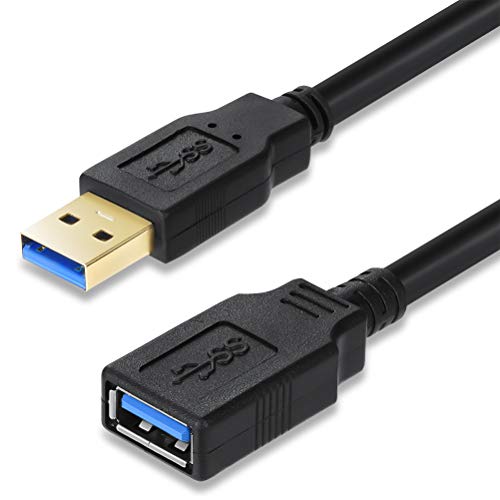
- 15-foot USB-A male-to-female design
- Up to 5Gbps with USB 3.0 hardware
- Shielded, plug-and-play construction
Best For: Everyday desktop and TV peripheral extensions
Longest Proven Reach
65-Foot Active USB 2.0 Repeater

- 65.61-foot male-to-female cable
- Built-in repeater maintains USB 2.0 signaling
- Two cables can reach a stated 131 feet
Best For: Very long USB 2.0 peripheral runs
Best for High-Bandwidth Long Runs
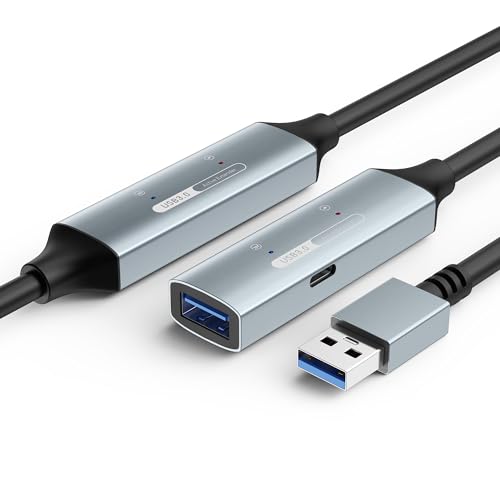
- Active booster supports stated 5Gbps performance
- USB-C auxiliary power for demanding devices
- Shielded, flexible jacket rated for 10,000+ bends
Best For: VR, webcams, SSDs, and other long USB 3.0 runs
Best Active 25-Foot Option – 25ft USB 3.0 Active Extension Cable
For shoppers comparing usb extension cables for long runs, this 25-foot active USB 3.0 cable adds reach while using a signal-enhancement chipset to help maintain connectivity. It supports USB 3.0 speeds up to 5 Gbps and works with USB 2.0 and USB 1.1 devices.
Best For: Extending webcams, VR devices, hard drives, printers, hubs, and other USB-A peripherals across a room.
Pros:
- Active signal booster supports a 25-foot run and data rates up to 5 Gbps.
- Backward compatible with USB 2.0 and USB 1.1 devices.
- Plug-and-play support for Windows, Mac OS, Linux, and Chrome OS.
- Multi-layer shielding and gold-plated connectors help reduce interference.
Cons:
- It is an indoor-use cable according to the listed specifications.
- The round cable weighs about 500 g, so it may be less convenient for compact setups.
This is a practical long-run choice when you want active USB 3.0 extension and broad operating-system compatibility without installing drivers.
Best 30-Foot Reach – Kumiho Active USB 3.0 Extension Cable
This Kumiho model is a strong candidate among usb extension cables for long runs, offering 30 feet of USB-A male-to-female reach with an active signal booster. It supports transfer rates up to 5 Gbps and includes a power port on cables 15 feet or longer for more stable long-distance transmission.
Best For: Long indoor or outdoor connections to gaming consoles, storage devices, cameras, printers, scanners, and other USB peripherals.
Pros:
- 30-foot length provides the most reach among the listed cables.
- Supports USB 3.0 speeds up to 5 Gbps.
- Backward compatible with USB 2.0, 1.1, and 1.0 devices.
- Tinned copper, layered shielding, and an aluminum-alloy housing support signal clarity and durability.
Cons:
- The power port is designed to supply power to the chip, but a separate charger is not listed as included.
- USB-A connectors may not fit devices without a USB-A port or adapter.
Choose this cable when maximum reach matters and you appreciate the added power support intended for longer runs.
Best Two-Pack Value – UGREEN 15-Foot Braided USB Extension Cables
The UGREEN two-pack offers two 15-foot USB-A extension cables for flexible desk, office, or entertainment setups. For buyers seeking usb extension cables for long runs, each cable supports up to 5 Gbps data transfer and up to 2A charging, with a braided exterior for added durability.
Best For: Users who need two medium-long extensions for webcams, phones, hubs, keyboards, mice, printers, drives, or headsets.
Pros:
- Two 15-foot cables provide convenient coverage for multiple devices.
- Supports data transfer speeds up to 5 Gbps and charging up to 2A.
- Braided outer material and aluminum-alloy connectors are designed for durability.
- Plug-and-play operation requires no driver installation.
Cons:
- Each cable is 15 feet, shorter than the 25-foot and 30-foot active options.
- The listed recommended use is indoor.
- It is a passive extension design rather than an active, signal-boosted cable.
This two-pack makes sense when you need multiple 15-foot connections and value a durable braided jacket over maximum single-cable distance.
Best for VR Setups – GEARit Active USB 3.0 Extension Cable
GEARit’s 30-foot active cable is designed for USB 3.0 long-distance connections, making it a useful option when comparing usb extension cables for long runs. Two integrated amplification chipsets support data transmission up to 5 Gbps, while the included Y-cable can provide extra power when paired with a separate 5V/2A USB charger.
Best For: Extending VR headsets, webcams, external drives, USB hubs, and other peripherals across a room.
Pros:
- 30-foot active extension with two amplification chipsets.
- Supports USB 3.0 transfer rates up to 5 Gbps and backward compatibility.
- Includes a Y-cable power option for devices requiring additional power.
- Gold-plated connectors, copper wiring, and layered shielding support signal stability.
Cons:
- The 5V/2A USB charger for the power booster is not included.
- The Y-cable may be necessary for higher-power devices such as Oculus Rift.
- It uses USB-A male-to-female connectors, which may require an adapter for other port types.
With its long length, dual amplification, and optional power support, this is particularly well suited to demanding VR and across-the-room peripheral setups.
Heavy-Duty Long-Run Pick – 20-Foot USB 3.0 Extension Cable
For shoppers comparing usb extension cables for long runs, this 20-foot USB 3.0 cable is designed for room-spanning connections. Its 5Gbps transfer rate, 22AWG conductor, triple-layer shielding, and reinforced gold-plated connectors make it a practical choice for printers, webcams, scanners, and similar peripherals.
Best For: Home offices, conference rooms, webcams, printers, scanners, USB hubs, and sheltered outdoor security-camera setups.
Pros:
- USB 3.0 supports data transfer speeds up to 5Gbps and works with USB 2.0 and 1.1.
- Heavy-duty 22AWG construction, triple-layer shielding, and reinforced joints support frequent use.
- 20-foot length helps connect devices across a room, while gold-plated connectors resist corrosion.
- Includes a 36-month replacement warranty and lifetime technical support.
Cons:
- Direct PC connection is recommended; cascading through hubs should be avoided.
- Not recommended for VR headsets, high-speed SSDs, or rapid charging.
- Outdoor use is sheltered only and requires conduit for direct burial.
This is a strong long-run option when durability and USB 3.0 data performance matter more than charging or demanding storage applications. The clear usage limitations make it best suited to standard peripherals and cameras.
Durable Braided Choice – 20-Foot USB 3.0 Extension Cable
This 20-foot braided cable is a versatile contender among usb extension cables for long runs, combining USB 3.0 performance with a flexible, wear-resistant design. It is suited to extending peripherals across a room while its reinforced joints help handle repeated plugging and bending.
Best For: Home-office peripherals, security cameras, keyboards, mice, printers, scanners, card readers, and Bluetooth adapters.
Pros:
- Supports USB 3.0 data transfer up to 5Gbps and is backward compatible with USB 2.0 and 1.1.
- Nylon braiding, all-metal shells, aluminum-alloy connectors, and reinforced joints improve durability.
- 20,000-plus bend-test rating and gold-plated connectors support regular handling.
- Offers a 36-month warranty and customer-service support.
Cons:
- For reliable operation, it should connect directly to a rear motherboard USB port rather than through a hub.
- Voltage attenuation over the extended length may prevent some devices from working.
- High-speed data use is recommended for shorter distances, according to the product guidance.
Choose this model if cable flexibility and physical durability are priorities. It offers broad peripheral compatibility, but long-distance power demands and hub connections may limit performance with some devices.
Maximum-Distance Option – 33-Foot Active USB 2.0 Repeater
When distance is the main concern, this 33-foot active repeater is a practical alternative for usb extension cables for long runs. Its built-in active extension supports USB 2.0 transfer rates up to 480Mbps, and up to four cables can be daisy-chained for a total run of 131 feet.
Best For: Long indoor or outdoor USB 2.0 data connections where plug-and-play setup and maximum reach are more important than USB 3.0 speed.
Pros:
- 33-foot (10-meter) active extension provides substantially more reach than standard short cables.
- Up to four cables can be daisy-chained for a total distance of 131 feet (40 meters).
- Supports full USB 2.0 transfer rates up to 480Mbps and is backward compatible with USB 1.1.
- Bus-powered, plug-and-play design requires no external power or software installation.
Cons:
- USB 2.0 speeds are considerably lower than the 5Gbps performance of USB 3.0 cables.
- The product details list a maximum current of 150mA, which may limit power-hungry devices.
- Its one-year limited warranty is shorter than the 36-month warranties listed for the other options.
This is the standout choice for exceptional cable length and simple installation. Select it for basic USB data transfer over very long distances, but avoid it when USB 3.0 speeds or higher power delivery are essential.
Best Value USB 3.0 Reach – 15-Foot High-Speed Extension
For everyday usb extension cables for long runs, this 15-foot USB 3.0 model offers a practical balance of reach, speed, and simple setup. It supports up to 5Gbps when connected to a USB 3.0 host and remains backward compatible with older USB standards.
Best For: Extending a desktop, TV, printer, storage drive, keyboard, or mouse without reaching behind the host device.
Pros:
- 15-foot length provides useful extra reach.
- Supports USB 3.0 data rates up to 5Gbps with compatible hardware.
- Double-layer shielding helps reduce electromagnetic interference.
- Plug-and-play design requires no drivers.
Cons:
- Data speed is limited by the connected USB port and device.
- Indoor use is the stated recommendation.
This is a straightforward choice when you need a moderately long USB-A extension for common peripherals and want USB 3.0 capability without a more specialized active repeater.
Longest Proven Reach – 65-Foot Active USB 2.0 Repeater
Among usb extension cables for long runs, this Tripp Lite cable prioritizes distance and signal maintenance over newer USB 3.0 speeds. Its built-in repeater extends a USB 2.0 connection up to 65 feet and can be paired with a second cable for a stated total reach of 131 feet.
Best For: Long-distance USB 2.0 setups involving compatible peripherals where maximum reach matters more than high-speed storage transfers.
Pros:
- 65.61-foot length suits very long indoor or outdoor runs.
- Integrated repeater helps maintain the USB 2.0 signal.
- Supports transfer speeds up to 480Mbps and backward compatibility with USB 1.1.
- Bus-powered, plug-and-play design needs no external power or software.
Cons:
- USB 2.0 tops out at 480Mbps, below USB 3.0 models.
- High-demand or high-bandwidth devices may be better suited to a faster standard.
This is the distance-focused option in the group. Choose it for unusually long cable paths and standard USB peripherals, but not when USB 3.0 throughput is a priority.
Best for High-Bandwidth Long Runs – 49-Foot Active USB 3.0
For demanding usb extension cables for long runs, this 49-foot active USB 3.0 cable combines a signal booster with a USB-C auxiliary power port. It is designed for up to 5Gbps connectivity over extended distances and is positioned for devices such as VR headsets, 4K webcams, external SSDs, consoles, and printers.
Best For: Long-distance USB 3.0 connections that may benefit from signal amplification and optional auxiliary power.
Pros:
- Active amplifier chipset is designed to support 5Gbps over the extended length.
- USB-C auxiliary power port can help with higher-demand devices.
- Triple-layer shielding and gold-plated connectors help reduce interference.
- Premium TPE jacket is tested for more than 10,000 bend cycles.
Cons:
- Its 49-foot length may be excessive for compact workspaces.
- USB-C auxiliary power may be needed for some high-demand devices.
- USB-A connectivity may not directly suit hosts or peripherals using other connector types.
This is the most feature-rich choice for long, high-bandwidth setups. Its active design and auxiliary power option make it more suitable than a passive extension when distance, stability, or device power demands are concerns.
How We Picked the Best USB Extension Cables for Long Runs
We focused on cables that clearly identify their USB standard, connector type, length, and intended use. The lineup includes active USB 3.0 cables rated up to 5Gbps, USB 2.0 repeater cables for lower-bandwidth devices, and options ranging from 15 feet to nearly 66 feet. We also considered practical details such as signal-boosting circuitry, braided construction, warranty coverage, daisy-chaining support, and suitability for webcams, cameras, VR headsets, hubs, and everyday peripherals.
Because real-world performance depends on the connected devices and environment, published speed ratings should be treated as maximums rather than guarantees.
Quick Comparison
| Type | Typical strength | Best suited for | Watch out for |
|---|---|---|---|
| Active USB 3.0 | Up to 5Gbps with extended reach | Webcams, cameras, storage, VR, hubs | Higher cost and possible power limits |
| Passive USB 3.0 | Simple, affordable extension | Shorter runs and basic peripherals | Less dependable at maximum lengths |
| Active USB 2.0 | Long-distance connectivity | Keyboard, mouse, printer, and other low-speed devices | 480Mbps maximum; not ideal for high-bandwidth equipment |
Key Buying Factors for USB Extension Cables for Long Runs
USB Version and Speed
Choose USB 3.0 when transferring files or connecting a camera, webcam, storage device, or VR headset. USB 2.0 is usually sufficient for keyboards, mice, printers, and other low-data-rate accessories, but it will not deliver USB 3.0 speeds.
Active Signal Boosting
For longer distances, an active repeater or built-in signal booster can help maintain connection quality. This is especially important beyond ordinary short extension lengths. Check whether the cable requires separate power or has limitations when used with bus-powered devices.
Length and Installation
Buy only the reach you need, leaving enough slack for routing without creating coils or sharp bends. Very long cables may be harder to conceal and can be more sensitive to interference. Some active models support daisy-chaining, but compatibility and total distance vary.
Connectors and Compatibility
These products generally use USB-A male-to-female connectors. Confirm that both the host device and peripheral have the required USB-A ports, or plan for a suitable adapter. USB-C devices may need a dedicated USB-C solution rather than a USB-A extension.
Who Should Buy Which USB Extension Cables for Long Runs?
For high-speed devices: Choose an active USB 3.0 cable for cameras, webcams, external storage, hubs, and VR equipment.
For the longest reach: Look for an active repeater model with a clearly stated maximum distance and stable power requirements.
For basic peripherals: A USB 2.0 active cable can be a practical, cost-conscious choice for keyboards, mice, printers, and similar accessories.
For shorter, flexible setups: A 15- to 20-foot USB 3.0 cable may provide a good balance of price, speed, and easier cable management.