A dependable wireless connection can make the difference between a smooth gaming session and frustrating lag spikes. The best WiFi adapters for gaming combine consistent signal strength, modern wireless standards, and practical compatibility with your PC setup.
This roundup compares 10 PCIe and USB options, from affordable dual-band adapters to newer WiFi 6E and WiFi 7 models. Use the guide below to match connection performance, installation style, and budget to the way you play.
Best 10 Wifi Adapters for Gaming Picks for 2026
Best PCIe Wi-Fi 6 Upgrade

- Wi-Fi 6 speeds up to 2.4Gbps
- OFDMA and MU-MIMO help reduce lag
- Magnetized antenna base and Bluetooth 5.3
Best For: Windows desktop gamers wanting a permanent PCIe upgrade
Best Wi-Fi 6E USB Adapter

- Tri-band Wi-Fi 6E up to 3Gbps
- Uses 6GHz for lower congestion with a Wi-Fi 6E router
- Adjustable external antenna and USB 3.0
Best For: Windows users seeking a simple Wi-Fi 6E gaming upgrade
Best Long-Range PCIe Card
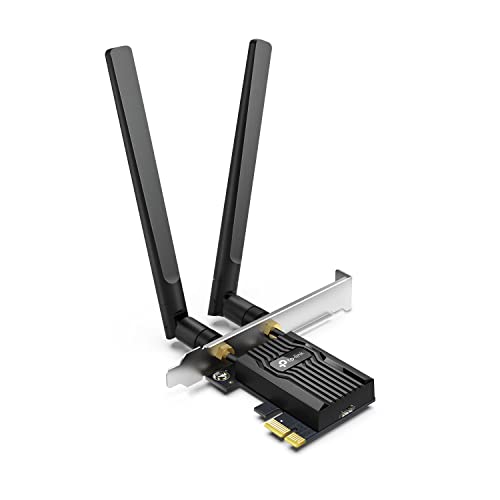
- AX3000 Wi-Fi 6 speeds up to 2.4Gbps
- Two 5dBi high-gain antennas
- Standard and low-profile brackets included
Best For: Desktop gamers needing stronger reception at longer distances
Best Budget USB Wi-Fi 6 Adapter
BrosTrend AX1800 Wi-Fi 6 USB Adapter

- Dual-band speeds up to 1,800Mbps
- Two 5dBi antennas for longer-range reception
- Includes a 3.3-foot USB 3.0 extension cable
Best For: Windows gamers wanting flexible external USB placement
Best Premium WiFi 7 Upgrade
ASUS ROG USB-BE92 BE6500 Adapter

- WiFi 7 tri-band support with 6GHz
- Up to 6,500Mbps claimed data rate
- USB Type-A and Type-C compatibility
Best For: Windows gamers with a WiFi 7 router
Best Range-Focused WiFi 6 Pick
TP-Link Archer TX30U Plus AX1800

- WiFi 6 dual-band connectivity
- Two adjustable high-gain antennas
- USB 3.0 and WPA3 security
Best For: Windows users gaming across rooms or through walls
Best Compact Budget Option

- Compact USB 3.0 design
- Dual-band AC1300 connectivity
- MU-MIMO support for compatible networks
Best For: Portable upgrades for supported Windows PCs and older Macs
Best Budget Range
Nineplus AC1300 USB WiFi Adapter

- AC1300 dual-band wireless speeds
- Two 5dBi high-gain antennas
- USB 3.0 with Windows support
Best For: Budget-conscious Windows users who need improved range
Best WiFi 6 Upgrade

- AX1800 WiFi 6 dual-band performance
- OFDMA and MU-MIMO for busy networks
- Adjustable antennas with one-meter USB cable
Best For: Windows 10/11 gamers with a WiFi 6 router
Best Compact Value

- AC600 dual-band connectivity
- Rotating 5dBi high-gain antenna
- Supports Windows 7 through 11 and XP
Best For: Budget-conscious users with modest gaming and streaming needs
Best PCIe Wi-Fi 6 Upgrade – TP-Link Archer TX3000E
The TP-Link Archer TX3000E is a strong choice among wifi adapters for gaming if you have a Windows desktop with an available PCIe slot. Its Wi-Fi 6 connection supports up to 2.4Gbps, while OFDMA and MU-MIMO are designed to help reduce lag on busy networks.
Best For: Desktop gamers who want a fast PCIe card, adjustable antenna placement, and built-in Bluetooth 5.3 support.
Pros:
- Wi-Fi 6 dual-band speeds up to 2.4Gbps
- OFDMA and MU-MIMO support low-latency gaming
- Magnetized antenna base helps optimize reception
- Includes Bluetooth 5.3, a low-profile bracket, and Windows 10/11 support
Cons:
- Requires a compatible desktop PCIe slot
- Driver installation is required
- Bluetooth requires the included USB cable to connect to an internal F_USB header
Choose this model when you want a permanent desktop installation with flexible antenna positioning and Bluetooth for controllers, headphones, or keyboards. It is limited to Windows 10 and 11 64-bit systems.
Best Wi-Fi 6E USB Adapter – NETGEAR Nighthawk A8000
The NETGEAR Nighthawk A8000 is a convenient pick among wifi adapters for gaming when you want to upgrade a Windows PC without opening the case. Its tri-band Wi-Fi 6E design reaches up to 3Gbps and can use the less crowded 6GHz band with a compatible router.
Best For: Windows 10 or 11 users who want a portable USB upgrade and have a Wi-Fi 6E router.
Pros:
- Tri-band Wi-Fi 6E support across 2.4GHz, 5GHz, and 6GHz
- Up to 3Gbps AXE3000 speeds
- Flippable high-gain antenna and included cradle help with placement
- USB 3.0 connection and WPA3 security
Cons:
- 6GHz benefits require a Wi-Fi 6E router
- Compatible with Windows 10 and 11 only
- Requires a USB 3.0 port for the stated USB performance advantage
The A8000 makes the most sense for an easy, no-card-installation upgrade, particularly in homes equipped with Wi-Fi 6E networking. Its adjustable antenna can help you find a stronger signal across the room.
Best Long-Range PCIe Card – TP-Link Archer TX55E
The TP-Link Archer TX55E is a practical option among wifi adapters for gaming when your desktop is farther from the router. This Wi-Fi 6 AX3000 card combines up to 2.4Gbps dual-band speeds with two high-gain antennas, OFDMA, and MU-MIMO for responsive connections on busy networks.
Best For: Windows desktop gamers who need extended reception and Bluetooth support in a standard or mini-tower case.
Pros:
- Wi-Fi 6 speeds up to 2.4Gbps
- Two 5dBi high-gain antennas are designed to improve range
- OFDMA and MU-MIMO support smoother gaming and VR use
- Includes Bluetooth, WPA3, and both standard and low-profile brackets
Cons:
- Requires an available PCIe slot in a desktop
- Supports Windows 10 and 11 64-bit systems only
- Bluetooth requires connection to an internal F_USB header
This card is a good fit for desktop setups where antenna reach matters more than USB portability. The included low-profile bracket also gives it more flexibility for compatible compact cases.
Best Budget USB Wi-Fi 6 Adapter – BrosTrend AX1800 Wi-Fi 6 USB Adapter
The BrosTrend AX1800 is an accessible choice among wifi adapters for gaming if you want Wi-Fi 6 performance without installing an internal card. It provides up to 1,800Mbps over dual-band Wi-Fi 6 and includes a USB extension cable for positioning the adapter where reception is strongest.
Best For: Windows desktop or laptop gamers who want external antennas, flexible placement, and straightforward setup.
Pros:
- Dual-band Wi-Fi 6 speeds up to 1,800Mbps
- Two 5dBi high-gain antennas support longer-range reception
- USB 3.0 extension cable allows signal-position adjustment
- OFDMA, MU-MIMO, and WPA3 support
Cons:
- Supports Windows 10 and 11 only
- Linux is not supported
- Does not include Bluetooth functionality
The AX1800 is a sensible plug-in alternative for PCs that lack a free PCIe slot or for users who want to move the adapter between systems. Its external antennas and extension cable are useful when the computer is positioned away from the router.
Best Premium WiFi 7 Upgrade – ASUS ROG USB-BE92 BE6500 Adapter
For gamers seeking the latest wireless standard, the ASUS ROG USB-BE92 is a high-end choice among wifi adapters for gaming. It supports WiFi 7, tri-band connectivity, the 6GHz band, Multi-Link Operation, and speeds up to 6,500Mbps, although actual performance depends on your network and environment.
Best For: Windows 10 users with a WiFi 7 router who want maximum wireless bandwidth and access to the less-congested 6GHz band.
Pros:
- WiFi 7 tri-band design with 2.4GHz, 5GHz, and 6GHz support.
- Up to 6,500Mbps, with 160MHz channels, MLO, and 4K-QAM support.
- USB Type-A and Type-C compatibility adds connection flexibility.
- Includes WPA3 security, OFDMA, MU-MIMO, and BSS Coloring.
Cons:
- Windows-only compatibility; minimum listed requirement is Windows 10.
- Its advanced WiFi 7 features require a compatible network to realize their benefits.
The ROG USB-BE92 is the most feature-rich option here for a modern gaming setup. It makes the most sense when paired with a WiFi 7 router and a Windows PC that can take advantage of its tri-band capabilities.
Best Range-Focused WiFi 6 Pick – TP-Link Archer TX30U Plus AX1800
The TP-Link Archer TX30U Plus combines WiFi 6 dual-band connectivity with two high-gain antennas, making it a practical option among wifi adapters for gaming when your PC is positioned away from the router. It supports up to 1,201Mbps on 5GHz and 574Mbps on 2.4GHz, with performance varying by distance, obstacles, and network conditions.
Best For: Windows 10 and 11 desktop or laptop users who need stronger reception across rooms or through walls.
Pros:
- Dual-band WiFi 6 with a combined advertised rate of up to 1,800Mbps.
- Two adjustable high-gain antennas and beamforming support help with signal reception.
- USB 3.0 connectivity, MU-MIMO, and OFDMA support suit busy networks.
- Supports WPA3 security and includes a two-year manufacturer warranty.
Cons:
- Supports Windows 10 and 11 only according to the supplied details.
- It does not include the 6GHz band offered by newer WiFi 7 adapters.
With its adjustable antennas and WiFi 6 features, the Archer TX30U Plus is a sensible middle ground for gaming PCs that need better coverage without moving to WiFi 7. Its Windows-only support should be checked before purchase.
Best Compact Budget Option – TP-Link Archer T3U AC1300
The TP-Link Archer T3U is a small dual-band USB adapter for users who want a straightforward wireless upgrade. As one of the more portable wifi adapters for gaming, it offers up to 867Mbps on 5GHz and 400Mbps on 2.4GHz, plus USB 3.0 and MU-MIMO support for compatible computers.
Best For: Gamers who want a compact adapter for a Windows PC or an older Mac supported by the listed operating-system versions.
Pros:
- Compact, portable design is easy to carry and use with laptops or desktops.
- Dual-band 2.4GHz and 5GHz connectivity with an advertised AC1300 class rating.
- USB 3.0 and MU-MIMO support can help provide a responsive connection.
- Supports a broad range of listed Windows versions and Mac OS X 10.9–10.14.
Cons:
- Older WiFi 5-class hardware lacks WiFi 6 and WiFi 7 features.
- The supplied Mac compatibility range ends at Mac OS X 10.14.
- Its compact design does not provide the adjustable high-gain antennas found on the Archer TX30U Plus.
The Archer T3U is a convenient choice for basic wireless gaming and everyday connectivity, especially when portability matters. It is best suited to users who do not need the newest WiFi standards or extended antenna design.
Best Budget Range – Nineplus AC1300 USB WiFi Adapter
The Nineplus AC1300 is a practical option for shoppers comparing wifi adapters for gaming on a Windows desktop or laptop. Its dual-band connection, two 5dBi antennas, and USB 3.0 interface are designed to improve speed and reception, especially when the computer is positioned farther from the router.
Best For: Windows users who want an affordable dual-band adapter with external high-gain antennas for gaming, streaming, and everyday connectivity.
Pros:
- AC1300 dual-band speeds rated up to 867 Mbps on 5GHz and 400 Mbps on 2.4GHz.
- Two 5dBi antennas can help improve signal reception over longer distances.
- USB 3.0 supports faster data transfer and remains compatible with USB 2.0 ports.
- Includes online setup assistance and a two-year support period.
Cons:
- Does not support Mac OS, Chromebook, or Linux.
- Windows 7 may require manual driver installation.
- Actual performance depends on the router, distance, and surrounding obstacles.
This adapter is a strong value pick when range and price matter more than the latest WiFi standard. Confirm Windows compatibility before buying, particularly if you use an older operating system.
Best WiFi 6 Upgrade – TP-Link Archer TX20U Plus
The TP-Link Archer TX20U Plus is a forward-looking choice among wifi adapters for gaming, particularly for Windows users with a WiFi 6 router. Its AX1800 dual-band design, OFDMA and MU-MIMO support, adjustable antennas, and included one-meter USB cable give you more placement flexibility and better support for busy networks.
Best For: Windows 10 and 11 desktop or laptop users who want a WiFi 6 adapter for gaming, streaming, and downloads on a compatible router.
Pros:
- AX1800 WiFi 6 speeds rated up to 1201 Mbps on 5GHz and 574 Mbps on 2.4GHz.
- OFDMA and MU-MIMO are designed to help reduce congestion and improve throughput.
- Adjustable high-gain antennas and a one-meter USB 3.0 cable allow flexible positioning.
- Supports WPA3 security and includes a two-year manufacturer warranty.
Cons:
- Compatible only with Windows 10 and 11.
- Not compatible with Mac or Linux.
- To realize its best performance, it should be paired with a WiFi 6 or newer router.
The Archer TX20U Plus is the most capable option here for a modern Windows gaming setup. Its advantages are most relevant when your router also supports WiFi 6; with an older router, the adapter cannot exceed the router’s capabilities.
Best Compact Value – TP-Link Archer T2U Plus AC600
The TP-Link Archer T2U Plus is a compact, straightforward option for wifi adapters for gaming when you need a basic dual-band connection without moving to WiFi 6. It supports up to 433 Mbps on 5GHz and 200 Mbps on 2.4GHz, while its rotating high-gain antenna can be aimed toward the router to improve reception.
Best For: Windows users seeking an affordable adapter for casual gaming, streaming, and general connectivity in areas with a reasonably strong router signal.
Pros:
- Dual-band AC600 connectivity supports both 2.4GHz and 5GHz networks.
- Rotating 5dBi antenna can be adjusted toward the router.
- Supports Windows 7 through Windows 11 and XP.
- Simple driver-based setup is available through TP-Link’s Download Center.
Cons:
- Its rated speeds are lower than the other two adapters in this roundup.
- Performance varies with distance, walls, and other obstacles.
- Driver download may be required before installation.
This is a sensible low-cost choice for older PCs or modest internet plans. It offers useful 5GHz support and an adjustable antenna, but demanding gamers or users with congested networks may prefer a faster WiFi 6 adapter.
How We Picked the Best Wifi Adapters for Gaming
We focused on adapters that are relevant to modern gaming PCs, prioritizing wireless standard, advertised speed, antenna design, connection type, and compatibility. The selection includes PCIe cards for permanent desktop installations and USB adapters for easier setup or portability.
Advertised throughput is only a starting point. Real-world performance depends on your router, internet plan, network congestion, distance, wall construction, drivers, and whether your PC supports the adapter’s interface. We also considered features such as WiFi 6 or newer support, dual- or tri-band operation, Bluetooth integration, external antennas, and USB 3.0 connectivity.
Quick Comparison
| Adapter type | Best suited to | Main advantage |
|---|---|---|
| PCIe WiFi 6 card | Dedicated gaming desktops | Strong, tidy internal installation with external antenna placement |
| USB WiFi 6 adapter | Simple upgrades and flexible placement | Easy installation and broad usability |
| WiFi 6E or WiFi 7 adapter | Newer compatible routers | Access to less-congested 6GHz connectivity |
| WiFi 5 or AC adapter | Budget systems and basic online play | Lower upfront cost |
Key Buying Factors for Wifi Adapters for Gaming
Wireless Standard and Router Support
WiFi 6 is a strong baseline for most gaming PCs, while WiFi 6E adds the 6GHz band when both the adapter and router support it. WiFi 7 can offer additional performance benefits, but it makes the most sense with a WiFi 7 router and a newer computer.
PCIe Versus USB Installation
PCIe cards are usually the better long-term choice for a desktop that has an available slot. They often include larger external antenna assemblies and may provide Bluetooth as an added feature. USB adapters are easier to install and can be repositioned, making them useful for compact PCs, laptops, or users who do not want to open the case.
Antennas, Placement, and Latency
External or high-gain antennas can improve reception, especially when the PC is under a desk or far from the router. For gaming, stable latency matters more than peak speed alone. If possible, place the antenna base in an open position and use the 5GHz or 6GHz band for nearby connections with less interference.
Compatibility and Drivers
Check Windows support, available USB or PCIe connections, case clearance, and driver availability before buying. A high-speed adapter cannot compensate for an outdated router, weak broadband service, or severe signal obstruction.
Who Should Buy Which Wifi Adapters for Gaming?
Choose a PCIe WiFi 6 card if you use a full-size gaming desktop and want a stable, permanent upgrade. Choose a USB WiFi 6 adapter if simple installation, flexible placement, or moving the adapter between computers matters most. Choose WiFi 6E or WiFi 7 when your router supports the newer band and you want more capacity for a modern network. Choose an AC600 or AC1300 model for a budget PC, basic multiplayer gaming, or an older router where premium standards would provide little practical benefit.