MUNBYN’s ITPP047 receipt printer is built for businesses that need dependable receipt output rather than a flashy desktop gadget.
If you want a thermal printer that fits a mixed POS environment, this one has a clear, practical appeal.
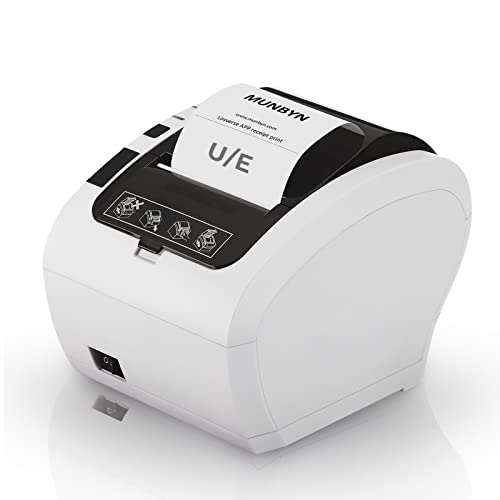
MUNBYN Receipt Printer ITPP047 Review Summary
The main reason to buy the MUNBYN Receipt Printer ITPP047 is simple: it is positioned as a fast, work-focused thermal receipt printer with USB or Ethernet connectivity, support for Windows, Mac, Linux, and Chromebook, and an automatic cutter that helps keep receipt flow tidy.
That combination makes it a sensible fit for small retail counters, cafes, food trucks, ticket points, and similar checkout setups where speed and compatibility matter more than visual polish.
It is especially relevant if you are trying to standardize on one printer across different computers or operating systems.
The listing also emphasizes a wall-mount design, included driver and setup resources on the USB flash drive, and broad use-case coverage for businesses that already live inside receipt-based workflows.
Review Scorecard
| Category | Score | Why it matters |
|---|---|---|
| Printing speed | 9/10 | Listed at 230 mm/sec and 40+ receipts per minute, which supports busy checkout lines. |
| Compatibility | 8/10 | Works with Windows, Mac, Linux, and Chromebook through ESC/POS support. |
| Installation support | 8/10 | The bundled USB drive includes driver, manual, SDK, tools, and how-to videos. |
| Space efficiency | 8/10 | Wall-mount support and a compact receipt-printer form factor help tight counters. |
| Checkout workflow | 9/10 | The automatic cutter improves receipt handling and keeps output organized. |
| Fit for common businesses | 9/10 | The listing explicitly targets retail, grocery, clothing, cafes, restaurants, and food trucks. |
| Ecosystem fit | 6/10 | The printer is not for Square, iOS devices, or DoorDash, so compatibility must be checked first. |
Verdict: this is a strong buy for operators who need a fast, general-purpose POS receipt printer and are willing to verify system compatibility before ordering.
Key Features and Specifications of MUNBYN Receipt Printer ITPP047
The MUNBYN Receipt Printer ITPP047 is a thermal receipt printer built around 80 mm paper and standard POS workflows.
The listing highlights USB and Ethernet connectivity, ESC/POS command support, and compatibility with Windows, Mac, Linux, and Chromebook systems.
The speed claim is one of the most important details here: MUNBYN says the printer can output 40+ receipts per minute at 230 mm/sec.
In a real business setting, that kind of throughput matters most when you are serving back-to-back customers and do not want receipt printing to become a bottleneck.
The automatic cutter is another practical feature.
It does not sound exciting, but it is exactly the kind of detail that improves day-to-day use in a counter environment.
Instead of tearing every receipt manually, you get cleaner handling and a more orderly output stream.
The listing also mentions a wall-hanging design with two hanging holes on the bottom, which is useful for freeing counter space.
That makes the printer easier to fit into smaller checkout stations where every inch matters.
Key listed points:
- 80 mm thermal receipt printer
- USB or Ethernet connection
- ESC/POS command support
- Windows, Mac, Linux, and Chromebook compatibility
- Automatic paper cutter
- Wall-mount capable design
- ENERGY STAR certified
- USB flash drive includes driver, manual, SDK, tools, and how-to videos
The product positioning is clearly business-oriented.
MUNBYN names retail stores, grocery stores, clothing stores, supermarkets, cafes, ticket points, food trucks, banks, and restaurants as target environments.
That tells you what it is optimized for: repetitive receipt production in standard POS use, not specialty label printing or consumer document work.
There are also important limitations to note.
The listing says it does not work with Square, does not support DoorDash, and does not support iPhone or iPad.
That does not make it a bad printer, but it does mean the compatibility question is not optional.
If your checkout stack depends on one of those systems, this is not the safe default.
Pros and Cons of MUNBYN Receipt Printer ITPP047
Pros
- Fast receipt output for busy counters and service lines
- Automatic cutter improves workflow and keeps output clean
- USB and Ethernet options give more installation flexibility
- Broad desktop OS support covers Windows, Mac, Linux, and Chromebook
- Wall-mount design helps when counter space is limited
- Included setup resources reduce friction during installation
Cons
- Not compatible with Square
- Not compatible with iOS devices
- Not compatible with DoorDash
- Compatibility depends on ESC/POS and system integration
- No built-in reason to choose it if you need mobile-first or app-first workflows
The biggest strength is that the printer is designed like a business tool instead of a consumer accessory.
The biggest weakness is also a business reality: if your software stack is unusual, you need to verify support first.
That makes the ITPP047 a solid option for standard POS deployments and a risky choice for loosely controlled app ecosystems.
Who Should Buy MUNBYN Receipt Printer ITPP047?
This printer makes sense for owners or managers who want a reliable receipt printer for a fixed checkout location and who value speed, auto-cutting, and flexible cabling over advanced consumer features.
It also fits teams that use multiple computer platforms, because the listing explicitly covers Windows, Mac, Linux, and Chromebook support.
It is a good match for:
- Retail counters that need a dependable receipt printer
- Cafes and restaurants with conventional POS workflows
- Food trucks or ticket points where compact setup matters
- Small businesses that may want to wall-mount the printer
- Shops that need USB or Ethernet connectivity rather than wireless convenience
It is less suitable for:
- Square-based merchants
- iPhone or iPad-centric setups
- DoorDash-dependent workflows
- Buyers who want a printer without checking software compatibility first
- People who need a printer for non-receipt tasks
If your checkout process is already built around ESC/POS-compatible hardware and desktop operating systems, this printer is easy to understand.
If your system depends on a mobile app or a tightly controlled platform, you should probably skip it.
Receipt Printer Setup and Compatibility Notes
Desktop OS Support
The headline compatibility claim is the broadest one: Windows, Mac, Linux, and Chromebook.
That is useful because many small businesses do not run a single uniform system.
A printer that can slot into different workstations is easier to standardize around, especially when staff turnover or hardware changes are common.
Connectivity and Placement
USB and Ethernet are the only connection options listed, which is a clue about the product’s intended environment.
It is meant to sit in a stable POS setup, not roam around the store.
The wall-hanging design reinforces that idea and can make a difference in crowded checkout areas where counter space is at a premium.
Receipt Flow and Cutter
The automatic cutter is one of the more valuable operational features here because it reduces manual handling during busy shifts.
For a printer like this, the difference between a neat cut receipt and a tear-off workflow shows up in speed, tidiness, and the general feel of the checkout process.
Setup Resources
MUNBYN says the included USB flash drive contains the printer driver, user manual, SDK, tools, and how-to videos.
That is a practical sign that the company expects real installation work, not plug-and-play consumer behavior.
For buyers managing their own POS setup, those resources should help reduce trial and error.
Alternatives to MUNBYN Receipt Printer ITPP047
If you want to compare before buying, start with other established receipt-printer lines that are often used in POS environments.
The right choice mostly depends on your software stack and connection needs.
- Epson TM-T20 series
- Star Micronics TSP100 series
- Bixolon thermal receipt printer
- Rongta receipt printer
Epson and Star Micronics are the safest comparison points if you want a more established POS printer ecosystem.
Bixolon is worth a look if you want another business-class receipt printer family.
Rongta is a useful lower-cost comparison class for buyers who want to see whether a different brand better matches their software environment.
Is MUNBYN Receipt Printer ITPP047 Worth It?
Yes, if you need a fast, standard receipt printer for a conventional POS setup and your system is compatible with ESC/POS, USB, or Ethernet workflows.
It is most compelling for small businesses that want broad desktop OS support, a compact footprint, and an automatic cutter in one package.
No, if your checkout depends on Square, iOS, or DoorDash, because the listing explicitly rules those out.
For buyers who can confirm compatibility first, the MUNBYN Receipt Printer ITPP047 looks like a practical, business-first choice rather than a speculative one.