If you want a PCCOOLER DC360 360mm AIO CPU Cooler review that focuses on the real buying decision, this one is about fit, not hype.
The product makes sense for builders who want a showpiece cooler with modern socket support and a 360mm footprint.
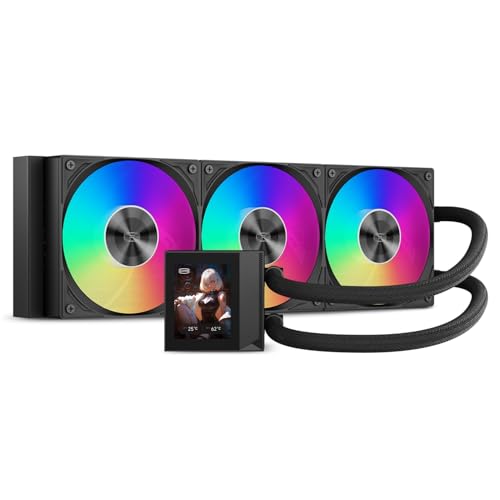
PCCOOLER DC360 Review Summary
The PCCOOLER DC360 360mm AIO CPU Cooler is best understood as a presentation-first liquid cooler that still needs to earn its place through practical compatibility and cable discipline.
The 2.4-inch IPS LCD is the main differentiator, but the rest of the package matters just as much: a 360mm radiator, a 2600 RPM pump, three 120mm high-static-pressure fans, ARGB lighting, and support for current Intel and AMD platforms.
For the right buyer, that combination is compelling.
It suits people building gaming rigs, creator PCs, and showcase systems where the cooler is visible and part of the aesthetic.
It is less ideal for compact cases, minimalist builds that do not want a screen, or anyone who cannot confirm case clearance and internal USB availability before ordering.
Review Scorecard
| Category | Score | Why it matters |
|---|---|---|
| LCD appeal | 9/10 | The 2.4-inch IPS screen and custom content support are the headline feature. |
| Cooling hardware | 8/10 | A 360mm radiator, 2600 RPM pump, and three fans give it a serious thermal platform. |
| Compatibility | 8/10 | Strong Intel and AMD socket support broadens its audience. |
| Case fit | 6/10 | The large radiator and fan stack require careful enclosure checking. |
| Cable management | 7/10 | Pre-installed fans and organized cabling should simplify the install. |
| Lighting and aesthetics | 8/10 | ARGB fans plus LCD customization make it a strong visual component. |
| Buyer value fit | 8/10 | It looks targeted at builders who care about both cooling and display-driven design. |
Bottom line: the PCCOOLER DC360 review comes down to whether you want a cooler that is as much about the build theme as the thermals.
If you do, it is a strong candidate.
If you only want the simplest high-performance cooler, there are more straightforward options.
Key Features and Specifications of PCCOOLER DC360
The product listing positions the PCCOOLER DC360 360mm AIO CPU Cooler as a full-size liquid cooler with visual customization.
The LCD is a 2.4-inch IPS panel, and the software support includes real-time system information plus user-uploaded PNG, JPG, GIF, and MP4 content.
That makes the pump block more than a decorative cap; it becomes part of the PC’s front-facing identity.
On the thermal side, the listing calls out a 360mm aluminum radiator, a 2600 RPM pump, and three 120mm fans built for high static pressure.
Fan speed is listed from 500 to 2500 RPM, with PWM control intended to balance cooling response and acoustics.
The ARGB lighting uses a standard 5V 3-pin header, which should fit common motherboard lighting ecosystems.
The package is also aimed at easier building.
The fans come pre-installed on the radiator, the cabling is described as organized, and the 400mm tubing should give some flexibility for top or front mounting in compatible cases.
That said, the product explicitly requires a case with 360mm radiator support.
| Spec | Listing detail |
|---|---|
| Product name | PCCOOLER DC360 360mm AIO CPU Cooler |
| Display | 2.4-inch IPS LCD |
| Display content | Real-time system info, PNG, JPG, GIF, MP4 |
| Radiator | 360mm aluminum radiator |
| Pump speed | 2600 RPM |
| Fan count | Three 120mm fans |
| Fan speed range | 500 to 2500 RPM |
| Lighting | 5V 3-pin ARGB |
| Tubing length | 400mm |
| Socket support | Intel LGA1851/1700/1200/115X; AMD AM5/AM4 |
| Fit requirement | Case support for a 394 x 120 x 27mm radiator plus 25mm fans |
| USB requirement | Available internal USB connection for the LCD |
The most important practical detail is not the screen.
It is the clearance requirement.
Builders should verify both radiator space and internal USB access before choosing the PCCOOLER DC360 360mm AIO CPU Cooler.
Pros and Cons of PCCOOLER DC360
Pros
- Striking 2.4-inch IPS LCD for system info or custom media.
- Broad platform support across newer Intel and AMD sockets.
- 360mm cooling hardware is appropriate for demanding builds.
- ARGB fan lighting fits modern synchronized build themes.
- Pre-installed fans and cable organization should make the install cleaner.
Cons
- Needs a large case with proper 360mm radiator clearance.
- Requires internal USB connectivity for the LCD feature.
- Screen-focused design may be unnecessary for buyers who only want cooling.
- Front-radiator or top-radiator fit will depend on the case layout.
The biggest advantage is obvious: the cooler is designed to be seen.
The biggest drawback is equally clear: a visually ambitious AIO can create more compatibility work than a plain tower cooler.
That tradeoff is normal, but it should be accepted before buying.
Who Should Buy PCCOOLER DC360?
The PCCOOLER DC360 360mm AIO CPU Cooler is a good fit for builders who want their cooling hardware to contribute to the system’s visual identity.
If your goal is a gaming PC, creator workstation, or showcase case with a theme, the LCD and ARGB combination makes sense.
It is also a reasonable pick for buyers who want modern socket coverage without narrowing themselves to a niche platform.
Support for AM5, AM4, LGA1851, LGA1700, LGA1200, and LGA115X means it can work across a wide range of recent and older builds.
You should probably skip it if your case is tight, your cable routing space is limited, or you do not care about the display at all.
If all you want is raw cooling in the least complicated form, a simpler 240mm or 360mm AIO without LCD hardware may be the better buy.
Cooling and Build Fit of PCCOOLER DC360
360mm Radiator Reality
A 360mm AIO is not a casual case-filler.
The listing specifies a 394 x 120 x 27mm radiator plus 25mm fans, so the total installed footprint is substantial.
That is a strength for thermal headroom, but it also narrows the number of cases that can accept it without friction.
LCD as a System Feature
The 2.4-inch IPS display is the feature most likely to shape the purchase.
Because it can show system information and custom media, it supports both monitoring and aesthetics.
The tradeoff is that it depends on software and an internal USB connection, so it adds another integration step.
Airflow and Acoustics Balance
The fan range of 500 to 2500 RPM suggests the PCCOOLER DC360 360mm AIO CPU Cooler is built to be adaptable.
At lower speeds it may be able to stay more restrained, while the upper range gives the cooler room to respond under load.
That does not guarantee a specific noise profile, but it does show the product is meant to cover both everyday use and higher-demand scenarios.
Installation and Case Planning
The pre-installed radiator fans and organized cabling are small but meaningful details.
They do not remove the reality of a large AIO install, yet they should reduce some clutter.
The buyer still needs to check top or front clearance, tubing route, and motherboard header availability before committing.
Alternatives to PCCOOLER DC360
If you want similar options, the most obvious alternatives are other LCD-equipped or ARGB-focused 360mm AIOs from established cooler brands.
Search Amazon for:
- Corsair iCUE LINK H150i LCD
- NZXT Kraken 360
- Lian Li Galahad II LCD 360
- DeepCool LS720
- ARCTIC Liquid Freezer III 360
Among those, the first three are the closest conceptual competitors if you want a screen-driven build.
The DeepCool and ARCTIC options make more sense if your priority shifts toward cooling-first simplicity rather than display features.
Is PCCOOLER DC360 Worth It?
The PCCOOLER DC360 360mm AIO CPU Cooler is worth it if you want a 360mm liquid cooler with an LCD that can actually become part of the build’s identity.
It is especially sensible for showcase PCs, themed gaming systems, and creator rigs where the pump block is visible.
It is less worth it if you have a smaller case, no interest in LCD customization, or a preference for a lower-friction install.
**Buy it for the screen, the ARGB look, and the broad socket support.
Skip it if you only need cooling and nothing else.**