The SABRENT PCIe 3.0 x4 Card is for builders who want storage expansion and wired networking in one slot.
This SABRENT PCIe 3.0 x4 Card review focuses on whether that unusual combination is actually useful in a NAS, homelab, or compact desktop.
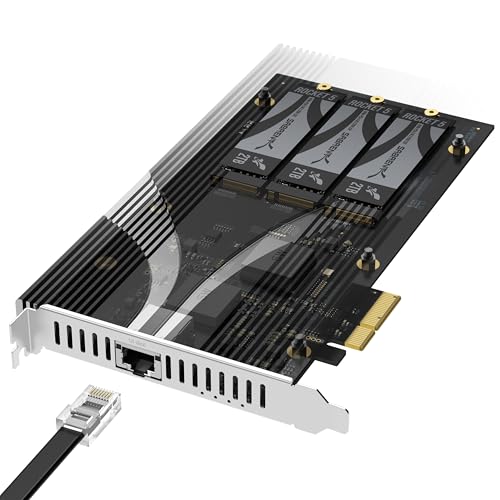
SABRENT PCIe 3.0 x4 Card Review Summary
This card makes sense when you have a limited number of PCIe slots but need both faster networking and more NVMe capacity.
The strongest case is for users who do not want to depend on motherboard lane bifurcation, because the listing says it installs in a physical x4 or larger slot and works without splitting lanes in UEFI.
The design is also unusually practical for mixed builds: three M.2 NVMe slots, a built-in 10GbE port, and an aluminum heatsink with thermal padding.
That is a lot of function on one PCIe 3.0 x4 card, so the appeal is obvious for NAS boxes, servers, and workstations that need to stretch limited expansion.
At the same time, the card is not a universal upgrade.
Its value depends on whether you can use all of what it offers.
If you only need one NVMe slot or you already have 10GbE onboard, it may be more card than you need.
If you have a spare slot and a clear bandwidth plan, it is a highly targeted, problem-solving add-in card.
Review Scorecard
| Category | Score | Editorial rationale |
|---|---|---|
| Expansion flexibility | 9/10 | Three NVMe slots plus 10GbE from one card is a strong use of a single PCIe slot. |
| Installation simplicity | 9/10 | The listing emphasizes no bifurcation required, which lowers setup friction. |
| Cooling and sustainment | 8/10 | A tool-free aluminum heatsink and thermal padding are well matched to sustained SSD use. |
| Compatibility range | 8/10 | Supports 2230-2280 drives and physical x4 or larger slots, which broadens fit. |
| Networking value | 8/10 | Built-in 10GbE is a major advantage for file transfers and NAS workflows. |
| Bandwidth efficiency | 7/10 | PCIe 3.0 x4 is the ceiling, so the card is best when expectations are realistic. |
| Buyer clarity | 8/10 | The use case is specific and easy to understand: storage plus network expansion in one slot. |
Key Features and Specifications of SABRENT PCIe 3.0 x4 Card
The core idea is simple: this is a PCIe 3.0 x4 expansion card that combines three M.2 NVMe SSD slots with an integrated 10GbE Ethernet port.
The listing positions it as an all-in-one storage and networking upgrade for NAS systems, servers, and desktop PCs.
Several details matter more than the headline.
First, SABRENT says the card does not require PCIe bifurcation, which is important for people whose boards do not support lane splitting or who do not want to adjust BIOS settings.
Second, it supports M.2 NVMe drives in 2230 to 2280 lengths, and the listing claims compatibility with PCIe Gen 2.0 through 5.0 drives.
The card also includes a tool-free aluminum heatsink with thermal padding.
That tells you the design is meant for real sustained workloads, not just brief benchmark bursts.
The heatsink is especially relevant if the card lives in a NAS or server that writes heavily or runs long transfers.
The network side is just as important.
The built-in port is a Marvell-based 10 Gigabit Ethernet connector with backward compatibility down to 100Mbps over CAT 5e or better.
That makes the card more than a storage adapter; it is a consolidation device for systems where PCIe slots are scarce.
Useful listing facts at a glance:
| Feature | Evidence from listing |
|---|---|
| Interface | PCIe 3.0 x4 |
| Storage slots | 3 x M.2 NVMe SSD |
| Supported SSD sizes | 2230 to 2280 |
| Networking | Integrated 10GbE Ethernet port |
| Cooling | Tool-free aluminum heatsink with thermal padding |
| Compatibility | NAS, servers, and desktop PCs with physical x4 or larger slot |
| Setup requirement | No bifurcation required |
The main limitation is bandwidth prioritization.
The listing says each M.2 slot operates at up to x2 PCIe 3.0 bandwidth, with total card bandwidth capped at x4.
That is not a flaw by itself, but it is a constraint buyers should understand before expecting three top-speed drives and 10GbE to behave like separate full-bandwidth components.
Pros and Cons of SABRENT PCIe 3.0 x4 Card
Pros
- Combines storage and networking on one card, which is ideal when slots are limited.
- No bifurcation required, so installation should be simpler on more systems.
- Supports a wide range of M.2 lengths, from 2230 to 2280.
- Includes a tool-free heatsink, which is useful for sustained drive workloads.
- Built-in 10GbE is especially valuable for NAS and file-transfer-heavy setups.
Cons
- The PCIe 3.0 x4 ceiling means the card is best for practical expansion, not absolute maximum throughput.
- Users who already have onboard 10GbE or plenty of NVMe slots may not benefit much.
- The shared bandwidth design means the three SSD slots should be viewed as a consolidated expansion solution, not three independent high-speed lanes.
- It is most compelling in systems with a real expansion bottleneck; otherwise it can be overkill.
The positive tradeoff is clear: SABRENT is not trying to turn one slot into a miracle.
It is trying to pack a useful amount of infrastructure into a form factor that many motherboards can actually support.
That is a meaningful distinction for builders who care about reliability and compatibility more than peak spec-sheet numbers.
Who Should Buy SABRENT PCIe 3.0 x4 Card?
This card is a good fit for NAS builders, homelab users, and small-server owners who need to add both fast networking and NVMe storage without replacing the motherboard.
It also makes sense for desktop users with one open x4-or-larger slot who want to keep the build compact while expanding capability.
It is especially attractive if you are working with a board that does not support bifurcation or if you do not want to troubleshoot lane-splitting behavior.
The listing’s no-bifurcation claim is one of the most important buying reasons because it reduces the uncertainty that often comes with multi-M.2 adapter cards.
You should also consider it if your workflow depends on large file moves, shared storage, or local caching.
The 10GbE port can matter as much as the storage slots, because faster wired networking is often the difference between theoretical capacity and practical usefulness.
Who should skip it:
- Buyers who only need a single NVMe drive mount.
- Users who already have integrated 10GbE and sufficient NVMe slots.
- Builders expecting each drive to run like a fully independent high-bandwidth lane.
- Anyone with no spare physical x4-or-larger slot.
Storage and Network Expansion Tradeoffs
Three NVMe Slots, One Priority
The headline feature is not just three slots, but three slots tied to one PCIe 3.0 x4 connection.
That is efficient design, but it also means the card is optimized for flexible capacity rather than raw per-drive maximums.
If your workload is a mix of boot media, cache, and overflow storage, that balance is useful.
Why No Bifurcation Matters
Many multi-M.2 cards become inconvenient the moment motherboard support gets involved.
SABRENT’s no-bifurcation approach lowers that barrier.
For buyers who want to avoid BIOS changes or compatibility guessing, this is one of the strongest reasons to prefer this card over a more complicated adapter.
The 10GbE Port Changes the Value Equation
The integrated 10GbE port is what turns this from a simple SSD carrier into a broader system upgrade.
In a NAS or home server, that can reduce the need for a separate NIC and leave the setup cleaner overall.
It is a meaningful advantage if network speed is part of the bottleneck you are trying to solve.
Cooling Is Part of the Product, Not an Afterthought
The tool-free aluminum heatsink suggests SABRENT expects sustained operation, not occasional tinkering.
That matters for SSDs, which can become less consistent under load if cooling is ignored.
For buyers planning continuous transfers or server duty, integrated thermal management is a practical plus.
Alternatives to SABRENT PCIe 3.0 x4 Card
If you want a different form of expansion, the closest alternatives are usually separate adapters rather than a single combined card.
A highpoint NVMe RAID card may be better for buyers who want more specialized storage control.
A Sabrent 4-port M.2 adapter is worth comparing if you care more about SSD count than networking.
For networking-first upgrades, a 10GbE NIC card can be the cleaner choice when you already have enough storage slots.
And if your board supports it, a PCIe bifurcation M.2 card can deliver a different balance of flexibility and throughput.
The right comparison depends on what problem you actually have.
If the issue is slot scarcity and you need both network and storage in one footprint, SABRENT’s card remains the more integrated option.
Is SABRENT PCIe 3.0 x4 Card Worth It?
Yes, if your system needs both 10GbE and multiple NVMe slots and you only have one usable expansion slot to spare.
That is the narrow but very real audience this card serves best.
It is not the most universal storage card, and it is not the fastest possible way to attach multiple drives.
But as a compatibility-friendly, multifunction expansion card, it makes a strong case for NAS, server, and homelab buyers who value practical consolidation over flashy maximums.
If you want a single-card upgrade that can simplify wiring, reduce slot pressure, and add meaningful capability at once, this one is worth serious consideration.
If you need raw lane count or already have separate storage and networking covered, look elsewhere.