TGDGAMER GPU Support Bracket review is for builders who want more than a simple anti-sag prop.
It combines adjustable support with an onboard temperature display and ARGB styling, which makes it a more visible case accessory than a plain brace.
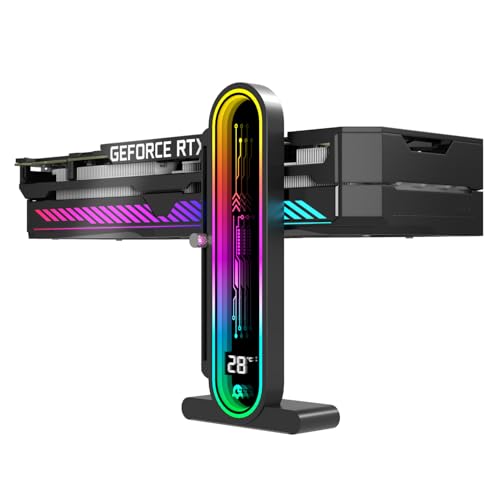
GPU Support Bracket Review Summary
The TGDGAMER GPU Support Bracket makes the most sense if you want to support a graphics card while also adding a small amount of monitoring and visual polish to the case.
The listing positions it as a universal 5V 3-pin GPU stand with a temperature display, height adjustment, magnetic base, and silicone contact points, so its appeal is broader than a basic fixed post.
Buy it if you want a support bracket that can be adapted to different case layouts and GPU heights, and you like the idea of an integrated temp readout.
Skip it if you want a minimal, invisible brace or if your build does not need ARGB or display features.
Review Scorecard
| Category | Score | Buyer-focused rationale |
|---|---|---|
| GPU support flexibility | 8/10 | Adjustable height from 35 to 157 mm gives it broad fit potential. |
| Thermal visibility | 8/10 | The built-in temperature monitoring adds useful at-a-glance context. |
| Case compatibility | 7/10 | Universal positioning helps, but fit still depends on your chassis layout. |
| Protection for hardware | 8/10 | Silicone contact surfaces and magnetic protection are aimed at reducing abrasion. |
| Installation simplicity | 7/10 | A magnetic base and stand design suggest easier placement than rigid supports. |
| Aesthetic value | 8/10 | ARGB and display styling suit showcase builds better than utilitarian braces. |
| Value for the use case | 7/10 | Strong feature mix if you will use the display and lighting; less compelling otherwise. |
Key Features and Specifications of GPU Support Bracket
The core selling point is the combination of support and monitoring.
Instead of acting only as a hidden prop under the card, this bracket is designed to be seen and used as part of the build’s visual theme.
The listing also emphasizes a broad adjustment range, which matters because GPU heights and case clearances vary a lot between towers.
Here are the useful facts pulled from the product record:
- Brand: TGDGAMER
- Product type: GPU support bracket / GPU stand
- Main functions: graphics card support, ambient temperature display, ARGB lighting
- Height adjustment: 35 mm to 157 mm
- Connection: universal 5V 3-pin ARGB style
- Contact surface: single-layer silicone pad
- Base design: dual recessed magnetic base with silicone-protected contacts
- Finish/color: black
- Intended fit: most GPUs, desktop cases, PCIe graphics card setups
The listing’s emphasis on a silicone contact pad and magnetic base suggests a design meant to reduce slippage and avoid scratching the case during installation.
That matters more than it sounds, because many GPU braces are technically functional but awkward to place cleanly in a finished build.
The temperature display is also a meaningful differentiator.
It will not replace proper system monitoring, but it can give you a quick ambient readout without opening software.
For some builders, that is a convenience feature; for others, it is a reason to choose this model over a simpler support stick.
Pros and Cons of GPU Support Bracket
Pros
- Wide height range from 35 mm to 157 mm makes it adaptable to many case and GPU combinations.
- Temperature display adds practical visibility beyond pure support.
- ARGB support can match a showcase build instead of hiding in the shadows.
- Silicone contact points are a sensible touch for scratch resistance and vibration dampening.
- Magnetic base should make positioning easier than fully fixed alternatives.
Cons
- More features than some buyers need. If you only want anti-sag support, the display and lighting may be extra complexity.
- Fit still depends on the case. “Universal” does not guarantee perfect placement in every layout.
- Style-driven design. Builders who want a discreet brace may prefer a simpler, smaller support.
- Lighting requires compatible setup. The 5V 3-pin approach is useful only if your system supports it.
Who Should Buy GPU Support Bracket?
This bracket is best for PC builders who care about both function and presentation.
If your GPU is heavy enough that you want physical support, but you also want the part to look intentional inside the case, the TGDGAMER design is a sensible option.
The temperature display makes it a better fit for users who like visible hardware feedback, even if that feedback is limited to ambient chassis temperature rather than full system telemetry.
It is also a decent match for people who are building around RGB ecosystems and want the support part to look integrated instead of bolted on as an afterthought.
The black finish and lighting support should fit into many mid-tower or showcase builds.
You should probably skip it if your build priorities are simplicity, stealth, or absolute minimum clutter.
If you already have a clean anti-sag solution and do not care about the display or lighting, a more basic support bracket is likely enough.
It is also a weaker choice for cases with very tight clearances where a tall accessory could complicate cable routing or airflow planning.
How It Fits a Modern GPU Build
Adjustable support across different layouts
The 35 mm to 157 mm height range is the strongest practical spec in the listing.
That spread gives the bracket a real chance of fitting different GPU depths and case floor heights without improvising shims or stacking parts.
Silicone and magnetic contact design
The silicone contact pad and silicone-protected magnetic base are not flashy, but they address two real annoyances: scratching the case and letting the support drift once it is placed.
Those details matter when the accessory sits directly under a heavy card and stays visible.
Temperature display as a utility layer
The ambient temperature display is useful mainly as a quick reference.
It is not a replacement for software or motherboard sensors, but it adds a small monitoring layer that can make the bracket feel more purposeful than a decorative stand.
ARGB for showcase builds
The ARGB connection makes the bracket more attractive for users already running lighting in the case.
If your build is meant to be seen, the support becomes part of the visual system instead of a purely mechanical fix.
Alternatives to GPU Support Bracket
If you want a simpler anti-sag solution, consider a more basic Lian Li GPU support bracket or an EZDIY-FAB GPU brace.
Those lines are common search targets for builders who prioritize clean support hardware over extra lighting or display features.
If your goal is adjustability without much visual fuss, a Cooler Master graphics card holder may be a better fit.
It is closer to the “install it and forget it” approach.
If you specifically want a more premium showcase accessory, search for a Thermaltake GPU support bracket.
That is the kind of alternative buyers often compare when they want stronger brand recognition in a visible build part.
Is GPU Support Bracket Worth It?
Yes, if you want an adjustable GPU support solution that adds monitoring and lighting instead of hiding under the card.
The TGDGAMER bracket is worth considering when your build benefits from a taller adjustment range, silicone-protected contact points, and a visible temperature display.
If you only need the most basic anti-sag function, this is probably more product than you need.
But for a showcase PC or a builder who likes hardware details that serve a purpose, it is a well-targeted option.