The KODAK Dock Plus 4×6 Photo Printer review is all about convenience, durability, and easy phone-to-photo printing.
If you want simple 4×6 prints without a complicated setup, this is an appealing option.
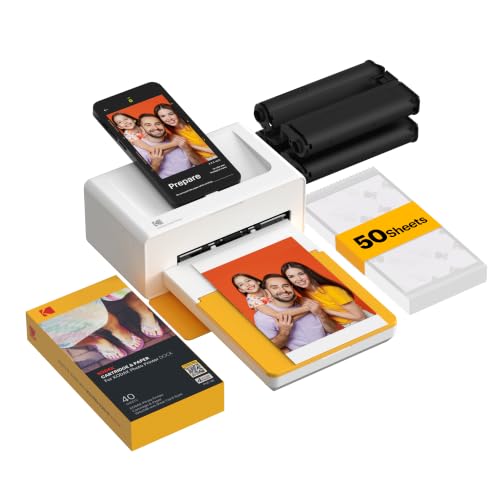
KODAK Dock Plus Review Summary
The KODAK Dock Plus 4×6 Photo Printer is best for families, casual photographers, and scrapbookers who want durable prints straight from a phone. It combines a docking station, Bluetooth connectivity, and 4PASS dye-sublimation printing into a home-friendly system that keeps the process straightforward.
If your goal is to print albums, frame-ready snapshots, or event memories with minimal fuss, this model does a lot right.
What stands out most is the balance between ease of use and output quality.
The KODAK Dock Plus 4×6 Photo Printer is not trying to be a studio machine or a travel printer; it is designed as a desktop photo station that works well in everyday homes.
That makes it especially attractive for buyers who value predictable results, protected prints, and a simple smartphone workflow.
It does have limits.
The print size is fixed to 4×6 photos, the speed is decent but not rapid, and the setup is better suited to a desk and power outlet than a bag or road trip.
Still, for the right buyer, the package is compelling.
Quick Scorecard
| Category | Score | Takeaway |
|---|---|---|
| Print quality | 8.0 | 4PASS dye-sublimation produces smooth, detailed 4×6 photos with a protective finish. |
| Ease of use | 9.0 | Simple Bluetooth workflow and beginner-friendly operation make it easy to start printing. |
| Phone docking and charging | 8.0 | The dock adds stability and lets your phone charge while printing. |
| App editing and control | 8.0 | The app supports cropping, editing, and customization for better print control. |
| Photo durability | 9.0 | Prints are designed to resist fingerprints, water, and fading. |
| Home printing convenience | 8.0 | Works well as a regular home photo-printing station. |
| Portability | 5.0 | Compact, but still more of a desktop setup than a truly portable printer. |
Bottom line: the KODAK Dock Plus 4×6 Photo Printer is a strong pick if you want easy, durable 4×6 photo prints from your smartphone and do not need advanced settings or travel portability.
Key Features and Specifications of KODAK Dock Plus
The KODAK Dock Plus focuses on a very specific job: turning smartphone photos into borderless 4×6 prints with minimal effort.
That narrow focus is actually a strength, because it helps the printer stay simple and approachable.
| Specification | Details |
|---|---|
| Brand | KODAK |
| Model | Dock Plus |
| Printing technology | 4PASS Dye Sublimation |
| Connectivity | Bluetooth, Wireless |
| Print size | 4×6 inches |
| Print output | Color |
| Special features | Borderless Printing, Docking |
| Approximate print time | About 55 seconds per photo |
| Device compatibility | Compatible smartphones, iOS and Android via app |
| Item weight | 1366 grams |
| Color | Yellow |
- Includes 50 sheets in the bundle shown, which helps new buyers get started right away.
- Prints borderless 4×6 photos that are ready for albums and frames.
- Charges your phone while printing when docked, which is a nice practical touch.
- Uses the KODAK Photo Printer app for editing, cropping, and customization.
- Designed for home use rather than outdoor or on-the-go printing.
From a buyer’s perspective, the spec sheet tells a clear story.
The KODAK Dock Plus 4×6 Photo Printer is for people who want convenience first, quality second, and advanced control third.
If you are looking for documents, larger photo sizes, or mobile travel printing, this is not the right fit.
Pros and Cons of KODAK Dock Plus
Here is the practical KODAK Dock Plus 4×6 Photo Printer pros and cons breakdown buyers should look at before choosing it.
| Pros | Cons |
|---|---|
| Simple, beginner-friendly operation | Best suited to home use, not travel |
| Docking station adds stability and charging | Not ideal for high-volume or fast batch printing |
| Durable photo output with protective lamination | Requires a compatible phone and app workflow |
| Borderless 4×6 prints look clean in albums and frames | Limited to a desktop-style setup and power outlet |
| App-based editing adds flexibility before printing | Only prints 4×6 photos, not documents or larger formats |
The biggest strengths are ease of use and durability.
The main drawbacks are more about flexibility and workflow than print quality.
In other words, this printer does its intended job well, but it is intentionally specialized.
How the 4PASS Printing Process Works
The defining feature of the KODAK Dock Plus 4×6 Photo Printer is its 4PASS dye-sublimation system.
Instead of laying ink on paper in a standard way, the printer uses layered color transfer and a clear protective lamination to complete each print.
That process matters because it changes how the final photo feels and performs.
The output is described as fingerprint-resistant, water-resistant, and fade-resistant, which is exactly what many buyers want for family albums, desk frames, and memory boxes.
Photos that are handled often tend to stay looking cleaner for longer.
For practical buyers, the key question is not whether the technology sounds fancy, but whether it makes a real difference.
Here, the answer is yes.
The finish gives the printer an advantage over cheaper instant-print options that can feel more fragile.
If you want keepsake prints that can survive regular handling, 4PASS is a smart design choice.
There is a tradeoff, though.
Dye-sublimation systems usually prioritize consistency and durability over raw speed or broad format support.
That is why the KODAK Dock Plus review comes down to use case: it is excellent for one job, not a do-everything printer.
Docking Station and Phone Charging Experience
The docking station is more than a gimmick.
It gives the KODAK Dock Plus a stable desktop presence and creates a simpler connection path for users who want fewer setup headaches.
Instead of juggling cables or relying only on wireless pairing, you can place a compatible smartphone directly on the printer.
This is especially useful for casual users who want a dependable printing routine.
The dock keeps the phone steady, and the charging function is a nice quality-of-life benefit during longer photo sessions.
If you are printing from a family event album or a batch of vacation photos, having the phone charge while it prints is genuinely useful.
From a usability perspective, the dock also helps reduce one common pain point: connection uncertainty.
Stable placement and a cleaner workflow matter for users who are not tech enthusiasts and simply want their photos to come out right the first time.
That said, the dock design reinforces the printer’s desktop identity.
This is not the kind of product you toss in a backpack for a weekend trip.
If portability is your priority, you may want a smaller pocket printer instead.
Print Quality for Albums and Framing
For a buyer, print quality is where the KODAK Dock Plus 4×6 Photo Printer earns most of its value.
The printer produces borderless 4×6 color photos with a glossy protective finish, which suits standard photo albums and common frame sizes very well.
The output is best described as clean, smooth, and practical.
You should expect attractive everyday photo prints rather than ultra-premium fine-art output.
Still, for family pictures, holiday snapshots, birthday memories, and social media photos you want to preserve, the results are strong enough for most home users.
The layered 4PASS process helps with consistent color and a polished appearance.
If you care about keeping photos from smudging in a drawer, getting marked by fingerprints, or fading over time, this printer has a real advantage over basic print methods.
Best fit: buyers who want ready-to-display 4×6 prints for albums, scrapbooks, and frames.
Less ideal: users who want larger formats, lab-level editing control, or very high-end professional print reproduction.
App Features and Creative Editing Options
The KODAK Photo Printer app is a major part of the experience because it handles the editing workflow before printing.
It supports iOS and Android, and it gives you the basics most casual buyers need: cropping, simple edits, and customization.
That matters because photo printing from phones often fails when the image framing is awkward.
The app helps correct that by letting you adjust what gets printed instead of relying on a default crop that may cut off faces or background details.
For many users, this is the difference between a frustrating first attempt and a successful print session.
The app also fits the product’s overall philosophy.
It does not try to overwhelm you with advanced tools.
Instead, it keeps things direct and usable.
That makes the KODAK Dock Plus a good option for first-time photo-printer buyers who value simplicity over deep control.
Still, app-based printing means you are dependent on a mobile workflow.
If you dislike pairing, app permissions, or software updates, this could feel less convenient than it sounds.
Buyers who want a fully standalone printer experience may prefer something else.
Best Uses for Family Events and Everyday Photos
The strongest use cases for this printer are everyday memories and family-centered printing.
That includes birthday parties, school moments, holiday gatherings, weddings, vacations, and quick photo projects where the goal is to turn digital memories into physical keepsakes.
It is also a solid fit for scrapbooking and memory books.
Because the prints are 4×6 and borderless, they fit naturally into albums without extra trimming or complex layout work.
That simplicity is a real advantage for busy households.
Good use cases include:
- Photo albums and scrapbooks
- Framing favorite family snapshots
- Printing event memories shortly after they happen
- Making physical copies of phone photos for gifts
- Keeping durable prints that can be handled often
Not the best use cases include:
- Document printing
- High-volume batch jobs
- Travel or outdoor use
- Large-format photography projects
That clear boundary is actually helpful.
The KODAK Dock Plus 4×6 Photo Printer knows exactly what it is, and buyers who want that exact use case are most likely to be satisfied.
Comparable Alternatives to Consider
If you are deciding whether the KODAK Dock Plus 4×6 Photo Printer is right for you, it helps to compare it with other popular photo-printing categories available on Amazon.
- Canon Selphy compact photo printer – A strong alternative if you want a well-known compact photo-printing line with a similar home-photo focus.
- HP Sprocket photo printer – Better suited to small, portable prints if portability matters more than 4×6 desktop convenience.
- Epson compact photo printer – Worth checking if you want broader photo-printing options and a different brand ecosystem.
- Fujifilm Instax printer – A good choice for users who prefer instant-style output and a more playful photo format.
Compared with these, the KODAK Dock Plus stands out for its docking convenience and durable 4×6 prints.
The main tradeoff is that it is less portable than pocket-sized printers and less versatile than some broader photo-printing systems.
Who Should Buy KODAK Dock Plus?
The KODAK Dock Plus 4×6 Photo Printer is a smart buy for people who want a simple, home-based way to print memorable phone photos.
It is especially good for families, scrapbookers, casual photographers, and anyone who likes the idea of printing photos the same day they are taken.
You should buy it if you:
- Want easy 4×6 prints from a smartphone
- Need durable photos for albums or frames
- Prefer a beginner-friendly printer with minimal setup
- Like the convenience of phone docking and charging
- Value a home photo station over portable printing
You should probably skip it if you:
- Need document printing
- Want a truly portable printer for travel
- Print in larger sizes often
- Want very fast batch output
- Do not want to rely on an app-based workflow
That buyer split is important.
The KODAK Dock Plus is not for everyone, but it is a very sensible choice for the right household.
It solves a specific problem well: turning phone photos into durable keepsakes without complexity.
Is KODAK Dock Plus Worth It?
So, is KODAK Dock Plus 4×6 Photo Printer worth it?
For most buyers in its target audience, yes.
The printer offers a strong mix of convenience, durable output, and easy smartphone printing, and those are the exact features that matter most in a home photo printer.
It is worth it if your priority is simple 4×6 photo printing with good-looking, protective results. The docking station, app-based editing, and 4PASS output make it especially appealing for families and memory keepers.
It is also a good value in the sense that it focuses on practical everyday use rather than unnecessary complexity.
It is not worth it if you need portability, document printing, or advanced photo control. Those buyers will be happier with a different category of product.
But if your goal is to print framed snapshots, album photos, and event memories from your phone, the KODAK Dock Plus 4×6 Photo Printer is easy to recommend.
Final verdict: this is a buy for casual home photo printing, especially if you want durable 4×6 prints and a low-friction workflow.
If that sounds like your use case, the KODAK Dock Plus is a practical and buyer-friendly choice.