If you need fast external storage, a hard drive enclosure with Thunderbolt 4 can turn an NVMe SSD or multi-bay drive setup into a high-performance desktop companion. The best models balance speed, thermal control, compatibility, and ease of installation.
In this roundup, we focus on enclosures that make sense for creators, power users, and anyone who wants dependable 40Gbps storage without guesswork.
Best 10 Hard Drive Enclosure with Thunderbolt 4 Picks for 2026
Multi-Drive RAID Storage Pick

- Fits four 3.5-inch or 2.5-inch SATA drives
- Dual Thunderbolt ports with RAID support
- Up to 1527MB/s sustained performance
Best For: Desktop users building a RAID-capable storage array
Silent 40Gbps Value Pick

- Up to 3600MB/s with top-end setup
- Fanless fin cooling design
- Supports NVMe drives up to 8TB
Best For: Quiet, portable NVMe storage across many devices
Ultra-Slim Desk Setup Pick
Satechi USB4 Slim NVMe Enclosure

- Up to 40Gbps with fast read/write rates
- Supports SSDs up to 8TB
- Slim body with hidden cable storage
Best For: Users who want a premium, compact Thunderbolt-ready enclosure
Fastest portable pick

- Up to 40Gbps and 3100MB/s with compatible NVMe SSDs.
- Supports Thunderbolt 3/4, USB4, and USB 3.x connections.
- Includes USB-C to C and USB-C to A cables.
Best For: Portable NVMe users who want strong speed and flexible connectivity
Best for cooled performance
- Dual-chip design pairs a 40G chip with a 10G chip.
- Built-in fan helps manage heat during heavy use.
- Supports up to 8TB NVMe drives and Thunderbolt 4/3.
Best For: Heavy-use NVMe setups that benefit from active cooling
Quiet premium pick

- USB4 and Thunderbolt 4/5 support up to 40Gbps.
- Fanless aluminum design keeps operation silent.
- Supports NVMe drives up to 8TB in multiple sizes.
Best For: Silent NVMe storage on USB4 or Thunderbolt 4 systems
Compact 4-Bay Speedster
TERRAMASTER D4 SSD NVMe Enclosure

- 40Gbps NVMe enclosure with Thunderbolt 5/4/3 and USB4 support
- Holds four M.2 NVMe 2280 SSDs for up to 32TB total
- Tool-free installation with active cooling and hot-swap support
Best For: Compact high-speed NVMe storage and editing workflows
Hybrid RAID Workhorse

- Two SATA bays plus two NVMe bays in one enclosure
- USB4 40Gbps support with Thunderbolt 3/4/5 compatibility
- Hardware RAID 1, software RAID 0, and large combined capacity
Best For: Mixed-storage workflows that need backup capacity and NVMe speed
Portable Thunderbolt Pick

- USB4/TBT4 enclosure with up to 40Gbps transfer speeds
- Tool-free, pocket-sized design for easy portability
- Supports 2230 to 2280 M-Key NVMe SSDs up to 8TB
Best For: Portable fast NVMe storage for Thunderbolt 4 laptops
Portable Thunderbolt 4 Speed Pick – SABRENT USB4 NVMe Enclosure
If you want a hard drive enclosure with thunderbolt 4 performance for a single NVMe SSD, this SABRENT model is built for fast transfers and easy setup. It supports Thunderbolt 3/4, USB4, and USB-C hosts, and it is designed for PCIe NVMe drives only, so it suits users who already know they need a high-speed M.2 solution.
Best For: Creators, editors, and mobile users who want a fast, tool-free NVMe enclosure with broad Thunderbolt 4 compatibility.
Pros:
- Up to 3,900 MB/s over USB4 and up to 2,700 MB/s with Thunderbolt 3/4
- Tool-free installation for 2230/2242/2260/2280 PCIe NVMe drives
- Integrated active cooling fan for more stable sustained performance
- Works with Thunderbolt 3, Thunderbolt 4, USB4, and USB-C on Windows and macOS
Cons:
- Does not support SATA M.2 SSDs
- Only fits PCIe NVMe drives, not broader M.2 formats
This is a strong pick if speed and convenience matter more than universal drive support. The fan-assisted aluminum and ABS build makes it especially appealing for larger file transfers and portable workflows.
Multi-Drive RAID Storage Pick – OWC ThunderBay 4
This hard drive enclosure with thunderbolt 4 is aimed at users who need much more than a single-drive portable case. The OWC ThunderBay 4 holds up to four 3.5-inch or 2.5-inch SATA drives, connects through Thunderbolt 3, and is built for sustained desktop storage with configurable RAID options.
Best For: Desktop users who want a four-bay Thunderbolt storage enclosure with RAID flexibility.
Pros:
- Supports up to four 3.5-inch or 2.5-inch SATA drives without adapters
- Dual Thunderbolt ports and up to 1527MB/s sustained performance
- User-configurable RAID 0/1/4/5/1+0 (10)
- Quiet aluminum chassis designed to dissipate heat
Cons:
- Larger and heavier than portable single-drive enclosures
- Uses Thunderbolt 3 rather than USB4/NVMe-style connectivity
For a stationary setup, this is the most storage-heavy option in the group and the best fit when redundancy or RAID management matters. It is less about portability and more about turning several SATA drives into a fast desktop array.
Silent 40Gbps Value Pick – UGREEN M.2 NVMe Enclosure
If you are shopping for a hard drive enclosure with thunderbolt 4 compatibility in a compact form, this UGREEN NVMe enclosure is a practical middle ground. It supports Thunderbolt 3/4 and USB4, uses an ASM2464PD chip, and is designed for 2230 through 2280 PCIe NVMe drives only.
Best For: Users who want a slim, fanless NVMe enclosure with wide host compatibility.
Pros:
- Up to 3600MB/s maximum speed with Thunderbolt 4 cables and devices required for top performance
- Double-sided fin design and three-dimensional cooling system for quiet operation
- Supports 2230/2242/2260/2280 NVMe drives up to 8TB
- Works with Windows, macOS, Linux, Android, and many USB/Thunderbolt hosts
Cons:
- Does not support SATA NGFF or mSATA drives
- Some thicker SSDs may require thinner thermal pads
This enclosure stands out if you want strong 40Gbps-class speed without a fan. It is a sensible choice for travel, mixed-device use, and anyone who prefers a quiet aluminum build.
Ultra-Slim Desk Setup Pick – Satechi USB4 Slim NVMe Enclosure
For buyers who want a hard drive enclosure with thunderbolt 4 support in a cleaner desk-friendly design, this Satechi USB4 enclosure is tuned for speed and aesthetics. It works with Thunderbolt 5/4/3 and USB4 hosts, supports multiple NVMe sizes, and includes thermal management features for dependable daily use.
Best For: Mac and PC users who want a slim, premium-looking NVMe enclosure for fast external storage.
Pros:
- Up to 40Gbps transfer speeds with up to 3840MB/s read and 3200MB/s write
- Supports 2230/2242/2260/2280 SSDs up to 8TB
- Cooling vents and thermal pad help manage heat
- Hidden cable compartment and compact 16mm profile for a tidy setup
Cons:
- Included USB4 host cable may be too short for some setups
- SSD is not included
This is the most polished-looking option in the roundup and a good fit when the enclosure will sit near a Mac mini or on a clean desktop. It delivers strong USB4/TB4-class performance while keeping the design minimal and portable.
Fastest portable pick – Fast, Flexible USB-C M.2 Case
If you want a hard drive enclosure with thunderbolt 4 performance for an NVMe SSD, the ORICO 40Gbps enclosure is built for fast transfers and simple plug-and-play use. It supports up to 40Gbps with a compatible NVMe drive and is designed for Thunderbolt 4 or USB4 host ports when you want the top speed.
Best For: Users who want a compact NVMe enclosure for fast file transfers, mixed-device compatibility, and everyday portable storage.
Pros:
- Up to 40Gbps speeds and up to 3100MB/s with a compatible NVMe SSD.
- Works with Thunderbolt 3/4, USB4, and USB 3.2/3.1/3.0 devices.
- Includes both USB-C to C and USB-C to A cables for more connection options.
- Aluminum cooling vest, thermal pads, and smart chip features help support stable operation.
Cons:
- Maximum speed requires a Thunderbolt 4 or USB4 host port.
- Thunderbolt ports on Intel systems before 12th gen are noted as incompatible.
- Only supports NVMe M.2 drives, not SATA-based SSDs.
Overall, this ORICO model is a practical pick if you want fast NVMe storage in a portable enclosure and need broad USB-C compatibility. Just make sure your host device supports the right protocol if you are buying specifically for Thunderbolt 4 speeds.
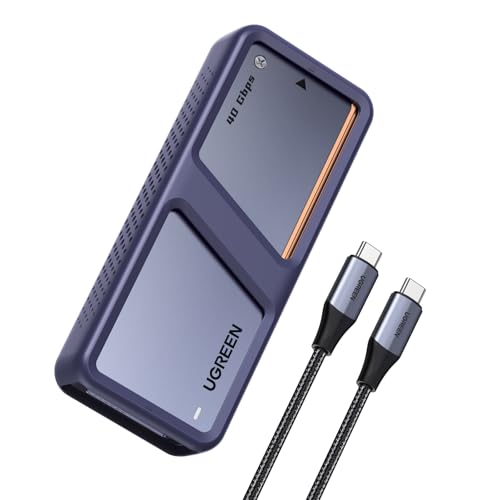
Best for cooled performance – Fan-Cooled NVMe Shell
The UGREEN 40Gbps enclosure is a strong hard drive enclosure with thunderbolt 4 support for users who want high-speed NVMe storage plus active cooling. Its dual-chip design is aimed at maintaining performance while reducing heat, and UGREEN notes that Thunderbolt 4 cables and devices are required to reach the stated top speed.
Best For: Users who want a high-speed NVMe enclosure with built-in fan cooling for heavier workloads.
Pros:
- Dual-chip design uses a 40G JHL7440 chip and a 10G RTL9210 chip.
- Built-in cooling fan automatically activates above 40°C.
- Supports up to 8TB M.2 NVMe SSDs for large files and backups.
- Compatible with Thunderbolt 4/3, USB4, and older USB standards.
Cons:
- Thunderbolt 4 cables and devices are required to reach 3600MB/s.
- Not compatible with SATA SSDs, PCIe 5.0 SSDs, or 9100 SSDs.
- Cooling fan may be a drawback if you prefer a fanless setup.
In practice, this UGREEN enclosure makes the most sense if you care about sustained performance and temperature control more than silent operation. It is a good fit for users planning larger transfers, editing work, or backup duties on compatible Thunderbolt 4 hardware.
Quiet premium pick – Quiet 40Gbps M.2 Case
If you want a hard drive enclosure with thunderbolt 4 compatibility but prefer a silent design, the Qwiizlab fanless USB4 enclosure is worth a look. It supports USB4 and Thunderbolt 4/5 ports for up to 40Gbps transfers, and its aluminum chassis is designed to shed heat without a fan.
Best For: Users who want a quiet, fanless NVMe enclosure for USB4 or Thunderbolt 4 systems.
Pros:
- Supports USB4 and Thunderbolt 4/5 for up to 40Gbps transfer speeds.
- Fanless aluminum chassis keeps operation silent.
- Works with M.2 NVMe drives in multiple lengths up to 8TB.
- Includes a 40Gbps USB-C cable, thermal pads, screwdriver, and screws.
Cons:
- Not compatible with Thunderbolt 2 or Thunderbolt 1.
- SSD not included.
- Backwards compatibility is limited to Thunderbolt 3 rather than older Thunderbolt generations.
This Qwiizlab model is a practical choice if your priority is a quiet portable SSD enclosure with modern high-speed connectivity. It suits users who want Thunderbolt 4-class throughput without adding fan noise to a desk or travel kit.
Compact 4-Bay Speedster – TERRAMASTER D4 SSD NVMe Enclosure
If you want a hard drive enclosure with thunderbolt 4 support for fast external storage, the TERRAMASTER D4 SSD is built around 40Gbps NVMe performance. It works with Thunderbolt 5/4/3 and USB4, making it a strong fit for large file transfers, 4K editing, and compact desktop setups.
Best For: Users who need a compact 4-bay NVMe enclosure for high-speed storage and editing workflows.
Pros:
- 40Gbps connection with support for Thunderbolt 5/4/3 and USB4
- Four M.2 NVMe 2280 slots with up to 32TB total capacity
- Active cooling with temperature sensors for quieter operation
- Tool-free, hot-swappable design for easier drive changes
Cons:
- No built-in RAID hardware
- Requires third-party tools for soft RAID setups
- NVMe-only design, so it is not for SATA drives
Overall, this is a practical choice if your priority is dense NVMe storage in a small footprint rather than RAID features. The wide compatibility and built-in cooling make it a flexible option for desktops, travel, and backup workflows.
Hybrid RAID Workhorse – ACASIS 4-Bay Hybrid Enclosure
The ACASIS hybrid enclosure is a flexible hard drive enclosure with thunderbolt 4 compatibility for users who want both capacity and speed in one box. It combines two SATA bays for 3.5/2.5-inch drives with two NVMe bays, so you can separate archive storage from active projects while keeping everything in a single enclosure.
Best For: Creators and power users who want one enclosure for HDD backups, NVMe editing, and RAID flexibility.
Pros:
- Hybrid layout with two SATA bays and two NVMe bays
- Supports USB4 and Thunderbolt 3/4/5 connections
- Hardware RAID 1 for HDD mirroring and software RAID 0 for NVMe speed
- Premium aluminum case with active cooling and 96W power supply
Cons:
- Full 40Gbps performance depends on RAID mode and compatible ports
- SATA bays are limited to 5Gbps
- More complex than a single-drive enclosure
This is a strong pick if you need a mixed-storage setup rather than a simple external drive dock. The hybrid design is especially useful for workflows that need both backup capacity and fast scratch storage.
Portable Thunderbolt Pick – Inateck FE2028 NVMe Enclosure
If you want a compact hard drive enclosure with thunderbolt 4 support, the Inateck FE2028 keeps things simple and portable. It uses USB4/TBT4 for up to 40Gbps transfer speeds and is designed for NVMe drives, making it a good match for fast external storage without a bulky footprint.
Best For: Laptop users who want a small, tool-free NVMe enclosure for fast everyday storage.
Pros:
- 40Gbps USB4/TBT4 support with up to 2700MB/s read and write speeds
- Tool-free flip-style design for quick SSD installation
- Compact aluminum build with dual cooling design
- Supports 2230/2242/2260/2280 M-Key NVMe SSDs up to 8TB
Cons:
- Not compatible with Thunderbolt 3
- Single-drive design only
- NVMe M-Key only, so SATA drives are not supported
For users who value portability and easy setup, this enclosure is one of the more straightforward options. It is best suited to modern Thunderbolt 4 or USB4 laptops that need fast, pocketable expansion.
How We Picked the Best Hard Drive Enclosure with Thunderbolt 4
We prioritized real-world transfer speed, build quality, cooling design, interface compatibility, and overall value. For a Hard Drive Enclosure with Thunderbolt 4, the enclosure itself matters as much as the drive inside, so we looked for stable performance under load, sensible thermal design, and clear support for modern SSD formats and bay configurations.
We also favored options that are easy to install and broadly compatible with Thunderbolt 4, USB4, and where applicable Thunderbolt 3 systems.
Quick Comparison: Which Type Fits Your Workflow?
Single-bay M.2 NVMe enclosures are best for compact, portable, high-speed storage. Multi-bay models make more sense if you need larger capacity, RAID flexibility, or a shared workstation setup. Some users will prefer fanless aluminum designs for quiet operation, while others should choose active cooling for sustained transfers and heavier workloads.
Key Buying Factors for a Hard Drive Enclosure with Thunderbolt 4
Speed and Host Support
Look for 40Gbps-class connectivity and verify that your computer actually supports Thunderbolt 4 or USB4 at full speed. Real-world performance also depends on your SSD, RAID setup, and cable quality.
Drive Type and Capacity
Make sure the enclosure matches your storage plan: M.2 NVMe for compact SSDs, or 2.5-inch/3.5-inch SATA and multi-bay options for larger archives. Capacity limits vary, so check the manufacturer’s supported maximum before buying.
Thermals and Noise
Fast SSDs can throttle if they run too hot. Aluminum shells, thermal pads, and heatsinks help, while fans improve sustained performance in larger enclosures. If silence matters, fanless designs are appealing but may be less ideal for continuous heavy writes.
Setup, RAID, and Expandability
Tool-free assembly is convenient for frequent drive swaps. For multi-bay units, RAID support can improve redundancy or performance, but only if your workflow truly benefits from it.
Who Should Buy Which Hard Drive Enclosure with Thunderbolt 4?
Choose a compact single-drive enclosure if you want fast portable storage for video, photography, or everyday backups. Pick a four-bay or hybrid enclosure if you need more capacity, redundancy, or a workstation-style setup. If you care most about simplicity, look for tool-free, bus-powered, or fanless designs; if you care most about sustained throughput, prioritize cooling and stronger thermal engineering.
In short, the best Hard Drive Enclosure with Thunderbolt 4 is the one that matches your drive type, your computer’s port support, and the way you actually use storage day to day.