Book scanning is much easier when the hardware can flatten pages, reduce distortion, and turn images into searchable text. That is exactly where the best book scanners with OCR stand out.
Whether you are digitizing textbooks, research archives, or teaching materials, the right scanner can save time and improve text accuracy from the start.
Best 10 Book Scanners with OCR Picks for 2026
Book Scanning Powerhouse
CZUR ET18 Pro for fast A3 OCR scanning

- 18MP capture with A3 support and 2-second page speed
- Auto-flatten and deskew help curved book pages
- OCR exports searchable PDF, Word, Excel, and TIFF
Best For: People digitizing large books who want fast OCR-ready scans
Archival Overhead Scanner
VIISAN S48 Duo for large-format OCR
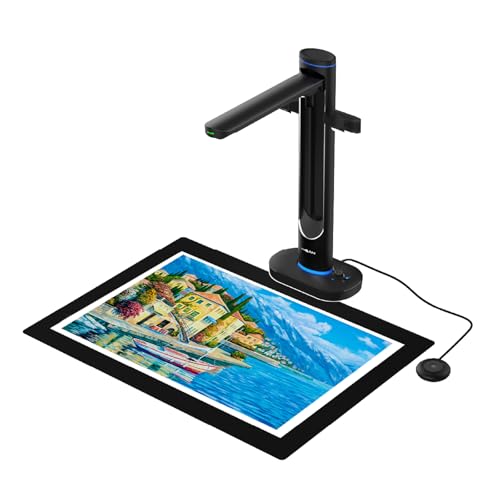
- Dual 48MP cameras with up to 600 DPI detail
- Scans A2 materials without pressing fragile pages
- OCR plus text-to-speech for searchable, accessible files
Best For: Libraries, schools, and archives handling oversized or delicate materials
Portable Teaching Scanner
NetumScan 13MP OCR document camera

- Foldable A3/A4 document camera with LED lighting
- OCR exports editable Word or TXT files
- Also supports live projection and video recording
Best For: Teachers, presenters, and portable home-office scanning
Classic Overhead Favorite

- Scans books and magazines without damaging them
- Auto Book Correction helps flatten curved pages
- Detects multiple items and supports page-turn scanning
Best For: Non-destructive scanning of books, newspapers, and clippings
Portable AI Book Camera
NetumScan 13MP Book Document Camera

- Multi-language OCR with word, PDF, and text output
- One-key automatic correction for skewed pages
- Foldable portable body with built-in LED lighting
Best For: Teachers and students needing a portable A4 overhead scanner
High-Resolution Archive Scanner

- 48MP capture with up to 600 DPI detail
- OCR for searchable PDFs and editable files
- AI page flattening and automatic page splitting
Best For: Desk-based archiving and high-detail book digitization
Fast Multi-Language Scanner
CZUR Aura Pro Portable Book Scanner

- Three laser lines help flatten curved book pages
- OCR supports 180+ languages
- About 2 seconds per page with supplemental side lights
Best For: Fast desktop OCR scanning with curved-book cleanup
Premium All-Round Book Scanner

- 38MP capture with A3 support
- Curve-flattening for bound books
- OCR to searchable Word, Excel, PDF
Best For: High-volume scanning with broad OCR needs
AI-Powered Archiving Scanner
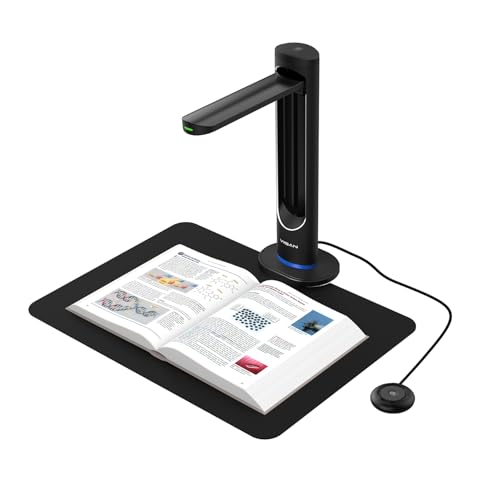
- 48MP sensor with 600 DPI output
- Auto page smoothing and laser positioning
- OCR plus searchable and editable formats
Best For: Archiving and digitizing books with automation
Large-Format OCR Book Scanner

- A2 capture for oversized documents
- Auto-flattening and double-page split
- OCR to PDF, Word, Excel, EPUB, TXT
Best For: Large books, newspapers, maps, and manuscripts
Book Scanning Powerhouse – CZUR ET18 Pro for fast A3 OCR scanning
If you want book scanners with OCR that can handle large pages efficiently, the CZUR ET18 Pro is built for turning bound documents into searchable files. Its overhead design, 18MP camera, and auto-flatten/deskew tools make it a practical fit for anyone digitizing books, reports, or oversized paperwork on Windows or Mac.
Best For: Users who need fast A3 book scanning with broad OCR support and searchable output.
Pros:
- 18MP HD camera captures up to A3 pages at 4896 x 3672 resolution.
- Auto-flatten and deskew technology helps correct curved book pages.
- ABBYY-powered OCR converts scans to searchable PDF, Word, Excel, and TIFF.
- Scans in about 2 seconds per page once you get used to it.
Cons:
- Cable connection only; it does not support Wi-Fi.
- Very glary paper is not recommended.
- Some OCR language support varies by system, including Arabic support limits.
The ET18 Pro is a strong all-around choice if you need speed, high-resolution capture, and OCR output for larger books or documents. Its best strengths are page correction and searchable file creation, though buyers should check language support and lighting compatibility before committing.
Archival Overhead Scanner – VIISAN S48 Duo for large-format OCR
For buyers comparing book scanners with OCR, the VIISAN S48 Duo stands out as a large-format overhead model designed for fragile or oversized materials. Its dual 48MP cameras, built-in AI processing, and OCR plus text-to-speech features make it useful for libraries, schools, and archiving workflows where preservation matters.
Best For: Archiving books, manuscripts, and oversized documents without pressing on the binding.
Pros:
- Overhead design scans up to A2 size without flattening or damaging pages.
- Dual 48MP sensors deliver detailed scans at up to 600 DPI.
- AI tools help flatten curves, remove finger marks, and clean backgrounds.
- OCR and text-to-speech support searchable and accessible content.
Cons:
- Requires USB connection; no wireless option is listed.
- Needs a reasonably capable computer, with 16GB RAM recommended.
- More specialized than basic document cameras if you only need occasional scanning.
The S48 Duo is a compelling option when preservation and detail are priorities. It combines high-resolution capture with automation that reduces cleanup work, making it well suited to serious scanning environments.
Portable Teaching Scanner – NetumScan 13MP OCR document camera
The NetumScan 13MP is a practical pick if you want book scanners with OCR that can double as a classroom document camera. It supports A3/A4 capture, one-key correction, and export to editable formats, while its foldable design makes it easy to move between a desk, classroom, or home office.
Best For: Teachers and presenters who need a foldable scanner for OCR, projection, and video recording.
Pros:
- One-key automatic correction helps fix skewed images quickly.
- 1300W CMOS sensor and built-in 6 LED lights support bright scans in different lighting.
- OCR converts images to editable text with claimed 98%+ accuracy.
- Works across Windows, macOS, and Linux, and can project or record video in real time.
Cons:
- Less powerful than higher-resolution overhead scanners in this group.
- Requires USB connection and software installation to get started.
- Designed for portability, so it may not suit heavy-duty archival workloads.
This model makes sense if you want one tool for scanning, live demonstration, and simple OCR conversion. It is especially appealing for educators who value portability and flexible use more than premium imaging specs.
Classic Overhead Favorite – ScanSnap SV600 for book OCR
If you need book scanners with OCR that can handle books and mixed paper materials without cutting them apart, the ScanSnap SV600 remains a well-known overhead option. Its page correction tools, multi-document detection, and automatic page-turn scanning features are built for convenient digitizing of books, magazines, and clippings.
Best For: Scanning books, newspapers, and mixed paper documents without damaging them.
Pros:
- Scans books and magazines directly without cutting or damaging pages.
- Auto Book Correction helps flatten and correct curve distortion.
- Multi Document Detection automatically crops and rotates multiple items in one scan.
- Page Turning Detection and Time Mode support guided, real-time scanning.
Cons:
- Uses a single-sheet overhead workflow rather than a high-throughput feeder design.
- Heavier and bulkier than portable document cameras.
- Resolution is listed as 1200, which is less specific than some high-megapixel rivals.
The SV600 is a practical choice if you want a proven overhead scanner with strong correction features and simple handling. It is especially useful for users who work with bound or delicate materials and want an easy, non-destructive workflow.
Portable AI Book Camera – NetumScan 13MP Book Document Camera
If you want book scanners with OCR that are simple to set up for home, classroom, or office use, the NetumScan 13MP book document camera is built around quick capture and basic workflow automation. It supports multi-language OCR recognition, one-key automatic correction for skewed images, and outputs in word, PDF, and text formats while handling A4-size material.
Best For: Teachers, students, and users who want a portable overhead scanner for A4 books and documents.
Pros:
- Multi-language OCR recognition helps turn scans into searchable text formats.
- One-key automatic correction can fix skewed images quickly.
- Built-in LED lighting and stepless dimming help improve image consistency.
- Foldable aluminum-alloy design makes it easier to carry and store.
Cons:
- Capture size is limited to A4, so it is not built for larger books.
- Requires a computer connection and software installation to get started.
Overall, this is a practical pick if you need a compact book scanner with OCR for everyday scanning, live projection, and video recording. It focuses more on ease of use and portability than high-end archive workflows, which makes it a solid entry-level overhead scanner.
High-Resolution Archive Scanner – VIISAN K48 Book Scanner
For buyers comparing book scanners with OCR for larger projects, the VIISAN K48 stands out as a high-resolution overhead scanner designed for books, reports, worksheets, and archive files. It captures up to 48MP and 600 DPI, adds AI-assisted page flattening and automatic page splitting, and includes OCR support for searchable PDFs and editable digital documents.
Best For: Archiving books, scanning detailed pages, and making searchable digital files at a desk.
Pros:
- 48MP capture and up to 600 DPI support clear text and detailed page images.
- AI-assisted page flattening and page splitting reduce cleanup on bound materials.
- OCR support creates searchable PDFs and editable digital documents.
- Also works as a 4K USB document camera for teaching and review.
Cons:
- Weighs 2.8 kilograms, so it is less travel-friendly than smaller scanners.
- Designed for desktop use, not quick on-the-go scanning.
The K48 is a strong fit when scan quality and workflow efficiency matter more than portability. If your priority is turning books into searchable digital files with less manual correction, this model is set up for serious desk-based digitization.
Fast Multi-Language Scanner – CZUR Aura Pro Portable Book Scanner
If you are shopping for book scanners with OCR that can handle curved pages and fast turnaround, the CZUR Aura Pro is built for quick overhead scanning with software assistance. It uses three laser lines for flattening curved book pages, supports multi-language OCR with 180+ languages, and can scan materials smaller than A3 in about 2 seconds per page according to the supplied notes.
Best For: Users who want fast OCR scanning for books, glossy pages, and mixed home or office tasks.
Pros:
- Three laser lines and AI software help flatten curved book pages.
- OCR supports 180+ languages for text recognition.
- Fast scan speed is listed at about 2 seconds per page.
- Supplemental side lights help reduce reflection on glossy papers.
Cons:
- OCR does not currently support Thai, Hebrew, or Arabic.
- Sound-control features can be affected by environmental noise and distance.
The Aura Pro is a good choice if you value speed and software-assisted cleanup in a desktop scanner. It combines scanning, desk-lamp functions, and OCR in one unit, but the language limitations matter if you need broader OCR coverage.
Premium All-Round Book Scanner – CZUR ET MAX 38MP OCR Scanner
If you want book scanners with OCR for high-volume digitizing, the CZUR ET MAX stands out for its 38MP sensor, fast capture speed, and patented curve-flattening tech. It is built to turn bound pages into clean, searchable files without forcing you to unbind the book first.
Best For: Libraries, offices, and researchers who need fast book-to-searchable-PDF workflows with broad language support.
Pros:
- 38MP CMOS sensor captures detailed scans up to A3 size.
- Patented curve-flattening helps reduce distortion on bound pages.
- OCR can create editable and searchable files, including Word, Excel, and PDFs.
- Supports Windows, macOS, and Linux for flexible setup.
Cons:
- Not recommended for glossy or highly reflective materials.
- OCR language support has some limits, including unsupported Thai and Hebrew.
- Arabic OCR is limited to ET Series scanners on Windows.
Overall, the ET MAX is a strong choice if you care about speed, detail, and practical OCR output more than specialty material handling. It is a solid fit for steady scanning projects where accuracy and workflow matter.
AI-Powered Archiving Scanner – VIISAN K48 48MP OCR Camera
Among book scanners with OCR, the VIISAN K48 is aimed at users who want high-resolution digitizing plus automation. Its 48MP sensor, auto page smoothing, and laser positioning make it a practical option for archiving books, documents, and other A3-sized materials.
Best For: Users who want a fast, plug-and-play scanner for searchable PDFs, editable files, and presentation use.
Pros:
- 48MP Sony CMOS sensor captures fine detail at 600 DPI.
- AI-assisted smoothing helps flatten curved pages and reduce shadows.
- OCR can produce searchable PDFs, Word, Excel, and MP3 output.
- USB 3.0 and no-driver setup make it easy to use on supported systems.
Cons:
- Minimum system requirements are Windows 10/11 or macOS 10.15+.
- Built-in features are geared toward utility, not portable scanning.
- Software and OCR workflow may be more than casual users need.
The K48 is a well-rounded choice if you want a scanner that does more than image capture. It combines strong resolution with OCR and automation, which is useful for organized digitization projects.
Large-Format OCR Book Scanner – VIISAN S21 A2 Scanner
If you need book scanners with OCR for oversized materials, the VIISAN S21 is built around A2 scanning and flexible overhead capture. It is designed for large books, journals, newspapers, maps, and other documents where size and alignment matter as much as text conversion.
Best For: Scanning large-format books and documents that need OCR, flattening, and editable file output.
Pros:
- A2 capture size is ideal for newspapers, maps, and large manuscripts.
- Supports auto-flattening, finger removal, and double-page splitting.
- Embedded OCR can convert scans to PDF, Word, Excel, EPUB, and TXT.
- Built-in LED lighting helps in darker environments.
Cons:
- Bundled OfficeCam software is not compatible with ARM-based devices.
- Glary papers are not recommended.
- Software support is limited to x64 and x86 architectures on Windows and macOS.
The S21 is the best fit here if your main challenge is format size rather than portability. It offers the OCR and page-correction tools needed for serious large-document workflows.
How We Picked These Book Scanners with OCR
We focused on models that combine reliable OCR accuracy with practical overhead scanning features, including auto-flattening, curve correction, and support for larger page sizes. We also weighed image quality, speed, compatibility, and how well each scanner fits common workflows like home archiving, classroom use, and office documentation.
Because Book Scanners with OCR are often used for mixed media, we gave extra credit to models that handle both books and flat documents without making setup complicated.
Quick Comparison: What Matters Most
The best option depends on your priorities. If you need high-volume digitizing, look for faster capture and stronger page correction. If your materials include large textbooks or artwork, prioritize A3 or A2 support. If you work across different devices, check operating system compatibility and software support before buying.
Key Buying Factors for Book Scanners with OCR
OCR Language Support
Choose a scanner with OCR languages that match your documents. Multilingual support matters for libraries, research collections, and mixed-language offices.
Page Correction and Flattening
Books rarely lie perfectly flat, so features like auto-flatten, deskew, and curve correction can make a major difference in readability and OCR accuracy.
Resolution and Capture Size
Higher resolution helps preserve small text, charts, and annotations. Larger capture sizes are important if you scan oversize books, magazines, or bound manuals.
Workflow and Connectivity
Consider whether you want a portable unit, a desktop overhead scanner, or a camera-style system. USB connectivity, software simplicity, and export options all affect daily usability.
Text Output and Accessibility
Some scanners do more than create searchable PDFs. Features such as text-to-speech or editable document export can be valuable for education, accessibility, and long-term archiving.
Who Should Buy Which Book Scanners with OCR?
Students and home users usually benefit from compact, simpler models that still offer dependable OCR. Teachers and office teams often need faster workflows and broader software compatibility. Archivists, librarians, and power users should look at high-resolution overhead scanners with stronger flattening tools and larger-format support. If your priority is preserving difficult pages with minimal cleanup, invest in one of the more advanced Book Scanners with OCR rather than a basic document camera.
In short, match the scanner to the type of material you handle most, then choose the best combination of OCR quality, page correction, and size support for your workflow.