If your storage needs are growing fast, the right expansion setup can save you from replacing your entire system later. This roundup focuses on high-capacity options built for easier scaling, stronger performance, and dependable everyday use.
From desktop JBOD enclosures to enterprise-grade NAS systems, these picks help buyers match capacity, connectivity, and future upgrade paths to real-world workloads.
Best 10 High Capacity NAS Expansion Units Picks for 2026
Synology Expansion

- Adds 12 drive bays to a DiskStation
- Plug-and-play expansion design
- Verified with HAT5300 SATA HDDs
Best For: Synology users needing easy, high-capacity expansion
Rosewill NAS Tower

- Up to 11 HDDs or 13 SSDs
- 11 external 5.25-inch bays
- Built for E-ATX DIY NAS builds
Best For: DIY builders needing a large, expandable NAS chassis
Synology Flagship NAS
DS3622xs+ 12-Bay Storage Server

- 12 bays with expansion to 36 bays
- 6-core Intel Xeon and up to 48 GB RAM
- 10/25GbE, Fibre Channel, and NVMe cache support
Best For: Businesses needing a powerful expandable Synology NAS
QNAP JBOD Expansion
TL-D800C 8-Bay Desktop Enclosure
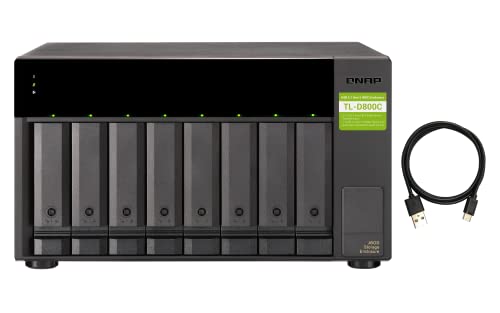
- 8-bay diskless JBOD enclosure
- USB 3.2 Gen 2 Type-C connectivity
- Works with QNAP NAS, PCs, and servers
Best For: Users needing easy external storage expansion
Enterprise 10-Bay Powerhouse
Asustor Lockerstor 10 Gen3 AS6810T

- 10 bays for large-scale storage growth
- Dual 10GbE + dual 5GbE networking
- 4 M.2 NVMe slots and ECC DDR5 memory
Best For: Enterprise teams and enthusiasts needing scalable, high-speed storage
Production-Ready Expansion

- Scales from 160TB to 360TB with expansion units
- Optional 10GbE or 25GbE network upgrades
- Built for multi-user video editing and backup
Best For: Video teams and businesses needing expandable, reliable storage
Compact High-Load 6-Bay

- 6 bays with dual 2.5GbE networking
- Dual M.2 NVMe slots for caching
- Backup suite for sync and recovery
Best For: Small businesses wanting a fast, backup-focused 6-bay NAS
High-Capacity All-in-One Powerhouse

- 4-bay chassis with up to 144TB total capacity
- Dual 10GbE for faster transfers and backups
- Supports Docker, VMs, surveillance, and media apps
Best For: Users who want high capacity and flexible expansion in one fast NAS
Enterprise-Grade Expandable Storage

- 6 bays plus four M.2 NVMe slots for expansion
- Dual 10GbE and dual 5GbE for high-speed networking
- ECC DDR5 memory supports stable 24/7 workloads
Best For: Power users and small teams needing enterprise-style expansion and speed
Budget-Friendly Large-Volume Starter

- Up to 80TB capacity in a compact 2-bay chassis
- Two M.2 NVMe slots and 2.5GbE networking
- AI photo tools and easy app-based setup
Best For: Users who want a compact NAS with strong capacity and simple everyday use
Synology Expansion – DX1215II 12-Bay Add-On
If you need high capacity NAS expansion units for a Synology setup, the DX1215II adds 12 more drive bays in a simple plug-and-play chassis. It is built to work with Synology DiskStation systems and pairs with Synology HAT5300 SATA HDDs for verified compatibility and strong performance.
Best For: Synology owners who want a straightforward way to add a large amount of storage capacity to an existing DiskStation.
Pros:
- Adds 12 additional drive bays to a Synology DiskStation
- Plug-and-play design makes expansion easy
- Supports Synology HAT5300 SATA HDDs for verified compatibility
- Includes Synology’s 5-year limited warranty
Cons:
- Diskless, so drives must be purchased separately
- Designed for Synology systems, which limits flexibility
This is a clean choice if you want a vendor-matched expansion path and do not need a standalone enclosure. The main appeal is simple capacity growth without complicating your NAS workflow.
Rosewill NAS Tower – Thor Full Tower NAS Chassis
For builders comparing high capacity NAS expansion units, the Rosewill Thor NAS is really a full tower chassis built for large DIY storage projects. It supports up to 11 x 3.5-inch HDDs or 13 x 2.5-inch SSDs, plus 11 external 5.25-inch bays, making it a flexible foundation for enterprise-style storage and workstation builds.
Best For: DIY NAS builders, AI server projects, and workstation users who want a large chassis with heavy expansion room.
Pros:
- Supports up to 11 x 3.5-inch HDDs or 13 x 2.5-inch SSDs
- Includes 11 external 5.25-inch drive bays for additional expansion
- Full-tower design supports E-ATX motherboards
- Comes with a 140mm PWM fan and USB 3.2 Type-C
Cons:
- It is a chassis, so you still need to supply the rest of the NAS hardware
- Large size may be more than many home users need
This option makes sense when storage density and build flexibility matter more than simplicity. It is better suited to custom systems than plug-and-play NAS expansion.
Synology Flagship NAS – DS3622xs+ 12-Bay Storage Server
If you want a powerful core system that can grow with high capacity NAS expansion units, the DS3622xs+ is built for demanding storage, backup, and virtualization workloads. It offers 12 bays out of the box and can scale to 36 drive bays with two DX1222 expansion units, while also delivering high performance and advanced networking options.
Best For: Businesses or advanced users who need a capable Synology system with room to expand significantly.
Pros:
- 12-bay Synology DiskStation with expansion support up to 36 drive bays
- High-performance specs include over 260,000 4K random read IOPS
- Includes a 6-core Intel Xeon processor and support for up to 48 GB memory
- Offers 10/25GbE networking, Fibre Channel support, and NVMe SSD cache options
Cons:
- Diskless, so storage drives are not included
- Expanded capacity requires separate DX1222 units
This is a strong choice if you want a serious NAS platform first and an expansion-ready storage strategy second. It is best when performance and scalability need to stay balanced.
QNAP JBOD Expansion – TL-D800C 8-Bay Desktop Enclosure
QNAP TL-D800C 8 Bay Desktop JBOD Storage Enclosure | USB 3.2 Gen 2 Type-C Connectivity
Check Price On AmazonThe QNAP TL-D800C is a practical pick if you want high capacity NAS expansion units in a desktop JBOD format. With 8 x 3.5-inch SATA bays and USB 3.2 Gen 2 Type-C connectivity, it works as storage expansion for QNAP NAS systems, Windows computers, and servers.
Best For: Users who want a simple, diskless 8-bay expansion enclosure for a NAS, PC, or server.
Pros:
- 8-bay JBOD enclosure with support for 3.5-inch SATA drives
- USB 3.2 Gen 2 Type-C connection for modern systems
- Compatible with QNAP NAS, Windows computers, and servers
- Includes a 250W power supply unit
Cons:
- Diskless, so drives are not included
- Single USB Type-C port limits connection options
This enclosure is a straightforward way to add a lot of storage without rebuilding your main system. It is a good fit when you want external capacity expansion that stays easy to connect and manage.
Enterprise 10-Bay Powerhouse – Asustor Lockerstor 10 Gen3 AS6810T
If you need a true high capacity NAS expansion unit for demanding business or creator workflows, the Asustor Lockerstor 10 Gen3 is built around scale, speed, and stability. Its 10-bay design, ECC DDR5 memory, dual 10GbE plus dual 5GbE networking, and four M.2 NVMe slots make it well suited to centralized storage, backup, virtualization, and media production.
Best For: Enthusiasts and enterprise teams that want a 10-bay NAS with fast networking, NVMe acceleration, and mission-critical memory protection.
Pros:
- 10-bay chassis supports massive storage growth for backup, surveillance, and shared files.
- Dual 10GbE and dual 5GbE ports support high-bandwidth, multi-user environments.
- Four M.2 NVMe PCIe 4.0 slots add cache or fast storage for heavier workloads.
- 16GB ECC DDR5 memory, expandable to 64GB, helps with stability and data integrity.
Cons:
- Sold diskless, so total cost depends on the drives and SSDs you add.
- Its enterprise-focused feature set may be more than casual home users need.
This is a strong fit when raw bay count is only part of the equation and you also need fast networking and SSD acceleration. For teams planning around future capacity and heavier workloads, it offers a well-balanced expansion platform.
Production-Ready Expansion – Synology DS1825+
The Synology DS1825+ is aimed at buyers who want high capacity NAS expansion units with a strong balance of speed, reliability, and upgradeability. It can scale from 160TB to 360TB with expansion units, while optional 10GbE or 25GbE cards help it keep up with large media transfers, multi-user editing, and business storage workflows.
Best For: Video production teams and businesses that need expandable storage with high-speed networking and mission-critical reliability.
Pros:
- Expands from 160TB to 360TB using expansion units for growing archives.
- Optional 10GbE or 25GbE upgrade cards support demanding transfer speeds.
- Designed for multi-user 4K/8K editing and simultaneous databases, VMs, and media services.
- Includes high-availability clustering, automated failover, and backup features for protection.
Cons:
- Diskless configuration means you must budget for drives separately.
- Its strongest value is in production and business environments, not basic file storage.
If your priority is long-term expansion with enterprise-style reliability, the DS1825+ is built for that path. It stands out most when your storage needs are tied to creative workflows and uptime matters as much as capacity.
Compact High-Load 6-Bay – TERRAMASTER F6-424
The TerraMaster F6-424 is a practical choice if you want high capacity NAS expansion units in a smaller 6-bay footprint without giving up modern hardware. With an N95 quad-core CPU, DDR5 memory, dual 2.5GbE, and dual M.2 NVMe slots, it is positioned for efficient multi-user file access, backups, and everyday business storage.
Best For: Small businesses and power users who want a fast 6-bay NAS with easy drive installation and strong backup tools.
Pros:
- 6-bay design provides solid storage capacity in a relatively compact enclosure.
- Dual 2.5GbE ports and link aggregation support high-concurrency file access.
- Dual M.2 NVMe slots add SSD caching options for better responsiveness.
- Business Backup Suite includes centralized backup, sync, cloud recovery, and snapshots.
Cons:
- Not as large as 8- or 10-bay alternatives for maximum capacity growth.
- Uses non-ECC memory, which may matter for some mission-critical deployments.
The F6-424 makes sense when you want a capable expansion-friendly NAS without jumping to a much larger chassis. It combines approachable hardware, strong connectivity, and backup-focused software in a balanced package.
High-Capacity All-in-One Powerhouse – UGREEN DXP4800 GT 4-Bay NAS
If you’re comparing high capacity NAS expansion units for a fast home lab, creator setup, or small office, the UGREEN DXP4800 GT stands out as a storage hub that mixes capacity with serious performance. Its 4-bay design supports large SATA drives, up to two U.2 NVMe-compatible bays, and two M.2 SSDs, so it can scale well beyond basic file storage while keeping transfers and multitasking responsive.
Best For: Smart home users, content creators, and small teams that want a high-capacity NAS with fast networking and flexible expansion.
Pros:
- Up to 144TB total capacity with 4 drive bays plus M.2 SSD expansion
- Dual 10GbE networking for fast backups, streaming, and editing workflows
- UGOS Pro supports Docker, virtual machines, Plex-style media apps, and SAN Manager
- Built-in SD slot, USB-C/USB-A ports, and 4K HDMI make local workflows easier
Cons:
- Diskless system, so you must buy HDDs and SSDs separately
- Some of the higher-end storage options depend on compatible drives and configuration
- Most advanced features may be more than casual users need
Overall, this is a strong pick if you want a NAS that can grow into media, backup, surveillance, and app-hosting roles without feeling limited by networking or expansion options.
Enterprise-Grade Expandable Storage – Asustor Lockerstor 6 Gen3
Among high capacity NAS expansion units, the Asustor Lockerstor 6 Gen3 is built for users who care about speed, reliability, and workload flexibility. With six bays, four M.2 NVMe slots, dual 10GbE plus dual 5GbE networking, and ECC DDR5 memory, it is designed to handle heavy collaboration, virtualization, and creator-grade storage without feeling underpowered.
Best For: Enthusiasts, small businesses, and creators who need an expandable NAS with enterprise-style performance features.
Pros:
- 6-bay design with four PCIe 4.0 M.2 NVMe slots for caching or all-flash acceleration
- Dual 10GbE and dual 5GbE ports support high-bandwidth multi-user workflows
- 16GB ECC DDR5 memory improves stability and data integrity for 24/7 use
- USB4 40Gbps ports add fast external expansion and backup options
Cons:
- Diskless unit, so storage drives must be purchased separately
- Its enterprise-focused feature set may be more than basic home users need
- Advanced networking and NVMe benefits depend on compatible infrastructure
This model makes the most sense when you want a NAS that can grow with demanding projects, especially where speed, uptime, and multi-user performance matter.
Budget-Friendly Large-Volume Starter – UGREEN DXP2800 2-Bay NAS
If you want high capacity NAS expansion units without jumping into a larger chassis, the UGREEN DXP2800 offers a compact entry point with solid everyday features. Its 2-bay design supports up to 80TB, includes two M.2 NVMe slots, and pairs an Intel N100 quad-core CPU with 8GB DDR5 RAM and 2.5GbE networking for smooth file access and media sharing.
Best For: Home users, enthusiasts, and small teams who want an affordable NAS with strong storage capacity and easy setup.
Pros:
- Up to 80TB capacity in a compact 2-bay desktop design
- Two M.2 NVMe slots add flexible SSD expansion
- 2.5GbE, 8GB DDR5 RAM, and Intel N100 support responsive everyday use
- AI photo album features help organize and deduplicate images automatically
Cons:
- Only two drive bays, so growth potential is more limited than larger NAS units
- Diskless system means you still need to supply your own drives
- Less suited to heavy multi-user or enterprise-style workloads than 4-bay and 6-bay models
This is a practical pick if you want a simpler NAS that still offers plenty of storage, local control, and useful creator-friendly features without overcomplicating the setup.
How We Picked These High Capacity NAS Expansion Units
We focused on expansion-friendly storage systems that offer strong bay counts, modern connectivity, and practical upgrade paths. We also looked at controller performance, network speed, memory support, and the overall fit for media libraries, backups, virtualization, and collaborative work.
Quick Comparison: What Matters Most
When comparing High Capacity NAS Expansion Units, the biggest differences usually come down to bay count, whether the device is a full NAS or a JBOD enclosure, and how fast it can move data over USB, 2.5GbE, 5GbE, 10GbE, or faster networking. Some buyers need maximum raw storage, while others need features like ECC RAM, NVMe caching, or dual-network redundancy.
Key Buying Factors for High Capacity NAS Expansion Units
Capacity and Drive Mix
Look at both the number of bays and the drive sizes supported. A higher bay count gives you more flexibility for growth, but larger drives may deliver better long-term value if your goal is maximum usable capacity.
Connectivity and Throughput
For large file transfers, media editing, and multi-user access, connection type matters as much as capacity. USB 3.2 Gen 2 is useful for direct-attached expansion, while 10GbE and faster networking make more sense for shared storage and performance-sensitive workflows.
Platform Type: NAS Vs. JBOD
JBOD enclosures are best when you already have a capable host and simply need more drive bays. Full NAS systems add their own operating system, apps, and management features, which is better for users who want a complete storage appliance.
Performance Features
Advanced buyers should pay attention to CPU class, RAM type, ECC support, M.2 NVMe slots, and available network ports. These features can make a real difference for backups, virtualization, streaming, and business file serving.
Who Should Buy Which High Capacity NAS Expansion Units?
If you want simple capacity expansion, a JBOD enclosure is often the cleanest choice. If you need centralized storage with apps, user management, and remote access, choose a full NAS. Home users and creators may prefer smaller, quieter models with solid 2.5GbE or 10GbE support, while businesses and production teams should prioritize ECC memory, redundant networking, and higher bay counts.
In short, the best choice depends on whether you need raw expansion, a complete storage platform, or a long-term system that can grow with your workflow.