The flyEVfish 15.
6-Inch Digital Calendar review is all about one thing: making family organization visible, shared, and easier to stick with.
flyEVfish Calendar Review Summary
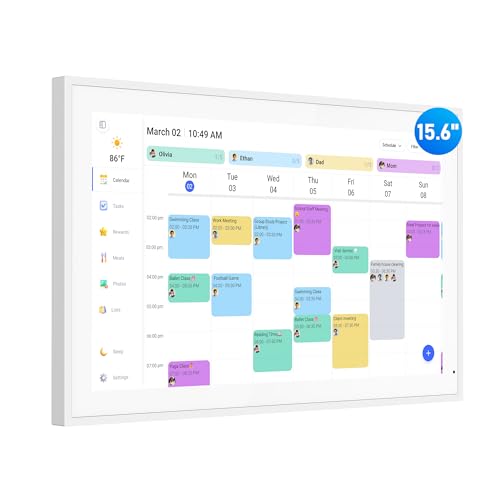
The flyEVfish 15.6-Inch Digital Calendar is best understood as a household command center rather than a simple electronic calendar.
It combines a shared schedule, chore chart, task tracker, meal planner, and photo display into one wall-friendly touchscreen, which makes it especially appealing for busy families that want routines to stay visible instead of buried in phones.
If you already use Google Calendar, Outlook, iCloud, Cozi, or Yahoo, the sync support is a major advantage.
The real value here is not just organization, but better follow-through: kids can see chores, parents can update plans quickly, and everyone can check the same screen instead of asking, “What’s happening today?”
Scorecard
| Category | Score | Why It Matters |
|---|---|---|
| Scheduling and organization | 9.0/10 | Combines a family calendar, chore chart, task lists, and meal planning in one shared display for keeping routines visible. |
| Ease of setup and syncing | 8.0/10 | Designed for quick plug-in setup and calendar sync with Google, Outlook, iCloud, Cozi, and Yahoo, plus direct entry on device or through the app. |
| Display and touchscreen usability | 8.0/10 | The 15.6-inch HD touchscreen format is made for easy viewing and interactive use in shared spaces. |
| Family engagement features | 9.0/10 | Color assignment, chores, star rewards, and custom meal plans are tailored to motivate kids and keep the whole household involved. |
| Placement flexibility | 9.0/10 | Can be wall mounted or used on a desk, making it adaptable to kitchens, hallways, dining rooms, or living rooms. |
| Extra utility features | 7.0/10 | Adds photo display, custom lists, weather forecasts, and sleep mode, which broaden usefulness beyond basic scheduling. |
Overall, this is a strong pick for families that want a shared digital planner with real practical depth.
It is not the cheapest or simplest option in the category, but it is one of the more complete ones for active households.
Key Features and Specifications of flyEVfish Calendar
The flyEVfish Calendar has enough built-in detail to feel like a purpose-made family hub rather than a repurposed tablet.
Here are the main specs and features buyers should know before deciding.
| Specification | Detail |
|---|---|
| Brand | flyEVfish |
| Manufacturer | flyEVfish |
| Size | 15.6 inch |
| Part Number | JT156M-H01 |
| UPC | 199284115835 |
| Item Weight | 1.54 kilograms |
| Warranty | 1 year |
| Power / Plug | US-style plug included |
| Mounting | Wall mount or desk mount |
| Calendar Sync | Google, Outlook, iCloud, Cozi, Yahoo |
| Weather | Next 3 days with time/location-based forecasting |
- 15.6-inch HD touchscreen for easy viewing and interaction in shared spaces.
- No subscription fees required, which matters if you want predictable long-term ownership.
- Plug in, connect to Wi-Fi, and sync calendars in minutes.
- Add events directly on the device or through the eCalendar app.
- Assign colors for family members and tasks.
- Use the interactive task chart with star rewards and custom rewards for kids.
- Display weekly meal plans for the household.
- Show photos when the calendar is not in use, including albums and featured images.
- Create custom lists for trips, holidays, packing, and reminders.
- View weather forecasts for the exact time and location of events, plus a 3-day view.
- Sleep mode turns the screen off at night and back on in the morning.
For buyers comparing connected planners, the feature mix is important because it extends beyond scheduling.
The product is designed to function as a family dashboard, not just a digital wall calendar.
Pros and Cons of flyEVfish Calendar
Every smart family planner has trade-offs, and the flyEVfish 15.6-Inch Digital Calendar is no exception.
The key is whether its strengths line up with how your household actually operates.
| Pros | Cons |
|---|---|
| All-in-one family organization hub | Primarily useful only for households that will keep a shared digital planner updated |
| Easy calendar syncing with major services | Wall installation requires screws and a suitable placement spot |
| Touchscreen makes it more interactive than paper planners | The large screen may be more than some users need for simple reminders |
| Useful chore and reward system for children | Feature-rich interface may take time to learn for non-technical users |
| Flexible mounting options | Wi-Fi access matters for sync features |
| Extra functions like photos, lists, weather, and sleep mode | Best used when the whole household participates |
The biggest pro is convenience at the family level.
The biggest con is equally simple: if your home does not keep shared schedules updated, a device like this can become an expensive screen instead of a useful system.
That is why the flyEVfish 15.6-Inch Digital Calendar pros and cons matter so much before buying.
Who Should Buy flyEVfish Calendar?
The flyEVfish 15.6-Inch Digital Calendar is a smart buy for families that want a visible, shared place to keep life organized.
It is especially useful in homes where people miss text messages, forget to check phone calendars, or need a consistent place to post chores and meal plans.
- Busy parents who want a central household schedule everyone can see.
- Families with kids who respond well to chore charts, star rewards, and visual routines.
- Households already using cloud calendars like Google, Outlook, iCloud, Cozi, or Yahoo.
- People who want a command-center display in a kitchen, hallway, dining room, or living room.
- Buyers who prefer one-time hardware ownership and want to avoid subscription-based planners.
Who should skip it?
If you live alone, use only a simple personal to-do list, or prefer a paper wall planner, this may be too much screen and too many features.
Likewise, if your household will not consistently update a shared calendar, you will not get full value from the device.
How the Family Planner Works Day to Day
In everyday use, the flyEVfish Calendar works best when it becomes part of the family’s routine.
The advantage of a 15.6-inch touchscreen is that it is large enough to scan quickly from across the room but still interactive enough to update without pulling out a phone.
That matters because family calendars fail when they are inconvenient.
This one is designed to reduce friction: you can check schedules, add events, update chores, and glance at meal plans in one place.
For parents, the value is not just having another calendar; it is having a shared habit-building tool that makes expectations visible.
The color-coding system is another practical design choice.
When each family member or task has a distinct color, the calendar becomes easier to understand at a glance.
That is particularly helpful in homes with multiple children, split responsibilities, or rotating after-school activities.
Calendar Sync and App Setup
Setup is one of the most important buying factors for any smart calendar, and the flyEVfish Calendar handles this fairly well.
According to the product details, it is meant to be plugged in, connected to Wi-Fi, and synced in minutes.
It works with Google Calendar, Outlook, iCloud, Cozi, and Yahoo, which is a strong compatibility list for most households.
That flexibility makes it easier to adopt because many families are already invested in one of those calendar ecosystems.
You are not forced to rebuild your schedule from scratch, and that lowers the barrier to entry.
You can also add events directly on the device or use the eCalendar app, which gives you more than one way to keep the data current.
Still, smart-planner setup is never entirely hands-off.
If your Wi-Fi is unreliable or your household uses a very fragmented system of calendars, the experience may feel less smooth.
This is a connected product, so network stability and regular use matter.
Chore Charts, Rewards, and Meal Planning
This is where the flyEVfish Calendar becomes more than a schedule board.
The chore chart and reward tools are a big part of its appeal for parents, especially if you are trying to build more independence in younger children.
The task chart can assign chores with star rewards and custom rewards, which adds a motivating layer that paper charts often lack.
In practice, that can make the device feel less like a passive display and more like a household accountability system.
Kids can see what needs to be done, and parents can reinforce completion without repeating themselves all day.
The weekly meal plan feature is another strong family-use addition.
Meal planning is one of the easiest ways to reduce weekday stress, and having it visible alongside the calendar means fewer last-minute “What’s for dinner?” conversations.
For many homes, that alone helps justify the screen’s permanent place in the kitchen or dining area.
These are the features that separate the flyEVfish 15.6-Inch Digital Calendar from basic digital frames or generic tablets.
Wall Mount vs Desk Mount Placement
Placement flexibility is one of the calendar’s best practical strengths.
You can wall mount it or use it on a desk, which expands the number of homes where it can fit naturally.
Wall mounting is ideal if you want a permanent family command center in a kitchen, hallway, or living room.
That keeps the calendar visible, and visibility is the whole point.
A wall location also tends to reduce clutter and helps the display function like a modern bulletin board.
Desk mounting works better for renters, apartments, or buyers who want to test the product before committing to a wall location.
The 15.6-inch size is large enough to be useful without becoming overwhelming, though it still needs a dedicated spot.
Before buying, make sure you have enough surface or wall space for a display of this size.
One thing to keep in mind is installation.
Wall mounting requires screws and proper placement, so it is not as instantly portable as a tablet stand or a small counter device.
That is not a flaw so much as a design decision, but it does affect convenience.
Photo Display, Weather, and Sleep Mode
The extra features on the flyEVfish Calendar are not the main reason to buy it, but they do make it feel more polished and useful day to day.
When the schedule is not being actively used, the photo display function lets you turn the screen into a more attractive household display.
Albums and featured images can make the device feel more personal and less purely utilitarian.
The weather tools are more functional.
Showing forecasts for the exact time and location of events is genuinely useful when you are planning school pickups, travel, sports practices, or outdoor activities.
A 3-day weather view adds another layer of convenience.
Sleep mode is a small but smart inclusion.
It prevents the display from glowing all night, then brings it back in the morning.
That is a practical choice for households that do not want constant light in a kitchen or hallway.
These features will not matter equally to every buyer, but they strengthen the product’s case as a multi-use home hub.
That flexibility is part of why the calendar feels more premium than a simple schedule board.
Alternatives to Consider Before You Buy
If you are still deciding whether the flyEVfish Calendar is the right fit, it helps to compare it with a few familiar alternatives.
- paper wall planners are better for low-tech homes that want zero setup and no Wi-Fi dependence.
- smaller digital calendars can fit tighter spaces if a 15.6-inch screen feels too large.
- tablet-based family calendar stands may offer more flexibility if you already own a tablet and do not need a dedicated device.
- basic chore chart boards are a simpler choice if rewards and visibility matter more than smart syncing.
Compared with these, the flyEVfish Calendar stands out because it combines calendar syncing, family task management, and shared display features in one dedicated unit.
That makes it more compelling for households that want a real system rather than a workaround.
Is flyEVfish Calendar Worth It?
Yes, for the right household, the flyEVfish 15.6-Inch Digital Calendar is worth it. It is especially valuable if your family needs a shared place for schedules, chores, meals, and reminders, and if you want that information visible in a central location every day.
The strongest reasons to buy are its broad calendar compatibility, family-friendly chore tools, flexible placement options, and the fact that it avoids subscription fees.
The biggest reasons to hesitate are the learning curve, the need for a suitable mounting location, and the reality that any shared planner only works if people actually use it.
If you want a practical family organization hub that can reduce daily friction and make routines easier to follow, this is a very sensible choice.
If you only need a basic reminder board, a simpler alternative will likely be enough.
But for busy homes looking for a modern shared planner, the flyEVfish 15.6-Inch Digital Calendar review points to a solid, well-thought-out buy.
Buying advice: choose it if your household will actively use a smart shared calendar; skip it if you want something simpler, smaller, or purely offline.